Server Version#: 1.30.1.6497
Player Version#: 4.97.3
I’ve been adding local extras to Movies for quite a few years, and I don’t think I’ve ran into this problem before. I use the subfolder method for extras - Trailers, Deleted Scenes, Scenes, Featurettes, etc.
A movie I added recently has two extras showing up with the name/title of “Opening.” One of the files is in the “Deleted Scenes” folder, the other is in the “Scenes” folder.:
F:\Plex Videos\Plex Movies\Glass (2019)\Deleted Scenes\Opening Scene (Deleted).mkv
and
F:\Plex Videos\Plex Movies\Glass (2019)\Scenes\Alternate Opening.mkv
They are not copies of the same file, and they are different resolutions and length, so I’m at a loss as to where the display name is coming from. They are mkv files, with no metadata except language tags for the audio. (I don’t think Plex actually reads the title info from mkv’s even if there was embedded information.)
I’ve attached the XML for the movie here, as well as the information MediaInfo reports for the files. The XML appears to have recognized the files properly, but assigned the name “Opening” to both files. Glass.zip (21.8 KB)
It’s hardly a life or death problem, but I’m curious if I’ve used some sort of reserved name or word in my file names, or if this is a one in a million bug I’ve uncovered.
I didn’t like “Disused Opening” for a title, so I renamed the file in the deleted scenes folder to “Deleted Title Credits.mkv” The file in the Scenes folder stubbornly insists it is still “Opening” even with a new name of “Deleted Opening.mkv”
I’ll try a couple of different file names later, to see if I can get one that works. Still wondereing why the original filenames didn’t seem to work as expected…
I’m pretty sure that Plex actually recognized the file name change automatically and assigned the new name before I refreshed the metadata for the movie. The manual refresh didn’t work for the second extra, though. When I have the time, I’ll re-name till I find one that Plex will accept.
Server Version#: 1.30.1.6550
Player Version#: 4.98.2
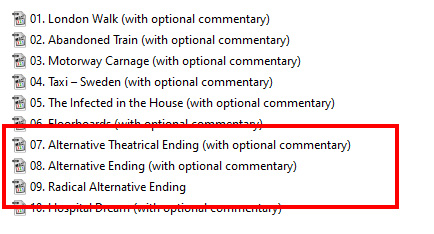
I am experiencing the same thing. Extras containing the word “opening” or “ending” in their filenames are displayed wrong. I’m pretty sure these filenames displayed fine before.
I’m going to take a wild guess that it’s something to do with the intro/credit detection and skip and finding the “extras” or credit scenes hidden inside those. The last two beta releases for the server have this in the release notes:
(Extras) Improved support for matching TV series extras with common community filename formats (#4774)
Of course, we are talking about movies here (so far), and I have absolutely no idea what a “common community filename format” is. I didn’t realize there was any sort of “matching” process going on for local extras in either type of library.
In any event, I don’t think there was a problem with filenames containing “ending” or “opening” before these versions…
Thanks, but how does naming files that way work using the sub-folder method?
And, how are the extras named, even if I decide to use the inline method? I’m sorry, but a title of “Clean OP 1” is hardly descriptive of the content of the extra.
I’ll do some research on Anime notation, I’ve never even heard of it until now.
This annoying “feature” or “improvement” has found it’s way through any movie I have that has an extra with a file name containing the words ending or opening. I suppose the titles of the extras are changed during the maintenance period for the server.
Am I now supposed to sift thru all of my movies and re-name all of those extras to the anime notation standard? I hope that when you said, “for the time being” you meant that it’s a bug that will be fixed at some point in time.
I haven’t bothered trying to rename files to conform to anime notation. I can’t find any info on how to name them on the internet, searches for anime notation only brings up keyboard and controller controls for video games. I’m obviously not using the right search criteria.
All I really want is for my extra to show up with a descriptive name such as “Alternate Ending,” not the generic title of “Ending.” Since Plex doesn’t read embedded metadata for the title field in extras, I can’t even work around it be adding that info to a title tag.
I’m still completely perplexed by this problem with naming local extras in a movie library for alternate openings and endings. The proposed solution and explanation implied that it was for a TV library, containing long running Anime series. I can’t find any information on Anime notation anywhere, and the Plex support docs don’t seem to have any info regarding this change.
I’m wondering why Plex would change the naming convention for local extras containing the words “ending” or “opening.” It seems to me like an unusual requirement to satisfy only one genre. (Anime)
I suppose this is what you might consider „collateral damage“. I now have a playlist with formerly well named themes that are now an indifferent list of „Opening“ and „Ending“ entries.
I’ll happily ask if there’s any plans to at least not apply that change to items already associated as „regular extras“. I have no issue with adding more extra types, as long as they aren’t getting into each other’s way.
I understand Anime fans are a passionate group of people, and probably have been using their own unique naming standards for quite some time.
Having said that, in every other case, Movies, TV or Music, Plex reminds us to use the preferred naming standards they have, and tell us NOT to expect proper results because someone has used a different naming format. Now, some of us have become collateral damage, because Plex has decided to make the Anime standard the new Plex standard.
I don’t understand your reference to “regular extras” - as far as I can see, my extras are all regular extras, and the new format with OP or ED is a new, undocumented type of extra. And again, there is no documentation, so I can start the process of fixing a most unwelcome change.
A new glitch in naming extras. Previously, I could name items in the trailers folder, so that they would appear in alphabetical order, so that the “primary” trailer would appear first, and therefore selected in the “View Trailer” icon for the movie.
I’m my alphabet, the letter R comes before V, but it seems Plex is using a different English alphabet than me.
I know that uppercase letters are first in the character mapping, but Plex used to correctly take that into consideration and follow the more traditional alphabetical order we all probably use., disregarding upper and lower case status. I would expect the items to show up in the same way they do in Windows file explorer, when set to sorting alphabetically by file name.
Maybe TV is another undocumented shorthand anime notation that is prioritized in Plex now with unexpected results in the Extras category.
Attaching the xml for a recently added item: X-Men.zip (19.1 KB)
P.S. - please reconsider the OP - ED problem. Anime fans got it right, “Opening” and “Ending” are the most logical and natural name for a different version of either, but don’t change all of the displayed names for the rest of us because the file names contain those words.
With a little bit of experimentation, it seems that Plex is using the order the characters appear in the Character Map app in Windows (Unicode order ???) That would put upper case letters before lower case letters.
I added the movie Up (2009) about a week ago, and the trailers and shorts are in the alphabetical order I expected. But if I change the trailer Up (Television Spot).mkv to Up (TV Spot).mkv and refresh metadata, it becomes the first trailer in the list.
If Plex isn’t going to fix the problem with alternate ending and opening scenes in our local extras all being re-named simply “Opening” or “Ending”, can someone at least tell us why this is happening.
The support article for local extras says to make sure we give our extras a descriptive name. Why is Alternate Opening.mkv and Alternate Ending.mkv not descriptive enough? Why would “Alternate Ending #1.mp4” and “Alternate Ending #2.mp4” both be shortened to “Ending,” but Trailer #1.mp4 and Trailer #2.mp4 will show up exactly the way they are named?
Please help a frustrated, collateral damaged Plex user out! This problem is with “regular” extras, in a movie library. I have no idea what “anime notation” or “common community filename formats” are, if either of those are the problem. Please revert back to the simple naming method that use to work so well, and that followed the naming conventions in your support documents.
(There is no mention of a special naming format for “Openings” or “Endings” in either of the support articles for local extras - TV or Movies)
I am going to pile on here as well. This is both undocumented (as far as I can tell) and unexpected behavior. If you are going to have special behavior for these it needs to be documented on the Local Extras page and provide an alternative for those of us who simply don’t want our file names to be ignored.