Server Version#:dont know
Player Version#:4.10.1
This came on suddenly 3d ago. I am running the server on an old macbook pro with a 3tb raid. On my local iMac, all iphones, ipads, all my smart tvs, shows the server as unreachable. i upgraded the server software (i think) by following the download link in the troubleshooting page. However, it will not open. I have restarted the server machine, screamed, cajoled, threatened, etc. but nothing is working. Please help.
If you have access to the server/PMS. Then re link your Libraries to your content storage. That should fix your issue.
I have physical access to my server, but I can’t run Plex media server on the computer itself. The iCon itself looks like it’s starting with the program and then stops. Without this access, I have no idea how to reestablish the server architecture
Can you open Plex from the Browser?
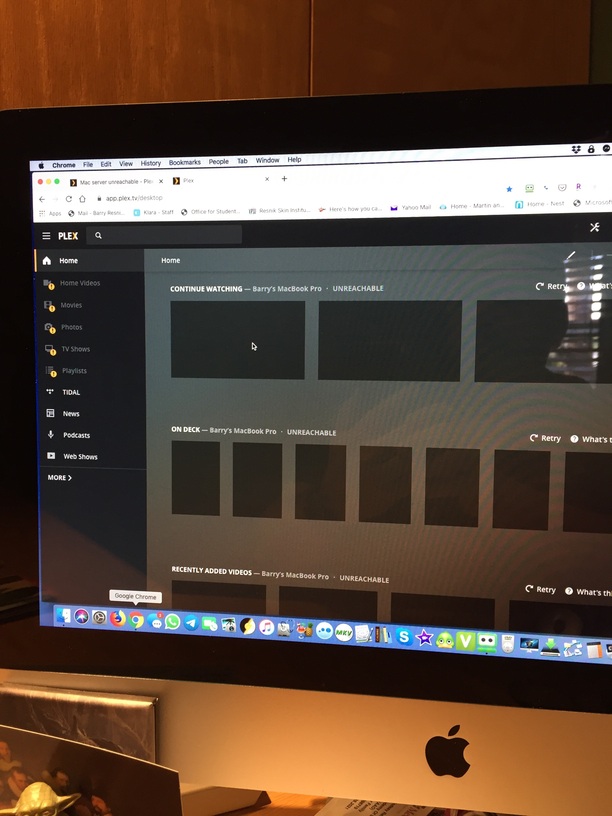

Something similar is happening to me, but in the server I’m getting a 'You don’t have access to the server´ in the pinned server and the preferences never load
Server version: 1.18.1.1973-0f4abfbcc





I presume you have restarted your Computer and router. If still no joy, just re link your libraries to the content storage location.
Ok, i give you permission to treat me like a simpleton. How do i “re link your libraries to the content storage location.” I don’t see that option in my account window
When rolling the cursor/pointer over a given Library you will see a 3 dot vertical Menu to the right called a Hamburger menu. Select edit and remove old link/Folders then add new to each library and save. After you establish a rebuilt Library move to next then go to Troubleshooting and apply Optimize database and clean bundles and restart you Server.
Ok, who said you were simple? Not me, I’m very understanding of polite forum members.
Cheers
The simpleton comment was my attempt at gentle humor. When I offer tech support to family and friends, I know exactly how it should be done, step by step. I often assume that they do too, and say “do this whole thing, then you will be fixed”. That skips a lot of steps, and leads to frustration. So I was giving whoever was going to help me carte blanche to break it down, as you were kind enough to do.
I accessed that hamburger and there is no Edit option for me, all I get is Unpin or Reorder. I actually downloaded the server software again, but it won’t unstill in 10.10, which is what I have on my vintage 2010 Macbook pro. I can upgrade to High Sierra, but would rather just reinstall a version of plex that works. Would you happen to have access to a link for a compatible version?
So no manage Library available.
So what version of MacOS are you running
10.10
I’m having the same issue as bresnik here.
Everything was working perfectly up until this morning. I can see the physical files on my mac mini but everywhere else, including on my computer where I have the root files stored show up.
Likewise, I just have “pin” and “reorder” as my options.
What is causing this and how do I fix it so my libraries appear again?
SE56, thanks for the help regarding older versions of Plex if I couldn’t upgrade to High Sierra. I found another old MacBook Pro running an OS higher than High Sierra. I plugged my mac raid in, and to my astonishment and profound gratitude, it was recognized! (as someone somewhere on some forum assured me it would be lol). I then installed Plex Server on this new workstation, assigned the folders to the libraries, and voila! it worked. I would love to know why it happened in the first place, but will probably never know.
I would like to know how I delete the first server I had, as Plex still looks for it. Thoughts?
Aseptien, I hope this helps.
Aseptien, SE56 gave me this UNINSTALL guide. You may need it.
Gary, thanks again.
Ok, your not wanting to update the OS.
Option would be to Total uninstall Plex Media server following theses instructions on this support page.


Uninstall Plex Media Server | Plex Support
Warning!: Following the instructions below will completely remove your Plex Media Server, including all library metadata, viewstates, etc. If you…
After completing this procedure the options are yours. I would use Plex announcements (Forums) and look for Plex media server and a corresponding date you remember it previous worked and correlate it with the method below for old versions.
You can download previous Plex Media Server versions directly from Plex you just need to know the version numbers which I will list the versions I have back to 1.4 at the bottom of this post.
Basic process is to go to Plex.TV/downloads and right click on the link to download the current version and copy the link address. Paste it into a text editor. For example the current version download for Windows is:
If you are using a different OS the method is the same you would just have a different URL. For OSX the URL would be something like:
You then need to know the prior version number, the full version information not just 1.6.1. For 1.6.1 the version info was: 1.6.1.3722-4955e31cf
We then replace the current version info (1.9.3.4290-9798172d4) with the prior version (1.6.1.3722-4955e31cf) we want to download so the new link for version 1.6.1 becomes:
Paste the new link into your web browser and the download should start.
Previous versions I have information for back to 1.4 are:
1.9.3.4290-9798172d4
1.9.2.4285-9f65b88ae
1.9.1.4272-b207937f1
1.9.0.4252-d07c1f408
1.8.4.4249-3497d6779
1.8.3.4235-2d20185b0
1.8.2.4209-b1d4aa012
1.8.1.4139-c789b3fbb
1.8.0.4109-42bd8c63f
1.7.6.4058-8fa494d15
1.7.5.4035-313f93718
1.7.4.4017-3886b5c85
1.7.3.3937-70f781325
1.7.2.3878-8088811b8
1.7.1.3856-757424396
1.7.0.3840-45a6a85f4
1.6.1.3722-4955e31cf
1.5.7.4016-25d94bad9
1.5.5.3634-995f1dead
1.5.4.3596-0d2d8c2be
1.5.3.3580-4b377d295
1.5.2.3557-029f6ffbf
1.5.1.3520-ed60c70d6
1.5.0.3501-3b8374a5c
1.4.4.3495-edef59192
1.4.3.3433-03e4cfa35
1.4.2.3400-ab906953b
1.4.1.3362-77c6a4f80
I hope this is what you want.
Cheers Gary
Grazi, appreciate all your attention.
1 Like
thanks bresnik! I actually followed those exact steps yesterday and got everything working again. I restarted the computer that I’m hosting the files from and when it came on, I got (again) the “unreachable” error but it quickly fixed itself? Not sure – but anywho, thanks!
Glad to hear it. Power to Plex lol
1 Like
Glad all are now happy, another Plex wonder. Great stuff “bresnik”
