Server Version#: 1.18.5.2309
Player Version#: 3.104.2
Both are running on an iMac with macOS Catalina.
Hi!
Can someone help me to enable remote and keyboard (and disable mouse) for macOS Plex Media Player?
Background: I have used Plex in 2010-2016 but not since so missed the last couple of years of changes. Looks very different now. Back in 2016, you could control Plex with a remote and keyboard, mouse support needed to be enabled extra. Now, on a fresh Plex Media Player install on macOS, I can neither use remote nor keyboard, only mouse?! That seems not to be right. Read the instructions on Plex help pages, but there is something wrong with those pages/they do not apply or are outdated.
1. Keyboard
According to the Plex help page: “Controlling the App” (https://support.plex.tv/articles/208052807-controlling-the-app/), “Plex Media Player can be fully controlled by using a keyboard”, and this seems to be out of the box.
However, pressing the standard buttons such as “arrow-down”, “arrow-right” … does not do anything? (i.e., I cannot move between movies, or menu items in the full-screen standalone MacOS Plex Media Player as I understand is the expected behaviour.)
I cannot find any option to enable/disable/configure keyboard control in Plex Media Player? What do I need to do?
2. Remote
The same help page: “Controlling the App” (https://support.plex.tv/articles/208052807-controlling-the-app/) also says: “Plex Media Player can be controlled by using an Apple Remote.”
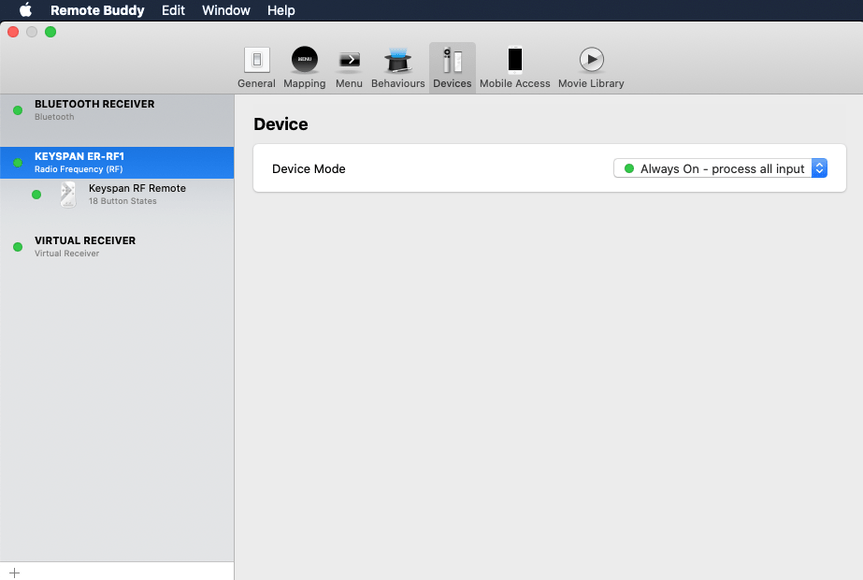
This seems to be the same as in 2015. I had replaced the Apple Remote with a Keyspan Remote in 2013 because Apple removed the IR from iMacs. The Keyspan Remote worked fine using the app Remote Buddy. According to Remote Buddy, as of 2020, the Keyspan Remote should still work with EyeTV (and it does work fine) and Plex Media Player (does not work). As EyeTV works, I expect the issue is with the Plex, not Remote Buddy, setup.
I cannot find any option to enable/disable/configure remote control in Plex Media Player? What do I need to do?
3. Mouse
According to the Plex help page: "Settings: Plex Media Player (https://support.plex.tv/articles/115000473213-settings-plex-media-player/), “Settings for the Plex Media Player app can be accessed from the User Menu (accessed by selecting your avatar image) located at the top of the Navigation Side Bar” and then under the heading “Main” there should be an option “Disable Mouse: Select to disable mouse input in the app”.
However, I cannot find any of those things?
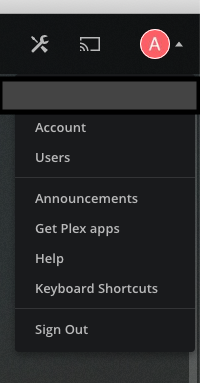
Clicking on my Avatar on the far left, there are no “Settings” (?) Presuming, they mean “Account”? If I click this, there is a menu section on the far left saying “PLEX MEDIA PLAYER”. There is a heading “General” in that section. Further down, under “[My Server Name]”, which I take to refer to the server, not player options, there is a section “SETTINGS” with a submenu “General”. None of those has any “Disable Mouse” option. (To be honest, I find this UI and this help somewhat confusing.)
Same as above, I am looking for a way to enable/disable/configure mouse control.
Any help configuring this correctly will be much appreciated. Particularly remote control would be great to have.
Cheers!
This is what I am looking at:






 I did some searching (as I don’t do Linux) and found this thread. You’ll want to reach through the first post and post any questions issues in that thread.