Managed account still sees a very old server

Server Version#: N/A
Player Version#: N/A

Hi,

I have 3 managed accounts on my plex account. One of these accounts (and only one…) still sees a very old server that I had. I have checked the authorized devices list, this server is not there any more. I have tried to create a new server with the same name and remove it, it obviously didn’t help.

The server show in the pins without any pinned library.
It’s an annoyance every time the managed account is accessed from a new device, it will try to access that old server first until it times out.
I don’t want to delete the managed account, to avoid losing the preferences.
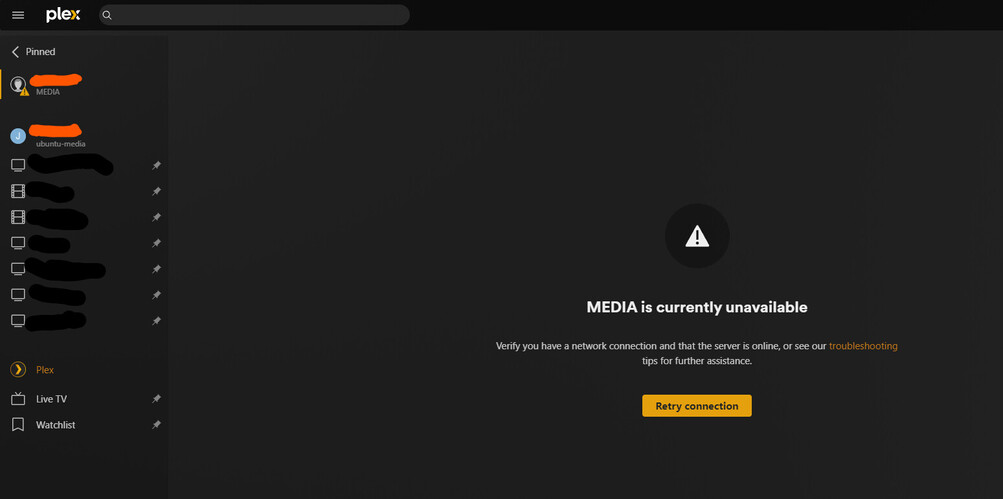
What’s my next step on this ?

Thank you!

Can you unpin the unavailable libraries from that user’s sidebar / main navigation?

No, no library can be removed. Here’s the view from the managed account:

When logged into the Managed account go to the Plex Home settings at https://app.plex.tv/desktop/#!/settings/plex-home

then click on your admin account row to see the libraries shared by the admin user to the managed account

Click the Edit button on the block with the old server and then click leave server

if the server is not listed I will need to ask someone on team that has access to backend stuff to take a look

1 Like

that fixed the issue, thank you @BigWheel !

The old server was appearing at that place. I removed it, and then I was able to confirm it works on a device after closing/reopening the app.

1 Like

This topic was automatically closed 90 days after the last reply. New replies are no longer allowed.
