Server Version#: 1.21.0.3608
Player Version#: 8.9.2.21619
Hi again,
The “Manual connections” Settings in the Android app seems to be broken as:
- I cannot change the IP anymore once I’ve activated “Enable manual connections”, typed it in and closed the settings screens. If I press on the IP nothing happens. I have to disable and enable the “Enable manual connections” button to be able to change/set the IP address.
- Even with a manual IP set, the app doesn’t seem to try to connect to this IP (see below)
So I did a fresh install of the Media Server on Win10 machine.
- Just clicked through the setup
- Settings->Network I setup to my liking:
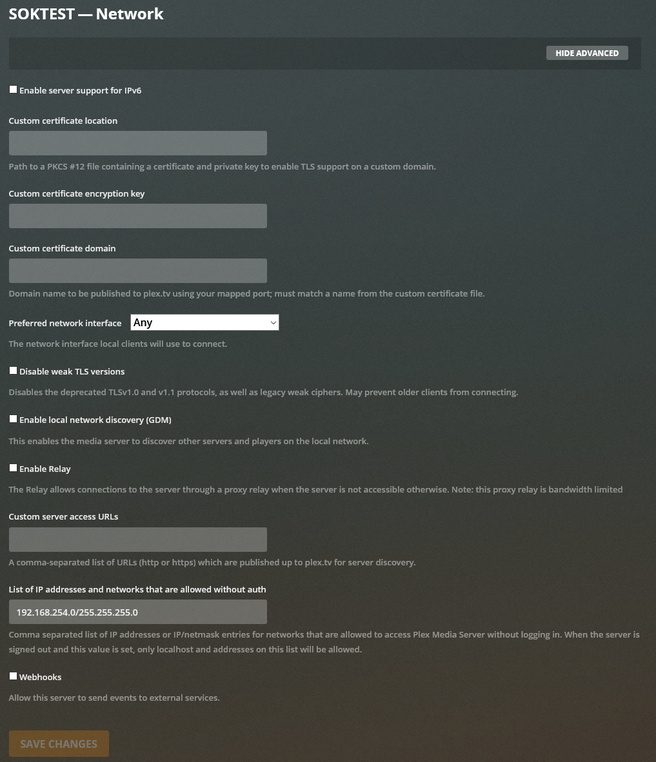
I installed the App fresh on my phone:
- Enabled network debugging
- Enabled Manual Connections and set IP to 192.168.254.10
- Set “Allow insecure connections” to “Always”
The log shows the set to “Always” but doesn’t log anything about enabling Manual Connections or the IP I’ve entered:
11-20 15:25:33.521  i: Hello, Plex for Android world (debug: false)!
11-20 15:25:33.521  i: App version: 8.9.2.21619 (815089457)
11-20 15:25:33.521  i: Nano server version: null
11-20 15:25:33.521  i: Manufacturer: OnePlus  Device: OnePlus7Pro  Model: GM1913  Product: OnePlus7Pro_EEA  Version: 10
11-20 15:25:33.524  i: Screen size: Normal Screen density: Unknown Resolution: 3120x1440 DPI: 490 Touchscreen: true  Marketplace: com.android.vending  Architecture: arm64-v8a
11-20 15:25:33.525  i: Showing toast: Network logging has started
11-20 15:25:40.463  i: [VideoUtils] MediaCodec found (OMX.dolby.ac3.decoder) for audio/ac3
11-20 15:25:40.464  i: [VideoUtils] MediaCodec found (OMX.dolby.eac3.decoder) for audio/eac3
11-20 15:25:57.081  i: [Settings] Insecure connections preference changed (Always: true)
11-20 15:25:57.082  i: [MyPlexApiClient] Call to refreshResources. Reason: insecure connections.
11-20 15:25:57.084  i: [MyPlexRequest] Refreshing resources (empty token: false)
11-20 15:25:57.085  i: [NetworkServiceBrowserManager] Starting Server discovery
11-20 15:25:57.086  i: Fetching [method:GET] https://plex.tv/api/v2/resources?includeHttps=1&includeRelay=1&X-Plex-Token=...hBsw
11-20 15:25:57.094  i: [GDM] Sending packet via /192.168.254.255
11-20 15:25:59.248  i: Resuming UnoHomeActivity.
11-20 15:25:59.252  i: [HomeHubsManager] Discovering. Force: false. Partial: false. Reason: home view model
11-20 15:25:59.253  i: [MergingHubManager] Notifying listeners with status: SUCCESS
11-20 15:25:59.253  i: [DynamicHome] Reusing results from previous discovery.
11-20 15:25:59.279  i: [DynamicHome] Not starting new discovery task because previous one was equivalent.
11-20 15:25:59.742  i: [ManualBrowserServer] Searching manual connections
11-20 15:25:59.743  i: [ManualBrowserServer] Finished manual server search, found 0 servers.
Connecting to the Server via browser from the phone (http://192.168.254.10:32400/web/index.html) works fine.
Any ideas?
thanks
Soko
PS: I originally found this issue with an older server version and older android version (Manual Connections not working on Android) but its apparently in the current version an issue as well.
PPS: I don’t want to enable GDM. If I have to do this the “manual connections” settings are pointless!
