Marking Individual TV Series as Recordings without Making Whole Library Recordings

Server Version#: 1.23.1.4571
Player Version#: 7.17 (1424) AppleTV

I have a very extensive TV Series library. Most of my series are files that are commercial free. However several series are either completely recordings with commercials or a mix. Libraries do have the advanced option for ad detection for All Items, All Recordings, or Disabled. It is pretty clear that recordings seems to be determined it they were recorded with the Plex DVR. My problem is my recordings are not recorded with the Plex DVR and therefore Plex does not seem to know they are recordings.

I need to use Channels DVR instead of Plex DVR because Plex DVR has yet to incorporate TVE recording. I think Plex is awesome and I want to have all my media entertainment managed through Plex. But until the TVE issue is addressed by Plex, I will need to use Channels DVR.

So I have the Channels DVR recordings placed in folders Plex looks at with all my other TV Series. I could of course set the library to detect ads on All Items. But I literally have tens of thousands of episodes and I do not want plex scanning tens of thousands of files to find commercials in only a couple hundred. And Plex doesn’t seem to recognize the standard .EDL files for ad skipping so I can’t sidecar .edl files from Channels DVR or comskip.

So is there a way to tell Plex a Series is recordings without putting the series in a special awkward library just for recordings.

Plex Media Server for Mac version: 1.22.3.4523

I’m in the same position. I know I’ve got the LiveTV/DVR Commercial Skip setup correctly as it works fine if I record in Plex. But adding files recorded elsewhere, including Channels DVR, results in no commercial skip for those files.

I’ve wondered if it has to do with the file type/container. I’ve searched the slim Articles that deal with commercial skip and find no reference to filetypes eligible for commercial skip.

When I add files to my Plex server I can see activity in the Activity menu. It shows Video Previews being generated and Skip Intros being detected. Those functions work as advertised.

I’ll be interested to see if anyone comes up with an answer.

Actually my hunch is that it really doesn’t matter what file type it is. I am fairly certain that Plex keeps track of files with ad skips in its own database files and stores the ad skip data there also.

Like it does with subtitles. Sure you can sidecar an .srt file to a video and get subtitles. But if you use Plex to download a subtitle it’s hidden away somewhere. Plex then looks to it’s database to find that subtitle information. The subtitles are not added to the original file nor sidecar in an .srt with the original file.

I imagine it is the same with ad skipping. Plex’s database files contain the file information, including ad skipping data. The video file itself does not contain that information. So you can use most types of video files from MPG to MP4 to TS.

In my question I am looking to be able to tell Plex if a file is a recording so it will do the detection process. But I don’t want every file I have scanned and processed. Just the ones I identify.

Your question is slightly different. But I think I might be able to help you if you are missing what I think you are missing.

Video previews and intros are separate processes. Intros are actually really creative. It uses the shows Intro music. It finds a sound pattern identical in most episodes of a particular season and therefore can accurately ID the intro in each episode of that season (there is a bit more to it, but that is a rough explanation.)

Ad detection is a different beast which uses a bunch of little tricks. Like finding network logos (commonly not displayed in commercials), Content rating logos (usually after commercials), black frames, volume changes, etc. And I do believe that both Plex and Channels use an application called Comskip. Their site says the files it can process are MPEG2, h.264, mpg, ts, dvr-ms, wtv. But cannot do copy protected recordings.

In Plex ad detection is only run on libraries that have ad identification set to “for recorded items” or “for all items”. Enable intro detection and enable video preview thumbnails are separate options. I suspect your problem is actually you have enable video thumbnails selected, enable intro detection selected, and ad detection disabled.

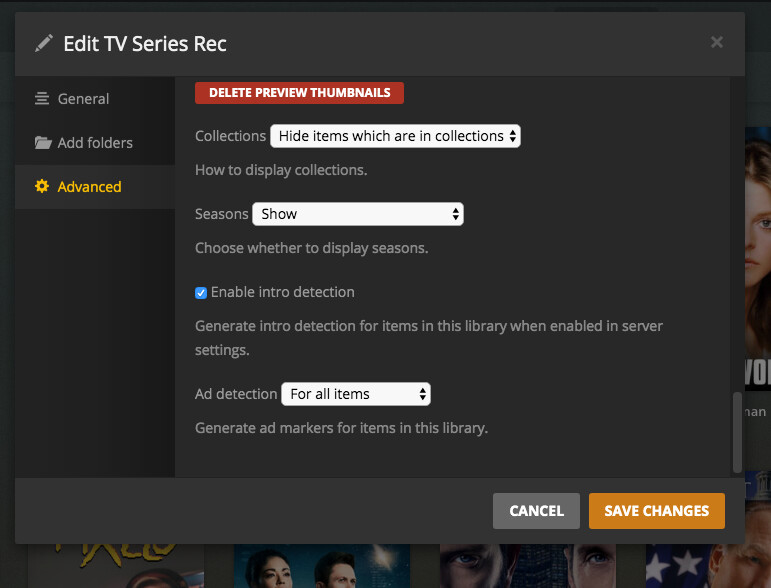
For you I would go to your library of choice, select manage library, select edit, select advanced. At the bottom of the box make sure ad detection is set to For All Items. This will scan every video in the library, so use with caution if you have a large library (which is why I am asking about manually marking files). Also remember it takes a fairly long time to do the ad detection. Sure it is just a couple of minutes a file. But that ads up with a lot of files. Also remember that ad detection is not run in real-time, it is a post process with data stored in a separate file or database someplace. Usually an .edl. And it’ll only be run at at a scheduled time (or when added) if setup in server settings. So make sure you got scheduling enabled in settings.

Hope that helps.

As for me, my OP still hopes for an answer to manual marking.
You can see the commskip data in the XML of a file. Compare a Plex recorded file vs. another recorded file. The XML data is very different. Hell, even the ‘Get Info’ data is very different.

For you I would go to your library of choice, select manage library, select edit, select advanced. At the bottom of the box make sure ad detection is set to For All Items.

Yea, they’re all set correctly:

I’m still stuck with Plex recorded files only able to skip commercials in the client apps. Rather than a manual process I’d like it to work as designed. Files are added, commskip is run on those files and the commercials are skipped in the client.

I haven’t dug into the logs to watch what happens. Just been living with it for now.

Thanks for the help. - Chris

Haven’t read this entire thread but came across it. Might be of interest:

This topic was automatically closed 90 days after the last reply. New replies are no longer allowed.
