Server Version#:1.16.5.1554-1e5ff713d
Player Version#:
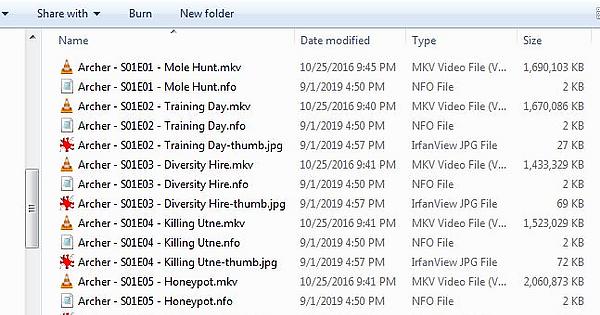
So I am using the correct naming conventions (Drive letter:\showname\season #\showname - s01e01 - episode title.xxx) and I decided today to reorganize my server…
Specifically, I made one group for Animation, and added the folders for the applicable shows to it… 90% of it is identifying incorrectly. specific examples:
Batman: the Animated Series is stuck being identified as Archer.
Numerous shows are showing 3-5 files for episodes, and those files are pulling from many folders.
Some shows are being identified as other shows, and I the web app and windows app won’t show “get info” in the menu so I don’t even know the location of the show to know what it should be. I know none of my cartoons are Game of Thrones or Ellen Degeneres though…
Why is there no option to manually tell it what a show is? Or is that option buried somewhere? and why can’t I split files that plex thinks is one episode?
Here’s a fun one… the artwork is for Archer, the name Plex gives it is Pokemon, Within, I’ve got Invader Zim, F is for Family, Archer, Beast Wars, and a few others… Episode 1 says it has 16 parts… those are S01E01 from 16 different folders… I tell it to split, it rescans and does nothing.
First of all, it’s NOT recommended to use the root of a drive as the root of a library!
Instead, create <Drive letter>:\shows and point the root of your library towards that
Secondly, don’t ask for help with obfuscated named, show us the real names, all the way from root down to the actual file, with that included, since naming matters, down to the extreme details
First folder in the webapp under the “Animation” folder is “Archer”
now I know my Archer videos are located at: “F:/Videos/Archer/Season 1/Archer - S01E01 - Mole Hunt.mkv” and so on…
So I click it, so far so good, the artwork matches, but that’s odd. only two seasons… click into Season 1… aaaand it’s Season 2 of Batman: The Animated Series, which on the computer is located at: F:\Videos\Batman The Animated Series\Season 2\
What’s in Season 2 in that Archer folder you ask? Well, all the episodes have ELEVEN parts… It seems to be taking anything it can find with “S02E01” in it and grouping them together, even if I tell it to “Split Apart” they stay grouped.
As I said before, these groups are pulling files from 11 completely different directories within “F:\Videos”
Less automation and more manual adjusting would be great right now…
I totally understand that naming matters, that’s why I was thrilled that plex uses the same conventions I’ve been using for decades… Series name - S0XE0X. - Episode Title.file extension
I get it, automation isn’t perfect, and that’s not what I want, I want some way to manipulate it so I can just tell it what the show is and how it should be grouped…
Wrong.
Your source is and will always be F:\Videos F:\Videos is the ROOT. Plex will scan all in the root.
If F:\Videos\Archer becomes root then plex will start the scan at that level and find “season 01, season 02,season 03”. Can you tell me what series is that?
I’ve never heard of any tv shows called season 01, season 02, season 03, etc…
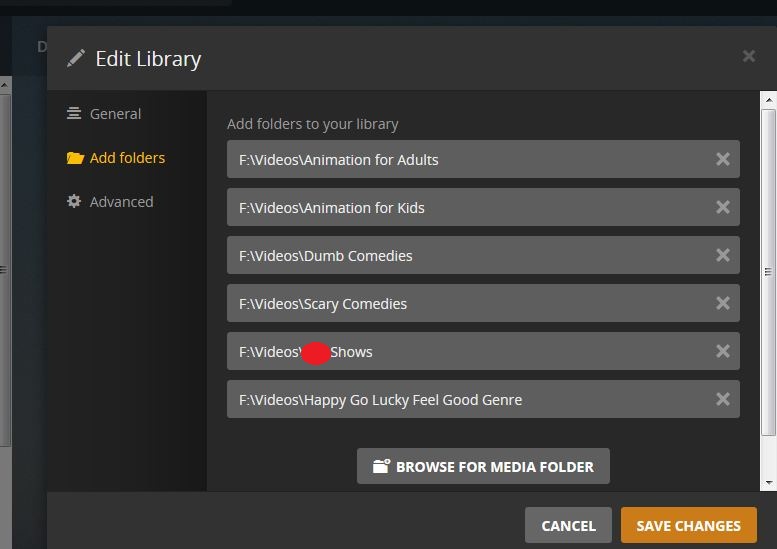
If you are looking to separate your shows based on genre then create individual folders.
F:\Videos\Animation for Adults
F:\Videos\Animation for Kids
F:\Videos\Dumb Comedies
F:\Videos\Scary Comedies
F:\Videos\Sex Shows ← LOL! Got censored!!!
F:\Videos\Happy Go Lucky Feel Good Genre
Now point each library to what ever genre you want them to have or create your library and point to each folder.