Media downloads not working for many months

@hradec I would like to see more examples of the type of download failures you were getting before.

Is it still happening when you download a show ? or a season ?

Is downloads using mobile/cellular enabled or just wifi ? If enabled, can you try with it disabled allowing only wifi for downloads to see if there is a difference

If problem is persisting, please get me new set of logs from the app and the debug server logs - plus indication of how many transcodes are running on the server when the failures occur

Thank you

Nothing changed! Transcoding is still failing as previously reported, even with the latest plex server version and the latest plex app.

It fails for an a show and for a season, as previously reported.

I never used mobile/cellular internet to sync/download, just local LAN!

I indeed tap to retry, and it starts retrying but fails every time. I can tap 100 times to retry, and it fails 100 times!

I did ran a continuous ping to the intranet plex server ip address on my lan, and it pinged without missing any packets for more than 2 hours. A download of an episode takes about 4-5 minutes tops, when I restart the intranet plex server and it sometimes works for 1 or 2 episodes before starts to fail, so there’s no actual connection being dropped.

I can actually watch a whole 2 hour movie on my phone on my LAN without interruption, even when transcoding on the fly.

I even tried to add my plex server as a “manual connection”, but according to the logs, download/sync keeps trying to use the plex dynamic dns to connect to my intranet server instead of the actual local lan IP address string I’ve add on “manual connection” in the plex app… Why it can’t just use the local IP address and port as I added to the app and download straight from it? Why connect to blablabla.plex.tv to translate to 192.168.10.13 when it could just use 192.168.10.13 as I entered?

Also, if the problem is connection dropping as you stated, why the download doesn’t just resume from where it stopped once the connection is back on? Even if the download started over would be better than just failing and stop doing anything until the user “taps to retry”!!

The plex download service keeps running on my phone as soon as I open plex, so it could very well detect that a download failed in the middle, and just resume/restart when it can ping the server again (when WIFI is back online), instead of stopping and requiring user input!

You have a service running that runs in background to download… why it doesn’t manage the connection dropping/switching automatically? Instead it delegates that workload to the user? what’s the point in that?

Can you imagine if the netflix app kept asking to retry a download everytime one walks off the wifi? They support would be exploding with tons of complains. Instead, their app just automatically checks and retry in case of errors, making sure the download is done correctly, all by itself, without user interaction.

Since my last message, I left the whole 10 seasons of Friends to be downloaded/synced… and checking today, only 30 episodes managed to be downloaded from 270… that’s since Oct 6th!

It only manages to download 1 or 2 sometimes when the plex server is restarted.

I have sent you 3 sets of logs already, from 3 different days, even with different versions of the server and android app… You’re asking me to send you a fourth one? Did you guys made any changes on anything regarding android download at all?

I can’t dedicate time to it right now to capture logs again as you’re requesting, but I’ll do it for the fourth time as soon as I can.
But I’m pretty sure the logs will be exact the same if you guys didn’t change anything, since the behavior I keep seeing is exactly the same.

So the issue only arises when transcoding ?

You mentioned before that you once noticed a lot of transcoder jobs running. How many get to run in parallel when the issue of failing downloads arises ?

Thanks for the confirmation

Would like to establish if DNS Rebinding has a bearing on this. Could you change your ping test to use this instead - from a PC on the local network

ping -t 192-168-10-101.a2d0250d4d6148b9b30f6ef016977aaa.plex.direct

See if you get any drop-out

What router make / model do you have and do you know if there is DNS Rebinding protection ?

This area will get looked into

Yes you have and they were all the same - the Plex Android app is getting a failure from the Android OS relating to the network connection to the server - but the server logs do not show any issues or errors.

I have been trying to reproduce this. I will try further.

The logs that I looked at were from September. I wanted to see if the underlying issue is still the same - that arising after the plex android app logs a zero error response
e: An exception occurred: java.io.IOException: Unsuccessful response: 0

This arises when the connection to the server breaks. I will see if it is to do with delayed availability of transcoded data

Well, the server starts transcoding when I ask to download a show or season, or when I tap retry. It Transcodes a couple of episodes (I can see the high CPU usage of 460% on booth PlexTranscode processes) and when it finishes it fails to download to the phone.
After that, it starts a couple more transcoding sessions, but those processes use almost no cpu at all (around 0.5%-0.7% cpu usage per proccess) and stay running for a reaaaaally long time. After that really long time, it fails again, and start another 2 sessions, with the same low cpu usage… and so on…

That happens sporadically (lets say 1 out of 50 times)… I couldn’t determine the specific reason for that, but sometimes I hear my server fans going crazy, and for sure I’ll find those tons of PlexTranscoder processes running at the same time, even with max simultaneous transcode set to 2. If I’m not quick enough to login and kill everything, my server “chokes” and I can’t even login anymore (due to excessive cpu usage, excessive RAM/SWAP) and I’m forced to reset.

here it is. I used adb shell to run the ping on my phone from my linux pc… It ran for a few hours, no packet loss:

it’s a DLINK DIR-878, and as far as I know, there’s no DNS Rebinding protection. I actually tested disabling all firewall settings on my router, just to make sure it wasn’t something in the firewall that could cause a problem.

That would be amazing!!! Thanks!

Yeah… I know!! LoL… I don’t get it either… if there’s a disconnecting happening, the server should at least say that there’s connection timeout. Maybe the server just ignores the timeout exception without throwing any messages, or maybe the error log messages on the app are being throw by a connection exception, but actually the exception is just catching the error caused by something else? like a fail to save/close file on the sdcard or something else?

I’ve done this type of “shoot myself in the foot” exception catch with a little too much code inside, and got confused by why the exception was happening, until I realized the problem was being caused by code that had nothing to do with what the exception was suppose to catch.

Ok! I’ll grab a new set of logs asap!! Thanks for the work so far! I really appreciate!

I thought the first 2 download ok without error

That is a good clue to pursue

I will have another look at the logs and also try to see if i can reproduce the problem with large TV show download.

Can you tell me all your transcoder settings on the server - with “Show Advanced”

Also the Network Server Settings with Show Advanced selected

Could we this time enable “Verbose” logging on the server for this test - you can disable verbose logging and just keep debug logging enabled once you get the logs

Also when getting the logs - could you also afterwards copy out this folder and zip a copy of it - as you appear to have several third party plugins and just want to make sure that is not affecting the performance of the server

“/var/lib/plexmediaserver/Library/Application Support/Plex Media Server/Logs/PMS Plugin Logs”

I think with this info, you will probably find that the first 2 downloads after restarting Plex Media Server will work but ones after it fail. I am following this up

and one more question:
In android app setting / quality
Does unticking “Automatically adjust quality” make a difference?

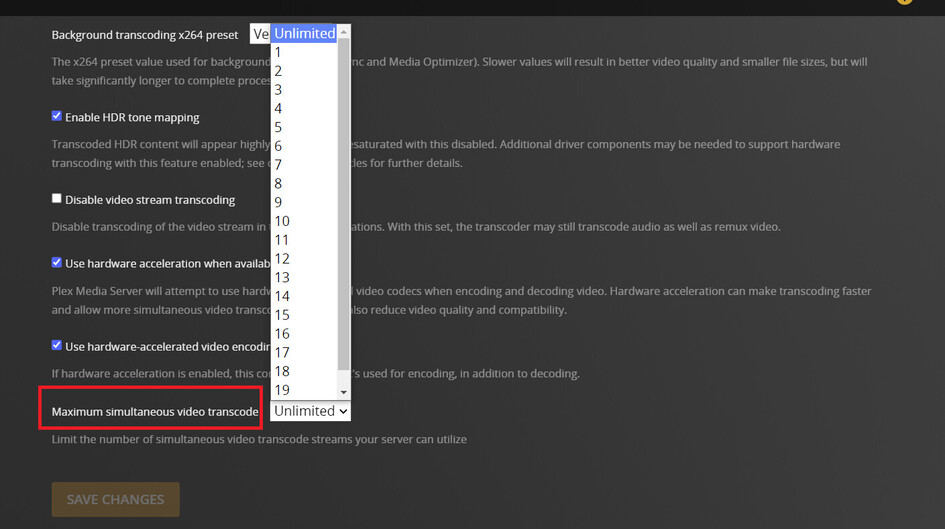
@hradec I have reproduced your issue by limiting the number of server transcoder sessions

Can you change this to unlimited and try the downloads again

I will reply to each of your questions asap, unfortunately I’m just swamped with work at the moment. Please bear with me!

But this morning my server was chocked again, with hundreds of Plex Transcode processes using all resources, to the point I couldn’t even run “htop” or “reboot” and had to physically push the reset button on the server.

I’ll capture the plex server logs and attach here as soon as the server comes up again (although neither debug or verbose was enable when this started happening in the past 16 hours)… it’s taking a long time to boot now because it’s checking all 14 disks after the reset.

here it is:
Plex Media Server Logs_2022-11-22_17-48-50.zip (1.6 MB)

@hradec and other users downloading whole TV Show Seasons or TV Shows

A bug has been identified for downloads that involve more than one media item (eg download of a whole season or a show) and download requires transcoding (lower quality set for the download) and the user has limited the number of allowed transcodes on the server - through this server setting:

The bug results in only the first few episodes being downloaded (the number determined by the value in the setting) and the others will hang or fail depending on which plex client app is being used. A restart of Plex Media Server would allow few more downloads

The issue is expected to be fixed in Plex Media Server version 1.30.2 which is planned for release in early 2023. Until then - please remove the restriction on simultaneous transcodes and keep it as the “Unlimited” default.

These logs were not usable as you disabled server debug logging

I’m still super busy with work and without time to dedicate to this right now. Hopefully by next week I’ll be able to upload new logs.

Until the fix for throttling downloads is released in January in 1.30.2 , please run with number of transcode sessions in Plex Media Server transcoder settings set to “Unlimited”.

For anyone having downloads issues on Android when DNS Rebinding Protection is in place on the local network, a fix has now been released in Plex for Android version 9.16.0

See Release Notice Plex for Android - #458 by ManuelPG

  • [Mobile] Downloads: downloads would fail if network had DNS Rebinding Protection enabled.

@sa2000 Is there a fix for iOS incoming? I think the dns rebinding issue is plaguing iOS downloads as well.

I recently tested DNS Rebinding Protection with Plex for iOS and the downloads worked fine. The issue we had was with Plex for Android

Would need to see debug server logs and Plex for iOS logs for a failed download attempt to investigate

Also you could check if there is DNS Rebinding protection on the local network by executing this in command line window on a machine with an IP address within the local network
nslookup 10-0-20-100.25BCDB7FA7B2496BB2DFF6D9D1345160.plex.direct

Interesting… I just upgraded my UDM Pro to 2.4.27, because this lookup had not been working. The dns rebinding does appear to be working now.

❯ nslookup 10-0-20-100.25BCDB7FA7B2496BB2DFF6D9D1345160.plex.direct
Server:		127.0.0.1
Address:	127.0.0.1#53

Non-authoritative answer:
Name:	10-0-20-100.25BCDB7FA7B2496BB2DFF6D9D1345160.plex.direct
Address: 10.0.20.100

But even with nslookup failing to translate the plex.direct url within the local network (due to DNS Rebinding Protection being in place), the Plex for iOS app should work ok as it does its own translation of the url

If the nslookup fails, that would indicate you have DNS Rebinding Protection active

Info: Plex for Android 9.19.0 has a number of Downloads fixes

On servers with hardware transcoding enabled but not working, the fallback to software transcode was leading to download failures when downloading a TV Show or Season with more than 2 episodes. This is fixed in the 9.19.0 release

  • [Mobile] Downloads: the failing of a pending download could impact the current download.

Other fixes

  • [Mobile] Downloads: transcode can fail if multiple clients download the same item concurrently
  • [Mobile] Downloads: no artwork displayed for season downloads.

Release Note: