Hopefully a simple question. I have Plex installed on my Synology NAS 218+. I also have a Mac that has many movie files. I am trying to ensure I setup the correct file locations so I can
move my files from My mac to that storage location
Identify the path when downloading files so they are stored in that same location.
On my NAS I have a “Plex” folder, and a “video” folder. Do I create another Folder called “Movies” (or would that be a subfolder to “Video” (where I would also include TV shows etc.
I realize this is like a very basic question, but as it is the foundation for all my subsequent actions, I really don’t want to get it wrong… Appreciate any help/guidance.
The critical thing first… you should not move your media to the actual Plex folder/share on your Synology. That’s only for the database, metadata and local media assets downloaded by Plex itself.
As for where to place your movies beyond that… you’re pretty much free to choose.
Personally, I have used the default video share to add my own sub-structure
video
   Home Videos
   Movies
   Shorts
   TV Shows
Within Plex you can then point your libraries to whatever target folder you created.
In my setup, that’s:
Home
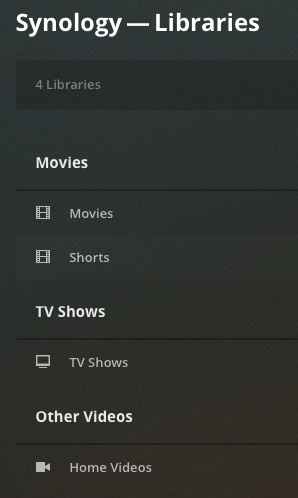
   Movies [kind: movie]
      -> pointing to .../video/Movies/
   TV Shows [kind: tv show]
      -> pointing to .../video/TV Shows/
   Shorts [kind: movie]
      -> pointing to .../video/Shorts/
   Home Videos [kind: other video]
      -> pointing to .../video/Home Videos/
That being said… you can also create 1 Synology “Share” (top level folder) for each library as per your personal preferences.
Thank you! I did read that I should not move media to the plex folder (but obviously forgot… thank you for the reminder!) I will create my repository in the video default and create the sub structure…Thank you for your help!
Thanks again for your help. I am making progress! I set things up per your instructions. I was able to get a file into “Video Station” in Synology, (rom my mac) but, despite also setting up my files paths as you indicated for Plex, my Plex library for “movies” remains empty. Maybe I missed a key point?
Apologies… I should have been more clear in my question.
File System Part
Can you take one screenshot in column view each, where we can see…
a movie file with all its parent folders (up to the top-level folder – e.g. Movies)
the content of a tv show season folder showing the episodes of that season (ideally with the full name of the file visible; up to the top-level folder – e.g. TV Shows)
Plex
Click Manage > Edit in the library context menu and take screenshots of the following content:
that looks wrong…
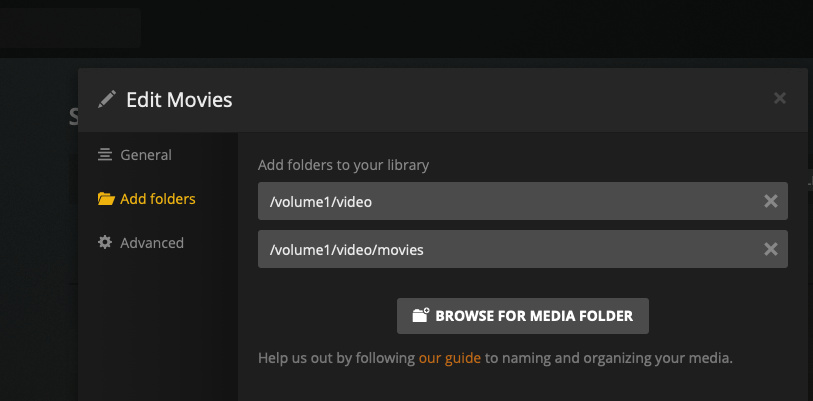
First… you should remove the link to /volume1/video – that still keeps all the other subfolders (Home Videos, Shorts, TV Shows) in scope of this library
Second… did you notice that your Plex configuration points to /volume1/video/movies while the folder has a capitalized M in Finder (movies vs Movies). Are you sure you’re pointing this to the right folder?
Use of the /volume1/video (predefined) share on Synology can be problematic. They have hard coded specific tools to look for and interact with it such as Video Station.
It is for this reason, I suggest and support each person making shares of their own liking and which make sense to them. There is no practical limit to the number of shares you may define so do what makes sense.
Thank you both for your guidance. l’ll go make the changes based on your recommendations. If I am successful I’ll be sure to reflect it in this thread.