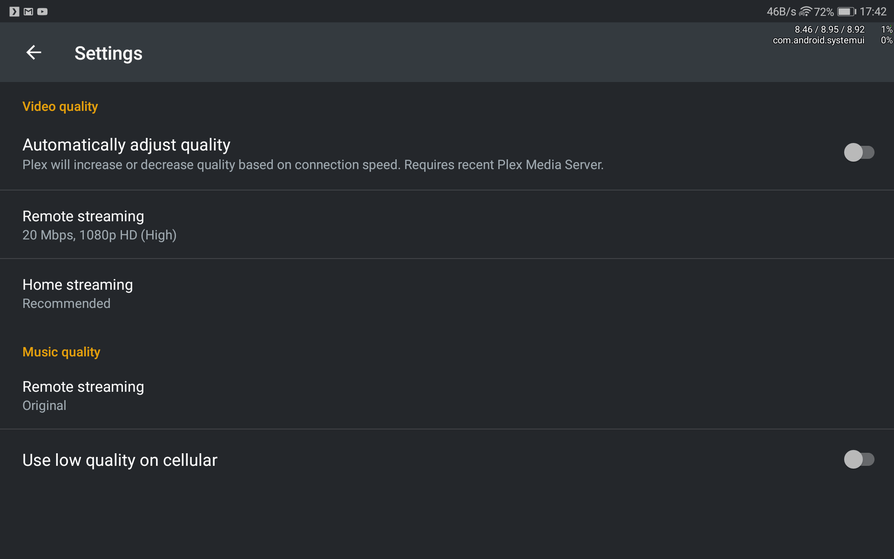
Hi, Just a quick one, i’m trying out a 5G SIM to stream my content remotely but it seems for some reason media wants to transcode using the android app even when set to original quality. Furthermore i have opened Plex using the kodi app and it streaming with directPlay comfortably at 20mbps on that same device.
Does anyone have any ideas as to why this would happen?
Hey Tom, there are no restrictions.
It plays fine over a remote wifi connection and also seems to play well with kodi (using mobile data). But the android app seems to want to transcode all media and also play at a low quality.
i cannot see this option in advanced settings. Could it possibly be the app?
Will plex transcode that same movie as well when you’re playing it from within your home network? (just checking if it’s related to remote access or the particular client in the first place)
I can confirm it does not transcode whilst playing through my local network. Its only transcoding / playing lower quality with the android app. I’m now playing the movie using the web app (with a data SIM) and it also streams at the quality ive set it to so no problems there.
This is a setting for Android mobile devices with a cellular/mobile data connection.
If that applies to your device, you should find it under Settings > Quality > Video Quality > Limit Cellular Data.
I can currently only verify this on an iOS device which as a similar setting.
When enabled (=mobile/cellular data connection identified), I can select playback bitrate / resolution same as for remote streaming / home streaming settings.
If it doesn’t show for you… what version of Plex for Android (mobile) and what version of Android do you have installed on that mobile?
i have changed the playback settings within the android app to play original quality which was an initial step for me. Ive gone through the settings on plex web and the android app and the closest thing i can see is an option : use low quality on cellular which is not selected.
Plex Version 4.20.1
Plex android version: 7.26.0.14578
Android Version 7
I’m guessing it has alot to do with the Android app?
I’ve just double checked with someone who actually had an Android phone at hand. The Limit Cellular Data setting should still be there in that version (and also with this version of Android).
Can you force-quit the app, re-open it and then open Settings > Quality > Video Quality in the Plex for Android (mobile) app on your phone and provide a screenshot?
Hey Tom,
As mentioned above, there is an option to ‘use low quality on cellular’ within the quality settings on the app but its not selected. That being said, the first thing i tried was to select original video from the playback settings whilst playing the media file and it didnt respond that.
This screen looks a little odd…
Do you have any restrictions on mobile data usage in the Android system settings (e.g. limiting the Plex app to a certain bandwidth)?