I got updated to 1.15 and had crashes with memory full every day. Could not get back down to 1.14 since the download was removed. Finally gave up on Plex working on a fix quickly and just bought 16gb of ram versus the 4gb I had (2GB was given to Plex docker now 10GB). 5 days uptime, 3.5GB ram used.
If you are using docker you can use docker pull plexinc/pms-docker:1.14.1.5488-cc260c476 to revert to 1.14.
I had memory leak problem in +918. We noticed that disabling DLNA fixes memory leak issue. I’m now running latest PMS and memory stays around 10-13%.
I have DLNA disabled on all instances by default so sadly this was not the fix for me.
My local server (running in an ubuntu docker container) has started slowing down, eventually becoming totally unresponsive for the past month or so. Noticed that Plex memory usage was slowly accumulating the longer it was running. Just tried disabling DLNA, and saw this:
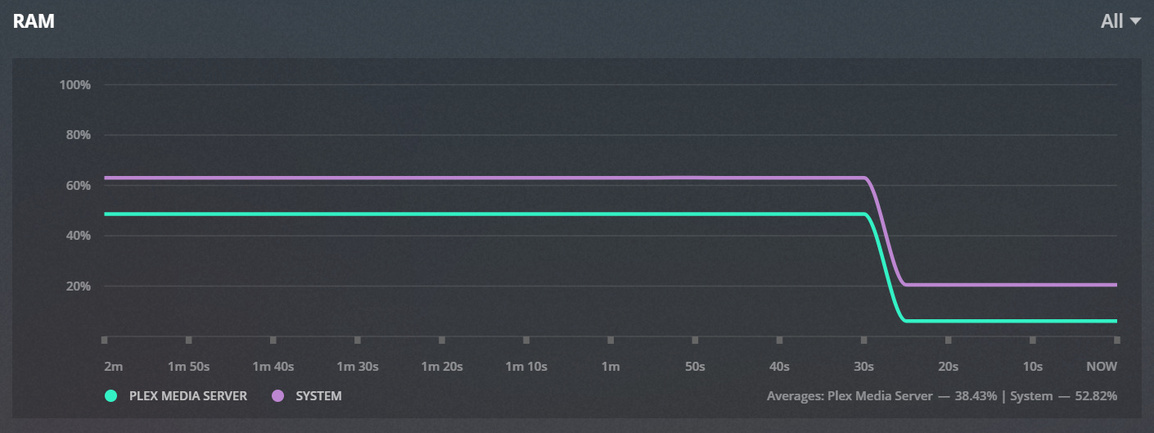
Seems to bode well for fixing my issue.
There may be more than one issue leading to high memory use. DLNA clients are known to make massive requests to the Plex DLNA Server which in turn get passed to the Plex Media Server - these being requests for hundreds of media items all being in one request
I have some screenshots of my usage, its a docker container running in a VM on esxi.
On second thoughts, would this be considered normal swap usage over a 2 day period for the plex process?
Let me know if anyone wants any logs.
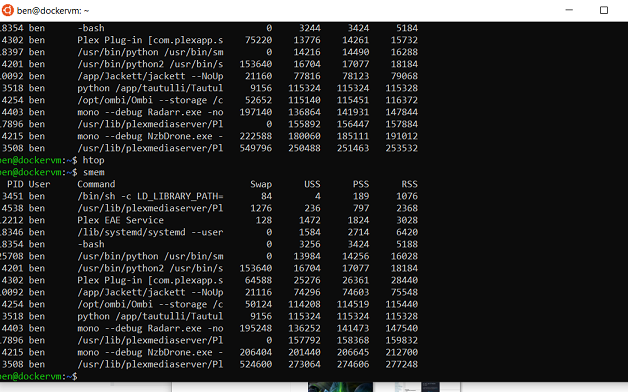

< 300MB RSS looks fine so far.
Can confirm! After disabling DLNA the RAM usage went from 2,5GB to 250MB. It’s weirs since I never use DLNA, so it’s not a big deal to disable it.
I also see a memory leak in plex DLNA server with versions 1.15.x. Also version 1.14.1.5488 seems to be affected. It consumes 85 % of the 2GB in my proxmox debian LXC container. In the moment I’m back to version 1.13.9.5456 which constantly uses 1,05GB. Here ist the output of free -h (v1.13.9.5456):
              total        used        free      shared  buff/cache   available
Mem:           2.0G        1.0G        110M        3.5M        865M        976M
Swap:          3.0G         31M        3.0G
and top (v1.13.9.5456):
top - 07:12:10 up 2 days, 16:17,  1 user,  load average: 0.46, 0.53, 0.31
Tasks:  21 total,   1 running,  20 sleeping,   0 stopped,   0 zombie
%Cpu(s):  0.3 us,  0.0 sy,  0.0 ni, 99.7 id,  0.0 wa,  0.0 hi,  0.0 si,  0.0 st
KiB Mem : 52.3/2097152  [||||||||||||||||||||||||||||||||||||||||||||||||||||                                                ]
KiB Swap:  1.0/3145728  [|                                                                                                   ]

  PID USER      PR  NI    VIRT    RES    SHR S  %CPU %MEM     TIME+ COMMAND
  359 plex      20   0 3082768 869652  17152 S   0.5 41.5 108:41.53 Plex DLNA Serve
  308 plex      35  15 1795756 129640   9244 S   0.2  6.2   3:56.44 Plex Script Hos
I created a thread about this exact same issue last February and it didn’t get any attention. Hopefully now that more people are reporting it, they will look into it.
I am expecting a debug build from the development team to make available to help identify where the memory leaks are
Awesome! I was afraid this might quietly fade away because people were saying it was solved by disabling DLNA, which obviously doesn’t help for those of us who already don’t have DLNA enabled
I just recently got live TV setup as well as the DVR and I am having massive memory leaks. I’m pretty sure it is Comskip getting stuck on the process and just keeps iterating frames and in turn consuming memory (at least that I can tell from the log file in comskip that just keeps filling up). Is this the issue you guys are seeing? My shows will get stuck under “Activity” saying it is still recording but with no % just a spinning circle that looks like this (the episode finished airing hours ago and I have had successful recordings of the same show after this one that completed so it is random):

Everytime I restart the plex container they clear out but while they stack up they consume massive amounts of memory. Check out this 30 day graph:

The only reason this hasn’t been a show stopper for me at this point is because I have 144GB ram in the system which gives me large enough of a buffer to restart it every couple days.
As far as I can tell there are at leas three known memory issues, this is speculation though and not an official statement.
- DNLA leaks which can be solved by simply disabling the service (I doubt a lot of people actually use this)
- DVR leaks that were already acknowledged by the devs
- The unknown leak that is happening even when no DVR or DNLA is being used.
This topic, as far as I intended it, is meant to be only for the latter. I think there are similar topics about the first two which I would recommend people use accordingly.
I just updated to 1.16.1.1246. Docker has been up for just over 2 hours on my Unraid 6.7.0 system. It completed refreshing the guide right after bringing up the new version. Memory usage dropped from 534 MB used to 415 MB used by the docker container when it completed. Overall system memory usage is remaining around 33%, which is what I was seeing before the memory leak issue.
Fingers crossed that updating the EPG crossed something off of the list!
Memory usage is creeping up after 23 hours of usage. Docker is now using just over 2 GB with total system memory usage at 52%. Better than it had been in the past.
My LG C8 TV refuses to direct play when I disable DLNA, do you know if this is supposed to happen? (The TV is on the same lan subnet as the plex server)
This memory leak is very annoying, I currently have assigned 24GB memory to my plex VM to reduce how often I have to restart the plex service, so it would be awesome if I could disable DLNA and get directplay on my TV.
Thank you for keeping the discussion alive and enumerating the issues.
I’m having the memory leak issue as well. Ubuntu 18.04, just caught use around 8 GB of 32 GB, but was pushing up against VMWare performance.
I’ve disabled DNLA since I didn’t use it. I don’t use the DVR, either. I’ll keep an eye on use moving forward and will report back if it returns.
+1 memory leak when using my own xml for the epg. Using the official unraid docker. Would be nice to have an eta on a fix or on having per device epg sources.
