How are you checking your overall memory utilization? I just did a pmap against the Plex Media Server process and it came back with 16043316K. 16GB.
I was just eyeballing it with top. It’s been running for several days but according to pmap I’m currently at 4749408K. Just under 5GB.
Yeah, I had plex crash last night. So what I did not is put together which checks my rclone mount to ensure it’s up, and check the virtual memory usage and res memory for both rclone and pms.
This is what I have right now, seems to be pretty steady, but next time it crashes hopefully I can see what it got up to. The numbers are coming from pmap.
Jun 30 18:56:01 PlexVM root: The mountpoint /mnt/GoogleDrive is up
Jun 30 18:56:01 PlexVM root: rclone virtual memory usage is: 1.27 Gigabytes
Jun 30 18:56:01 PlexVM root: rclone res memory usage is: .3874 Gigabytes
Jun 30 18:56:01 PlexVM root: plex virtual memory usage is: 15.85 Gigabytes
Jun 30 18:56:01 PlexVM root: plex res memory usage is: 3.20 Gigabytes
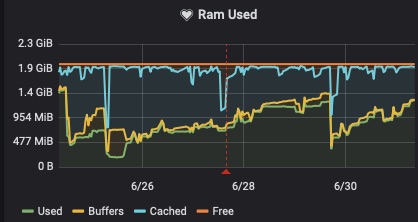
Issue still seems to be there after upgrade to 1.16.1.1291
DLNA server is off. DVR is on and in active use.
Running in ubuntu container on an Odroid SBC.
Gareth
Running on ubuntu LTS 16.04 and noticing this too.
restart of service certainly saw a drop of memory usage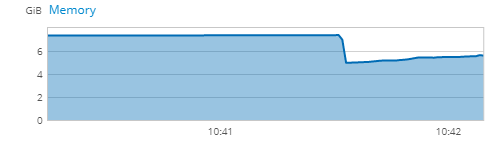
Plex DLNA on my home server currently using 13Gb ram on 1.16.0.1226
For my issue with the memory leak, disabling DLNA looks to be the workaround. I’m not entirely sure what specifically with DLNA is the root cause. But, I can say that with DLNA on, I was having to restart the container every 2-3 days. If left alone, the container would consume everything available from my 32GB of system RAM, and max out all 8 cores, on my unRAID 6.7.2 (Slackware) server, using 1.6.1.x Plex Media Server container from this repo: https://hub.docker.com/r/linuxserver/plex
I always run the latest container. Updating within 24 hours of a new release. This issue has plagued me for months. Now, with DLNA off, the container runs idle at 455MB, until I put it under load, then hovers at about 1.26GB, thereafter, fluctuating with load.
What I do not know is what EXPECTED idle and under load numbers should be for this app, in a container. But, some additional info for those troubleshooting.
Any update on this, Plex? This has been dragging on for months now.
Dear Plex team,
Also having the DLNA leak on my QNAP, I deactivated it temporarly but since I’m using the feature it would be great this gets fixed.
Any update on this?
Thank you
i dont use dvr, is there way to turn this off? 706MB ram
I’m running PMS 1.16.5.1488 docker in UnRAID 6.7.2 and I started having problems this week with the PMS docker eating up 15GB+ of RAM and bringing my system to a standstill. No DVR or tuner.
I disabled DLNA to no avail. Turning off thumbnail generation seems to have almost mitigated the issue, but transcoding seems to in some cases cause it as well.
Same here. Currently 1 stream is using 22GB.
I’ll throw my hat into the ring. Since I’m using a non-supported OS (Endeavour OS, a fork of Arch), I don’t expect any direct help but first, a quick introduction.
For about 2 years, I’ve been running PMS on a bare metal sever with Mint 18 then upgraded to Mint 19, then to 19.1. I do a daily reboot (7:30am) and I never, ever had any problems with Plex’s memory usage. I had DLNA enabled and never used the DVR function.
Over the weekend, I installed Endeavour OS and on Sunday night, I went to log into my server and noticed the login screen was SUPER unresponsive. I was able to ssh into it and ran htop and noticed Plex was consuming pretty much every bit of my 16 gigs of RAM. I restarted the server and thought nothing of it.
Tonight, about an hour or two ago, same thing. I couldn’t log into my server. I ssh’d in and checked and what do you know… Plex was eating all available RAM again. So I set ‘MemoryMax=4G’ in the restrict.conf file and we’ll see if that does anything. I also disable DLNA even though I never had to do that with Mint.
I love using a rolling distro for more up to date packages but stuff like this might just push me back to Mint.
I ran the same version while in Mint and Endeavour OS… v1.16.3.1402. Again, not that I expect any help because of my OS but I’ll attach my logs in case anyone wants to view them.
EDIT: After typing this, maybe this is why Plex dev’s don’t support Arch based distros.  No problems in Mint but with Arch…lots of memory utilization problems. I see some of you were also using Ubuntu and had the problem. I’m confused as much as the rest of you on the cause!!!
Also having a memory usage problem. Ram at 99% and plex using 89% of it according to the dashboard. Ubuntu 18.0.4 8GB ram i5 Intel Processor. 8TB of 18Tb used on raid 5.
I dont use DVR
Same issue:
Plex Version 1.16.6.1592
UnRaid 6.7.2
No DVR
DLNA not enabled
16 GB RAM
Core i7-4790K
Plex will run fine for 2-3 days then memory usage starts to creep up, the interface slows down and video starts buffering more and more until Plex becomes unresponsive all together. The entire server is very slow until I manage to restart the Plex docker. After the docker has been restarted the system is fine again for another 2-3 days. This has been going on for around 1 or 2 months now.
Same issue as well after migrating mine off the Nvidia Shield onto a Centos 7 VM.
Plex Version 1.16.5.1554
ProxmoxVE 6.0-6
No DVR
DNLA disabled
16GB RAM
Intel® Xeon® CPU E5-2690 0 @ 2.90GHz (2 Sockets) - 4 cores assigned.
I noticed my initial migration creeped up to the full 8GB I had initially given it, so I doubled it up to 16. Within the first 24 hours after this reboot (based on the host resource graphs) it maxed out at 16GB. HTOP showed most memory usage being Plex agents at no more than 3.3% each. If you need any logs from me just let me know what you would like.
Still no improvement and no apparent involvement from Plex. This has been ongoing for months. I’m using Plex’s official docker on unRAID, the RAM use just keeps climbing. Logs attached. Can we have some feedback?
Logs.zip (1.8 MB)
I have been having this issue for over a year now over various Plex updates and updates to my OS on a QNAP system running Linux. However, the last update to 1.16.3 has resulted in Plex being far more unstable. Not sure what has changed between the last release and this one, but some change has exacerbated the problem so that I need to restart Plex every few hours after it has been used. The DLNA server process is the one that eats up memory on my server. I do not have or use DVR service so the problem has nothing to do with that. All previous versions of Plex would slow down the Plex interface after a few days. With this version the Plex interface becomes completely unusable after a few hours of use. The Plex providers are going to start loosing their client base really fast if this is not fixed soon.
I’ll join you guys. For 2 years now, Plex eat all of my RAM at my Synology. always eat up every reachable memory, always going up to 98%. I’m hope there will be an update… I’m hoping that for years now…
(DNLA Server seems the problem, and I know that this issue already aknowledged, but it doesn’t help me to run my VM-s. I always have to stop Plex.  )
)
Best: Peter
Count me in on this issue. Plex DLNA process using all available memory on a QNAP TS-451+ with 8G RAM. Issue worked around by disabling DLNA in Plex settings. Running Plex version 1.17.0.1709. Is anyone looking into this? Is there any way to raise a support request?
