Server Version#: 1.21.1. 3876-3c3adfcb4
What I am about to ask about is for a little plugin I had been using since 2019 which loaded up my own album reviews for the 6000+ albums I have in my collection. The plugin is from the post here Music metadata from Tag or File. I have then been using this plugin fine as per the instructions in this post here Metadata Issue.
I have had to do a recent window re-install on my pc and it seems now like this plugin is working very sporadically with artists within my music library and does not want to bring up the album reviews in the vast majority of cases anymore. I have cleared the library and even gone as fine as removing plex from the pc and reinstalling again in case something had gone wrong but is still not fetching the info I have in UTF-8 summary text files I have in each album folder.
Can someone who has used this plugin confirm if it is still working as do not fancy manually adding all the album reviews one by one again as this plugin was a god send for me and would love to know if need to do something different or weather it just does not work anymore.
Thanks
Boroboy383
Found the answer to the above from another thread on the forum which stated since an update of plex last year the custom agent i was using would not not work at all as the way plex scanned information had changed.
Gutted that the above is the case as was not wishing to add over 6000 album reviews myself. Is there any other way I can get plex to automatically import my album reviews at all or not.
Thanks
Boroboy383
Hi @boroboy383
the plugin is still working on my end. Admitted, I haven’t had to reinstall my server but it’s always on the newest Plexpass version.
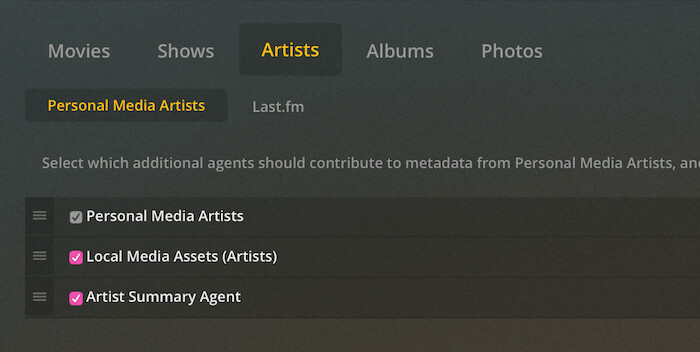
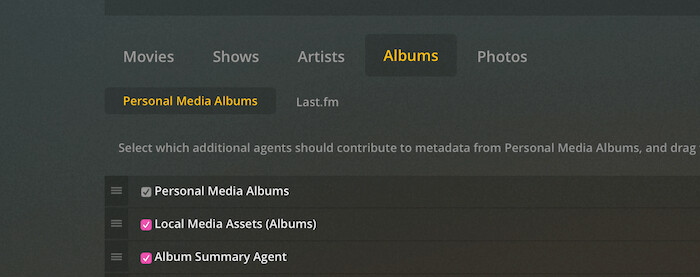
Here’s the order of the agent:
The Library-Agent is of course set to Personal Media Artists
@bananafranco
Not sure what is happening with my set up then as I had it set up in the same way as the pictures above but for some reason will not pull the information form the UTF-8 text files or should I say it does but only from the odd one or two files for some reason so I presumed after reading another thread that it had just sopped working with plex and I had updated to the must recent version of plex, so not sure why it is not working for me then if working for yourself.
Also if you add anything new to the music library does the agent still pick up the UTF 8 file in with the music to populate the bio or album review.
The only thing i notice different in the pictures compared to my set up is the artist and album summary agent in my set up is named as album summary agent (test) not sure if that is the reason why or not as the pictures above for the agent do not have test in brackets after them.
That’s because I renamed the agent in the Info.plist & the .py file - it’s just a cosmetic change.
Yes, e.g I added 3 albums today and the summary got picked up nicely.
Here’s a file to test with - just to make sure.
summary.txt (26 Bytes)
@bananafranco
I think after looking through I am now making headway on this as just saved a new summary file with UTF-8 and has showed up but then another artist I have loaded which had summary files I had created in the past does not load up, so going to have to have a play around with them files to see if something is causing it not to load up as when it loads this artist all artist and albums thumbs are blank which is odd, so not quite sure why that is doing that at present.
Edit ------ has made a liar out of me!! lol, I have just reloaded the files after running them through MB picard again just in case was some weird thing happened to my tags and the files have loaded up properly and including the info from the summary file.
So in my mind it is one of two things either the tags have somehow got slightly messed up along the way or when I have asked plex to scan my music library which stands at over 95000 songs I am thinking it may not have loaded the files correctly when it has done a full scan so thus not reading the summary file properly.
At least that’s promising to hear. Maybe a ‘Refresh Metadata’ on an album or the whole library is enough to populate all albums again?
@bananafranco
I have tried that and nothing happens i have just tried to load a test section on my library and again it seems like it is not loading the info correctly and all the album thumbs are not there and it is not picking up the info from the summary files. Will have to do more investigating as something has to be wrong somewhere with the files or the way plex is scanning the files for some reason.
My other thing I am thinking is maybe plex with the way you need to set it up to read the summary files does not like doing mass adding for some reason which in itself I would find very odd.
@bananafranco
I think I have finally cracked it and believe it must be the way plex is scanning the files as if I load my library from scratch without having an artist with the details pre populated from the summary file it will not load the details up for all artists that I have added in that particular batch and will not let me do a metadata refresh.
Now if I add one artist which I know will load the information from the summary files, it seems like any artist I then add to the library will then load the information from the summary file if there is any there and I can refresh the metadata.
So it seems like it is a strange quirk of plex with the way you need to set it up to read the summary files and how it wants to load the information, hopefully this has finally resolved it for me!!! Jesus I need a beer!!!
Hi, I’ve got album reviews for a lot of my music albums and I’d love to know how to populate them automatically (rather than having to laboriously copy and paste in the plex front-end). I can easily create a summary.txt or album.nfo for each album using python.
So far I’ve been directly updating Plex’s back-end SQLite database, but I’d guess that isn’t the recommended way!
You mention using a summary.txt - what is it that makes Plex read that file? Do I need a plug-in? Thanks for any insight, sorry if this is a stupid question!
@hertfordkirks
If you download the musicsummerytest.bundlezip in the 3rd post down in this thread Music metadata from Tag or File and download it, then unzip it to your plugin folder located within the plex directory.
You will then need to in the web interface go to agents under settings and under albums & artists make sure you have them set up in the following order:
Personal Media Artists
Local Media Assets
Artist Summary Agent
Please be mindful this will only work on a fresh install of a music library and when you set the library up you would need to have the settings as follows:
Scanner= Plex Music Scanner
Agent= last.fm
When you load the library up it should then scan the suymmary.txt files within you album and artist directory. Please bear in mind these .txt files need to be saved as UTF-8 files from with notepad otherwise plex will not pick them up at all.
It can be quite a laborious process if you have not already got the files in .txt format especially if you have a large library like I have.
Hope that helps
Fantastic, thank you. I’ll give it a try!