Sorry but I have been using my iPad to access the forum and also to access Plex tv to enter the access code to connect the tv, not the windows computer.
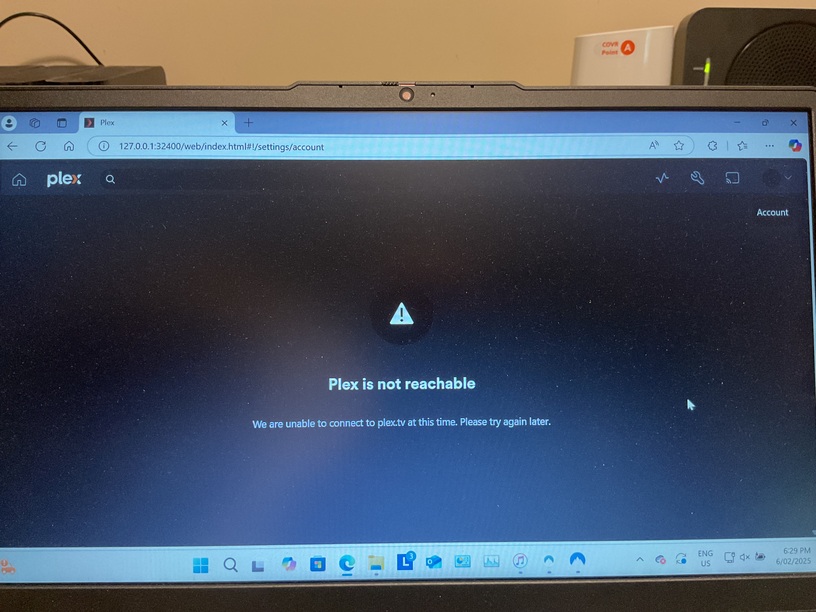
On the PC which gives you the error message, please post a screenshot of that error message.
You said you have more than one router, right?
Could you login to the one that is connected directly to your computer, and set the DNS server setting to 8.8.8.8
then restart it.
This is all becoming too hard. I think I will just leave it as is because it does seem to work ok apart from the login situation and no remote access.
Try putting in this address instead… https://127.0.0.1:32400/web
When I try doing that it automatically adds /index.html#!/ which ends up being exactly what I had before.
Also I was able to login to the Plex Forum on my windows PC without any problem.
Hi
I just thought I would update you.
For a number of reasons I ended up in resetting my computer to how it was when I purchased it i.e all data etc removed. I have now reinstalled Plex and it has resolved the login issue.
When setting up the computer again i removed the second router but still cannot get remote access.
I will have to look at how I can resolve that/
