I have made a fresh PMS install (Official docker app) in UnRaid (v6.12.9) and followed the Move an install to another system. Although the UnRaid install initially worked (web-UI is accessible), after unzipping all TrueNAS files & folders (all expect the not-needed Cache folder) PMS went “dark” and although the container stars there is no web-UI functionality any longer. Setting all files and folders to “root” user as owner (the user under which PMS was installed) made no difference.
Any ideas/hints on how this TrueNAS to UnRaid migration can be made please?
Seems that the Web-UI disappearance was a glitch and after a container restart it was fine. Still, although I stopped the container, unzipped all past Plex files (FreeNAS), restarted the container, the server is visible via web-ui and registered to my account but NO Library is visible, showing just as a fresh PMS install. Any ideas?
The migration described by Plex didn’t worked in the OFFICIAL PMS docker app, even after setting the proper owner (chown -R nobody:users ./) and access rights (chmod -R 755 ./) to all copied files. Strangely the SAME procedure using the BinHex PMS docker app, works fine and all content and metadata appear intact in the new installation (Unraid) from the past one (TrueNAS Core).
On a side note, it seems that following the OFFICIAL instructions, I have “sign out of your account under Settings > Server > General in Plex Web App” which led to losing the server and thus all configured shared-users and history! Do NOT do so! The first time I tried the BinHex install I have NOT signed out of the new-server and all users and history was maintained just fine. After a few tries to make the OFFICIAL PMS docker app to work, I did the mistake to remove the server and thus lost users and history.
…really strange how one docker (BinHex) worked fine but the other (Official) didn’t. I would prefer to use the official docker-app (I tried quite a lot and even broken the users and history!) but since another release does the job i will stick with this one I guess!
Any ideas about the broken users (library access by friends) and watch-history?
The old server (FreeNAS) was not signed-out. Currently it is offline but i have all PLEX data in a big zip file (50GB+).
The new server (UnRaid) is up and running, with all libraries, metadata and content (files) operational. How can I “revive” the USERS watch history and sharing? (I see my Friends fine but all previously defined shares are gone and the sharing page is blank).
Thank you.
@ChuckPa i am not a sw-dev but i am pretty confident on CLI. I have extracted in a temp-folder all my old Plex data (zipped from FreeNAS, 50GB+) and i have the Preferences.xml file (1.18KB) and the Databases folder:
Both the Preferences.xml and the latest DB files are dated 29 MAR, when FreeNAS went offline to migrate to UnRaid. So, how may i reinstate the server-history and users-shares?
I have preformed Part-1 to a FRESH PMS install (the original PMS docker-app, hoping to work this time!), I have removed container and all past appdata and restored the old-server’s Preferences.xml.
I have run DBRepair.sh within the PMS container but PRIOR to doing Import Wath History let me please ask:
I am trying to restore the old-server’s SHARED-USERS and SHARED-USERS-ACTIVITY and NOT my own watch-history. My own watch-history appears in the restore already done (simply unzipping all old-server files to the new-server’s PMS folder). So, do i need to run the “Import Wath History” or not? (I will hate to see all my watch history appear as duplicates in my Trakt!)
If indeed the “Import Wath History” is to import SHARED-USERS SERVER HISTORY, please clarify to which DB should it be pointed? Should I copy the old-server db file in /config (the same folder with DBRepair.sh) and do import?
Finally, at which point shall I restore (extract) the old-server files? Shall I just keep the new DB and Preferences.xml (your step-1 and 2 above) and overwrite everything else?
@ChuckPa the last part with the 4-points of “migrating from anything → anything” was really helpful. KUDOS!
I used to be following the “Move an Install to Another System” guide but after doing the new-PMS install and copying all old-server-data (unzip & overwrite) to the new-PMS, things were getting broken. Strangely only the BinHex-PMS docker-app worked while the official-PMS and LinuxServer-PMS never managed to restore my libraries.
Following your hereby guidance I took another path this time:
Fresh install of Official-PMS docker-app
Setup docker path /media → /mnt/user/Videos, /config → /mnt/cache/appdata/Plex-Media-Server, /transcode → /mnt/user/tmp/transcode, NOT using Plex_Claim token
Stop PMS
Restore Preferences.xml (just copy from the old-server, chown 99:100)
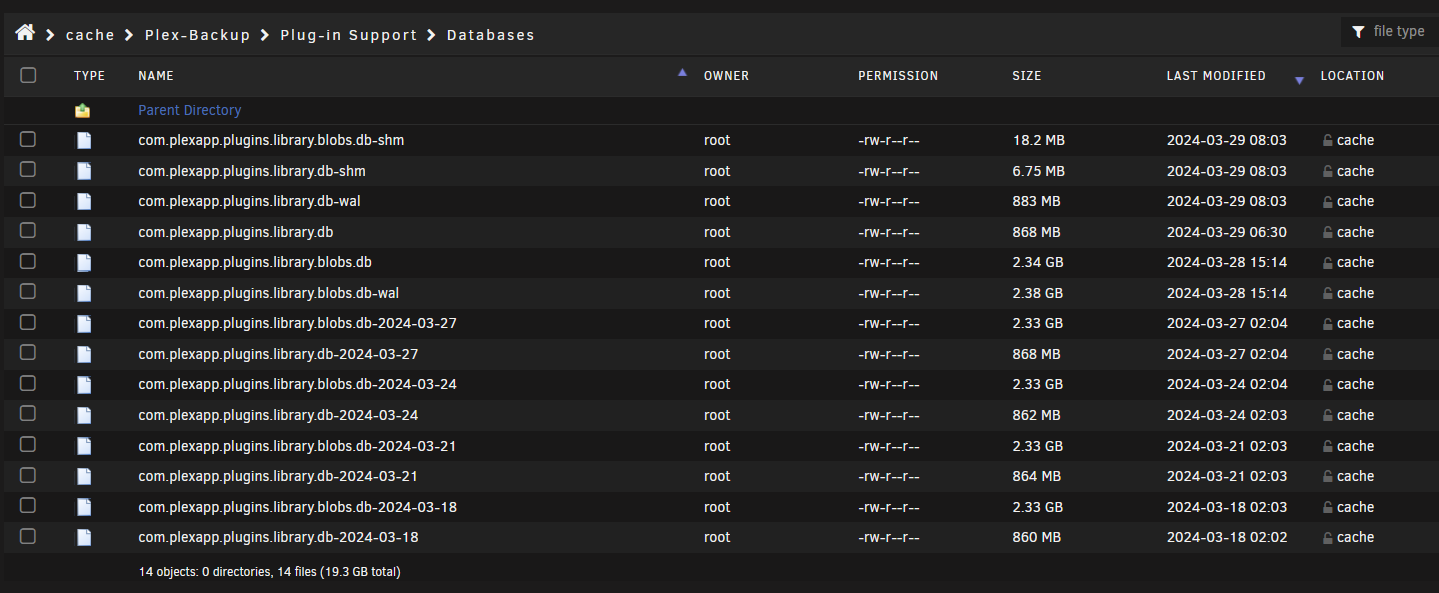
Restore database by copying the full Databases directory OR copy the DBs files (com.plexapp.plugins.library.db and com.plexapp.plugins.library.blobs.db, chown 99:100) and delete -shm and -wal files in the target directory (new-server) [See more details in the next post below]
DB automatic maintenance (using your great tool!), within the PMS container. I had no report for anything “fishy” with the old-server DB (798MB) and blobs.db (2,36GB)
Start PMS
My media folders worked out of the box (the path was set in the docker setup above as /media → /mnt/user/Videos)
Run PMS
The old-server name & libraries were present just fine
Run a full Library Scan
Run a Refresh all Metadata
…wait (a lot!) for the library to fully update
This setup the OFFICIAL PMS Docker-app in the new UnRaid server just fine.
A small “glitch” is that the shared users (Settings/Manage Library Access) were not restored BUT the old-server users history was fine (for all users) and the Friends appear fine too. I just have to redo the sharing setup from scratch (minor work).
@ChuckPa thank you and please feel free to comment if you may improve this bullets-guide for future PMS trans-system migrations! Keep up the good work!
“Databases” folder/directory – In its entirety – not just the .DB
Reason: If the target machine has -WAL and/or -SHM files , a foreign DB (with different media id numbers & pointers IN THE DB) will corrupt it the moment you start it up and make your first “Scan Files”.
– Blobs is paired with main DB too. It’s all got to be in sync.
Either:
Copy the Databases directory (keep the ‘full set’ of files together)
-or-
copy the DBs and delete -shm and -wal files in the target directory.
the SHM and WAL files are pending operations. It’s better to bring them along with the DB (a complete set)