Server Version#: Whatever comes with the official PMS Docker as of today (2021-04-12).
Player Version#: 4.54.5 maybe? It’s what shows in Plex Web - General…
Overview
I have PMS running on a Drobo5N, and I’m trying to migrate away from it, to unRAID (PMS in a Docker). I’ve copied all my media files over already, and I’ve installed the PMS docker and checked that it does indeed work (it runs & is accessible, etc). Note that I have not configured any Library locations or media watch folders or whatever they’re called in the unRAID/ Docker PMS install yet - it’s purely a virgin install (although I did configure my token).
The PMS running on the Drobo recently began acting buggy (it stopped fetching any metadata), so I don’t care about transferring all the metadata from there. The only stuff I’d love to preserve would be the users, watched status (per user), and play history (if possible). If the new PMS needs to rescan everything and refetch all the thumbnails, descriptions, etc - so be it. ¯\_(ツ)_/¯
The Problems
-
When I follow the directions on the “Move Viewstate/Ratings from One Install to Another” page and load up the PMS web interface, I get prompted to select which user I want to login as from among the users I have set up on the Drobo (yay!), but on the next screen I get the “No soup for you! You do not have access to this server” message (boo!).
-
When I do the above step, but additionally copy over the
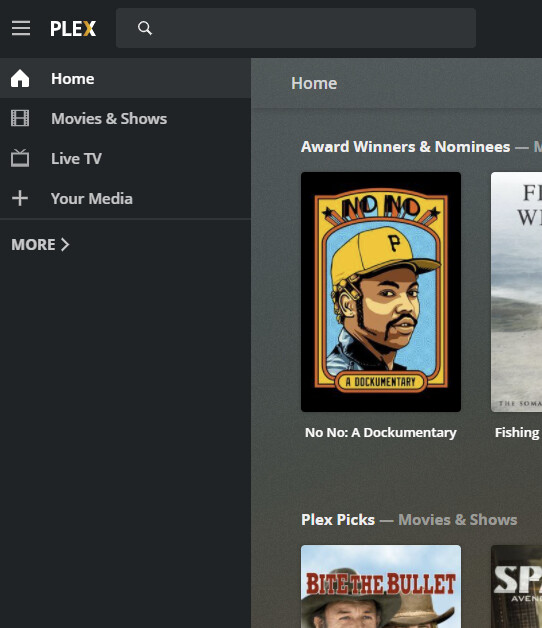
Preferences.xmlfile, I’m allowed to login and access the web GUI, but it loads as if it’s the player only:
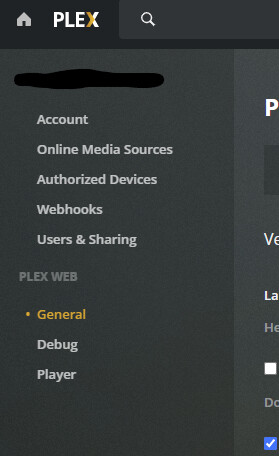
And there’s no server-related options under settings:
When I click the “+ Your Media” link in the sidebar, it takes me to an “Add your media to Plex” screen:
The button there just opens up the web page to download PMS. -
When I follow the directions from the “Move an Install to Another System” page and copy over the entirety of the
Plex Media Server/directory and start the PMS docker, the backend becomes inaccessible - the browser can’t connect to it.

Help?
