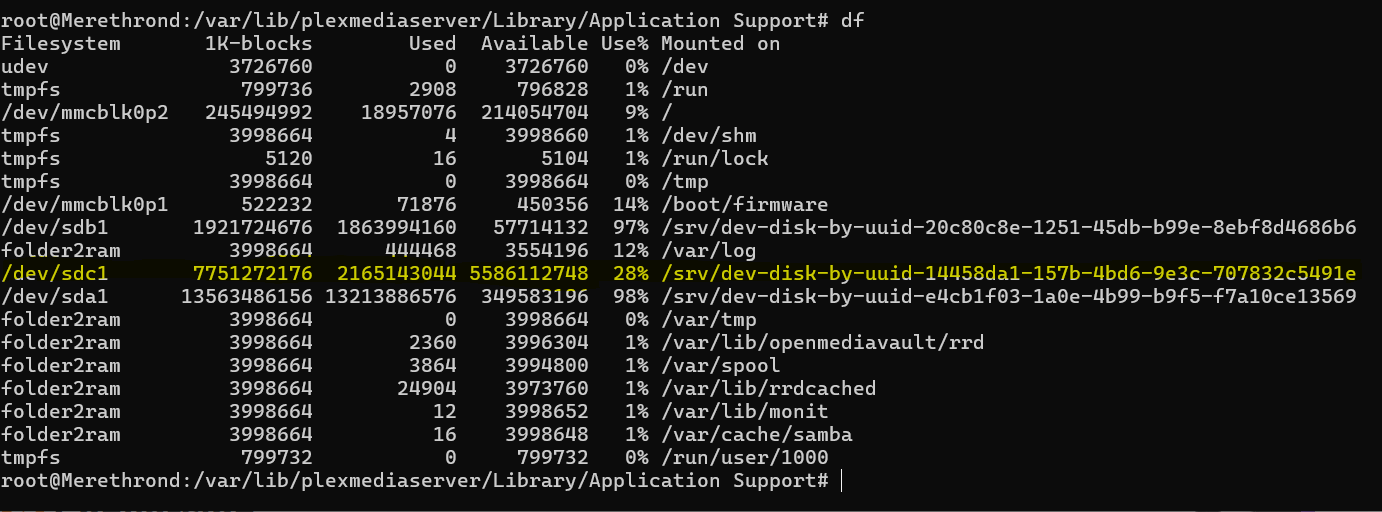
So I did miss the . at the end. After some looking online I modified the string to /var/lib/plexmediaserver/Library/Application Support/Plex Media Server# tar cf plexbackup.tar /sdc1/PlexData/ and it is showing >|. So may have done a bad thing.
tar cf /path/to/where/tar/file/goes <source path to put into tar>
You cannot use /dev/sdc1/Filename. /dev/sdc1 is the raw partition.
If you write to it, you’ll wipe out all the formatting and any other contents on that partition.
2 All paths which begin with /dev are raw device. You want to use where the raw device is Mounted On
Therefore
cd "/var/lib/plexmediaserver/Library/Application Support"
tar cf /mounted/path/PlexBackup.tar .
One question that I have potential concerns about. The Pi host I am moving from had 3 different media folders (media, media2 & media3) as there were three separate drives used. When I migrated the data to the QNAP I put it all in a single media folder. Does that matter or do I need to have the data in a exact clone?
So to create the backup I would use?
cd “/var/lib/plexmediaserver/Library/Application Support”
tar cf /sdc1/PlexData/PlexBackup.tar .
or do I use the absolute path
cd “/var/lib/plexmediaserver/Library/Application Support”
tar cf /srv/dev-disk-by-uuid-14458da1-157b-4bd6-9e3c-707832c5491e/PlexData/PlexBackup.tar .
Sorry to seem so dense, still very new to the Linux world
I did the process noted above but looks like that is creating a PlexMediaServer in the PlexMediaServer folder. I am cleaning that out and will go up a level and run again.
ok got that cleaned up and paths look right (see below) but Plex server is still showing offline from my computer or any other device and cannot connect to it when accessing it direct from the QNAP Plex App (page cannot be displayed).
No worries and very much appreciate the help.
I ran the batch of commands and server shows started on QNAP (old Pi host powered down) but not reachable.
The QNAP is on the same VLan as the old host and my laptop. I can web into the QNAP and SSH to it and reach shares.
Not sure what is causing the Plex server not to be reachable
Ran the reclaim and it went through with the final output of
Claim completed without errors Starting PMS PlexMediaServer is disabled. Complete.
What command should I run to pull the logs needed?
Also do you mean the PMS stopped or Logs? If logs how do I turn that off since I cannot connect to the instance?
 to /var/lib/plexmediaserver/Library/Application Support/Plex Media Server# tar cf plexbackup.tar /sdc1/PlexData/ and it is showing >|. So may have done a bad thing.