It’s a bit hard to explain, but I’m not trying to create an exact copy of a the whole Plex server (like all the existing guides have instructions for). I’m only trying to copy all Plex-media-configuration (so playlists, likes, what has been played, etc) into an additional new Plex server instance (so a Plex server instance with a different name, that can run simultaniously next to the other instance).
I’ve actually already succeeded in doing this, but I’d like to doublecheck here if I did it correctly and if my 2nd Plex instance can be considered “healthty”.
So here is a short description of what I’ve done / I’m trying to do:
Source (master) server
TrueNAS Core 13.0-U6.1 (FreeBSD) → Will be replaced with TrueNAS Scale soon
Plex Media Server 1.40.0.7998
Media mount point: /mnt/mediads/ → After installing TrueNAS Scale, this mountpoint will become /data and be the same on both source and destination
Plex Media Server instance name: Plex-Master
Destination (backup) server
TrueNAS Scale 23.10.1.3 (Linux)
Plex Media Server 1.40.2.8312
Media mount point: /data
Plex Media Server instance name: Plex-Backup
Actions taken
Install the Plex Media Server on the TrueNAS Scale destination server without any libraries, but completely working and available in Plex WebGUI interface.
Stop the Plex Media Server on the TrueNAS Scale destination server
Replace following folders on the TrueNAS Scale destination server with the contents of the TrueNAS Core source server:
Plex Media Server/Media
Plex Media Server/Metadata
Plex Media Server/Plugin Support
Plex Media Server/Plugins
Start the Plex Media Server on the TrueNAS Scale destination server
It seems to start ok, without errors and in the WebGUI all media-configuration seems correctly copied
Of course all libraries are still pointing to the incorrect path and when trying to change / fix this, I’m getting an error “Your changes could not be saved”
After rescanning all libraries, everything seems to work well and all media-configuration seems correctly copied to the destination server
The rescanning after changing the library paths of course takes a huge amount of time (and probably isn’t really necessary, as the media data should be in sync), but I hope that once I replace my TrueNAS Core master server with TrueNAS scale (and both servers having the same media mount point) this might not be necessarry anymore…
Also I noticed that there are no logs in “Plex Media Server/Logs”. Is this normal?
Question
So just to be clear (as I’ve already found a seemingly working solution to my problem), here is my question: I this a valid approach / process to follow? Or do you see any problems / issues with this?
Unfortunately I don’t know much about Truenas or Docker.
But I can tell you that you’ve done it correctly so far, if you have omitted the file Preferences.xml from the copy process.
In sync with what? Ultimately it is the storage location which ties a media file to its metadata. If you could make the Docker in such a way that the media files are accessible under the exact same folder/file names as they were on the old server, you can avoid both changing the library media paths as well as the costly rescans.
I’m not sure. Either it is being redirected to the global machine log, or you have an access permissions issue in your plex data folder.
(though I seem to remember that the former is non-default, and requires explicit instructions to do so)
I have indeed not touched the Preferences.xml after the fresh /bare install on the destination server.
I have a replication task to sync my media on the source server with my media on the destination server (so the media files themselves should be the same on both servers).
I plan to reinstall the source server from TrueNAS Core to TrueNAS Scale very soon. After this the media files will be under the exact same folder for Plex, so that a rescan is (hopefully) not required anymore.
The only settings I could find related to logs were
and
But When I click on “Download Logs” nothing happens.
When I click on “Download Database” something does happen (under Activity it says “backing up DB”), but still nothing is actually downloaded
Regarding permissions, you could be right, because I did notice a couple of days ago that the “Logs” folder had a different owner vs all other folders in that location:
So apparently, my assumption that the Plex Configuration Dataset that I’ve created on the host, is directly mounted in the docker container, is false. It seems like the configuration is somehow duplicated from the docker container to the Plex Configuration Dataset on the host. And the logs are somehow not properly duplicated to there (or maybe this is intentional?).
Anyway, this is sufficient for me, as long as I know where to find them…
I’ll try to have a look inside the logs now, to see if there is anything unhealthy / suspicious. But if I understand you correctly, what I’ve done so far should be “ok”, right…?
As I understand it, this can be defined in the Docker container configuration. You can map any folder in the container to a folder on the host machine if you want to.
If you have tested and found it working
adding new items and fetching metadata for them
editing metadata of existing items
playback with transcoding. Be sure to test both video transcoding, as well as audio transcoding from Dolby (AC3, E-AC3, TrueHD) codecs.
I’m only just starting with Kubernetes / docker, so I don’t know much of it either I’m afraid. But here is what I could extract as Docker container config:
root@truenas-backup:/mnt/backup-pool/encrypted-ds/app-ds/plexconf-ds/Library/Application Support/Plex Media Server# k3s kubectl -n ix-plex-test describe deploy plex-test
Name:               plex-test
Namespace:          ix-plex-test
CreationTimestamp:  Mon, 01 Apr 2024 12:24:07 +0200
Labels:             app=plex-2.0.3
                    app.kubernetes.io/instance=plex-test
                    app.kubernetes.io/managed-by=Helm
                    app.kubernetes.io/name=plex
                    app.kubernetes.io/version=1.40.1.8227
                    helm-revision=8
                    helm.sh/chart=plex-2.0.3
                    release=plex-test
Annotations:        deployment.kubernetes.io/revision: 8
                    meta.helm.sh/release-name: plex-test
                    meta.helm.sh/release-namespace: ix-plex-test
Selector:           app.kubernetes.io/instance=plex-test,app.kubernetes.io/name=plex,pod.name=plex
Replicas:           1 desired | 1 updated | 1 total | 1 available | 0 unavailable
StrategyType:       Recreate
MinReadySeconds:    0
Pod Template:
  Labels:           app=plex-2.0.3
                    app.kubernetes.io/instance=plex-test
                    app.kubernetes.io/managed-by=Helm
                    app.kubernetes.io/name=plex
                    app.kubernetes.io/version=1.40.1.8227
                    helm-revision=8
                    helm.sh/chart=plex-2.0.3
                    pod.name=plex
                    release=plex-test
  Annotations:      rollme: sA67K
  Service Account:  default
  Containers:
   plex-test:
    Image:       plexinc/pms-docker:plexpass
    Ports:       32469/TCP, 1900/UDP, 32410/UDP, 32412/UDP, 32413/UDP, 32414/UDP, 32400/TCP
    Host Ports:  0/TCP, 0/UDP, 0/UDP, 0/UDP, 0/UDP, 0/UDP, 0/TCP
    Limits:
      cpu:     4
      memory:  16Gi
    Requests:
      cpu:      10m
      memory:   50Mi
    Liveness:   tcp-socket :32400 delay=10s timeout=5s period=10s #success=1 #failure=5
    Readiness:  tcp-socket :32400 delay=10s timeout=5s period=10s #success=2 #failure=5
    Startup:    tcp-socket :32400 delay=10s timeout=2s period=5s #success=1 #failure=60
    Environment:
      TZ:                          Europe/Brussels
      UMASK:                       002
      UMASK_SET:                   002
      NVIDIA_DRIVER_CAPABILITIES:  all
      PUID:                        4009
      USER_ID:                     4009
      UID:                         4009
      PGID:                        5002
      GROUP_ID:                    5002
      GID:                         5002
      PLEX_CLAIM:                  claim-<censored>
      PLEX_GID:                    5002
      PLEX_UID:                    4009
    Mounts:
      /config from config (rw)
      /config/Library/Application Support/Plex Media Server/Logs from logs (rw)
      /data from data (rw)
      /shared from shared (rw)
      /tmp from tmp (rw)
      /transcode from transcode (rw)
  Volumes:
   config:
    Type:          HostPath (bare host directory volume)
    Path:          /mnt/backup-pool/encrypted-ds/app-ds/plexconf-ds
    HostPathType:
   data:
    Type:          HostPath (bare host directory volume)
    Path:          /mnt/backup-pool/encrypted-ds/media-ds
    HostPathType:
   logs:
    Type:       EmptyDir (a temporary directory that shares a pod's lifetime)
    Medium:
    SizeLimit:  <unset>
   shared:
    Type:       EmptyDir (a temporary directory that shares a pod's lifetime)
    Medium:
    SizeLimit:  <unset>
   tmp:
    Type:       EmptyDir (a temporary directory that shares a pod's lifetime)
    Medium:
    SizeLimit:  <unset>
   transcode:
    Type:       EmptyDir (a temporary directory that shares a pod's lifetime)
    Medium:     Memory
    SizeLimit:  8Gi
Conditions:
  Type           Status  Reason
  ----           ------  ------
  Available      True    MinimumReplicasAvailable
  Progressing    True    NewReplicaSetAvailable
OldReplicaSets:  <none>
NewReplicaSet:   plex-test-75bc8cc4 (1/1 replicas created)
Events:          <none>
If I understand this correctly
/mnt/backup-pool/encrypted-ds/app-ds/plexconf-ds (on the host) is mounted to /config (in the container)
/mnt/backup-pool/encrypted-ds/media-ds (on the host) is mounted to /data (in the container)
EmptyDir (on the host) is mounted to /config/Library/Application Support/Plex Media Server/Logs (in the container)
It seems to me like this (apparently default) configuration “excludes” the Logs folder from being available on the host.
Again, as long as I know how to find the logs and as long as this configuration isn’t “unhealthy” for Plex, I don’t really care that this is how it is done…
What does concern me a little bit, is that the “Download logs” and “Download database” button don’t work in the Plex WebGUI.
Also it seems like this docker configuration causes the logs to get lost everytime the docker container is restarted.
Thanks for this advice. I will try these things out later this week!
And they have fixed it in version 2.0.4 (I did need to do a reinstall of the Plex app)
I’ve also retried to “Download Logs” and “Download Database” and it still doesn’t work. But after trying a bit more, it seems to be caused by my browser.
It doesn’t work on Vivaldi (even though it is configured not to block any cookies or tracking for this site) and it does work in Firefox. Not sure if that is a Plex bug though or if it is something still wrong with my Vivaldi browser settings… (Perhaps this is something you can easily try out yourself, if you’re interested in making sure everything properly works in the Vivaldi browser)
I still need to try out your tests to make sure my “plex-mirror” properly works… Will report back on that later…
A report back on what @OttoKerner suggested for testing the health of my mirrored plex:
adding new items and fetching metadata for them
→ works fine
editing metadata of existing items
→ works fine
playback with transcoding. Be sure to test both video transcoding, as well as audio transcoding from Dolby (AC3, E-AC3, TrueHD) codecs.
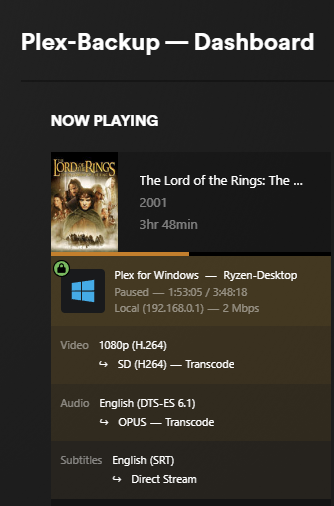
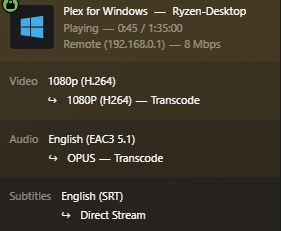
→ works fine for video, but I’m not sure how to properly test it for audio with those specific output formats that you mention.
I was able to change the amount of channels (I tried 3.1) in the “settings - player”, but not choose something like AC3, …
After this change, when playing video and choosing settings, “audio stream” still says the original output format (DTS-ES 6.1 in the my test video) and nothing about 3.1.
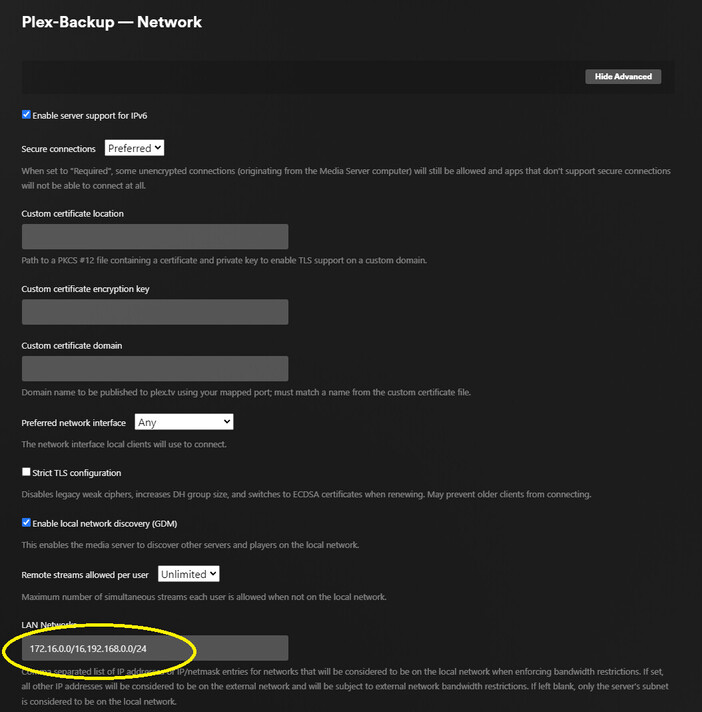
It was also an extreme struggle to make Plex Settings - “Remote Access” to be fully accessible outside your network (only an indirect connection worked).
After a very long search I found that I need to enter the following in Plex Settings - Network:
LAN Networks: 172.168.0.0/16,192.168.0.0/24
The first IP address is the subnet that kubernetes VMs lives on TrueNAS Scale (set in the TrueNAS Kubernetes advanced settings) and the 2nd subnet is subnet of my TrueNAS Server.
As a final check for the health of my Plex server, I also had a look at my log files if I could find any alarming errors or warnings and I did find some:
I also found the reason for these errors. It is seems like something that could be improved in Plex. The problem was that there was a space after my list of LAN Networks. It would be nice if Plex could either not allow spaces or could properly ignore them…
It is about the audio format of the source file. So test files which do have these audio codes in them, by playing them in a client which definitely doesn’t have Direct Play support for them. (Chances are good if you use a web browser and/or restrict the bitrate during playback.
Use the Activity - Now Playing in the dashboard of the web app to verify the “transcoding” status of the audio stream. If you then still can hear the audio, transcoding is apparently working.