Synology - Issue Migrating Plex to another Storage Pool

Server Version#:1.18.5.2309-f5213a238
Player Version#:

For various reasons I had to move Plex from one Storage Pool to another and am following this support article. I am running the exact same server and the same Synology Version 6.2.4

I am using a synology NAS (ds416play) and having trouble migrating Plex to a new drive & volume. Here is what I’ve done

  1. I copied the Source Plex Share folder (/volume1/Plex/Library/Application Support/Plex Media Server/) to a temp folder on the new Storage Pool (volume2). All files appear to be intact and the folder is quite large as expected with all the metadata
  2. The original Storage pool (volume1) was deleted which included the original Plex share folder (though I do still have access to the old drive which was physically removed from the NAS)
  3. I re-installed plex on the new Storage Pool
  4. Plex boots up just fine and creates a new Share Folder on the correct Storage Pool (volume2)
  5. Plex asks to create a new server (the original server is unavailable since the files were moved)
  6. I signed out of plex and shut the package down
  7. I took the files from the Source Plex Share Folder that were saved in a temp location and moved them to the Destination Share Folder (volume2)
  8. I started Plex and log in
  9. I log out then back in again
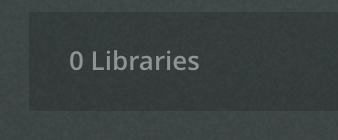
  10. The plex server has started and is set up the same as before (as far as I can tell) however Plex shows none of my old libraries

Any help or guidance would be invaluable.

did you follow the “edit your libraries” part in the thread you are following for the storage pool change?

There aren’t any libraries to edit, the server is empty, similar as if it was new. Unless I’m misunderstanding the guide, are you saying I should try to create new libraries that point to the media locations?

i have personally never done this conversion but the libraries should be in tact they just wouldn’t be working since the media is no longer in that location. it sounds like you are saying when you go to libraries in the settings that there are none. There should be libraries there if the entire set up was moved over. they would just have folder paths to locations that didn’t exist anymore.

Yes, you are correct that’s what I’m saying. Plex is saying that there aren’t any libraries in the server which doesn’t make sense to me since I moved the entire original source folder structure over.

image

reviewing your steps it looks like you skipped one of the sign outs in the instructions. Not sure i’ll be of much help here given i haven’t done this process. But you will also want to update your post with what dsm you are running.

edit: you must be on dsm 6 given your folder structure.

and you confirmed this by going to the parent folder and applying the permissions to all subfolders after you moved the contents?

Good catch, I’ve added that info to the original since I actually did do the log out step

Yes I did chown -R plex:users [SHARE_DIRECTORY] and then confirmed with a ls -l that the ownership of the source folders is correct (I checked what plex set them as by default first then matched that)

chuck will have to chime in here as he probably can tell what may have happened off the top of his head. or he’ll have to dig into the folder. But perhaps that how to is outdated for a syno migration. he will know that best though.

actually I just noticed that the permissions set by plex are typically
drwx------+ 1 plex users
while my new ones are
drwx------ 1 plex users
dont’ know what that the plus ( + ) at the end there means or how to set it.
Thanks for your help in the meantime

If I may add here?

While this is a bit late coming, the best way to move a shared folder on DSM is in Control Panel → Shared Folder

  1. Control Panel - Shared Folder
  2. Highlight the shared folder (“Plex” shared folder)
  3. EDIT
  4. General
  5. In the “Location” dropdown window,
  6. Select the new location (PlexMediaServer for DSM 7 shown here)
  7. Select the new volume
  8. Click SAVE
  9. Wait for the operation to complete.

Regarding the drwx------ vs drwx------+, the + indicates the Synology ACLs are intact and active. These can be (re)set manually to add the ACL in FileStation or Control Panel - Shared folder by “Apply to this folder , sub-folders and files” checkbox.

The installer will check the top level permissions and then recursively apply to the whole shared folder.

In this move, might those sub-folder permissions have been damaged?

Lastly, if the move was performed by DSM, when PMS next starts, it will find the new shared folder location (I ask DSM where the “Plex” shared folder is located)

Thanks for chiming in Chuck,
Yes, that is a much better way of moving a share folder. To give a little more context I originally had 2 Storage Pools

volume1 - Very small, under 1tb with a single HD but was the first storage pool I set up years ago
volume2 - much larger pool with multiple HDs

I had to remove the small harddrive from volume1 and didn’t realize that the original Plex shared folder was hosted from that storage pool. By the time I realized it was to late and small HD had been removed and the volume2 storage pool was already expanding onto the new larger HD which is taking up that bay (this is a very slow process that can take days sometimes).

Thankfully I still have the small HD and was able to get all the files from the original Plex shared folder back onto the NAS and a new Plex shared folder created from the larger storage pool.

I’m certain the permissions were jumbled in the process it’s just a matter of figuring out how they were jumbled and how to straighten them out.

How could I fix those sub-folder permissions? Also a little unclear on your last sentence. I did create the new share folder via DSM but moving the original files from the small HD back to the NAS I did via command-line
since DSM can’t read SHR formatted drives via USB with the GUI

To set the permissions back to correct.

  1. Make certain PMS is stopped (obvious)

  2. Open the Plex shared folder

  3. rename “Library” to “Library.hold” (we’ll set this aside for a minute)

  4. From that external USB drive you now have connected to the Syno,

  5. COPY “Library”, and all below it to the new “Plex” shared folder

  6. This will take the longest time

  7. When COPY is complete, we will fix all the permissions

Now to fix the permissions

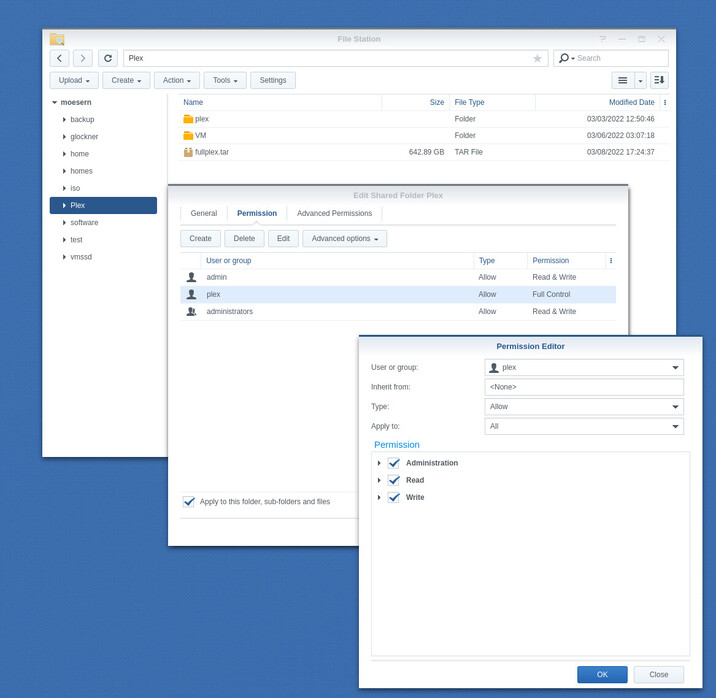
  1. FileStation
  2. Right-Click “Plex”
  3. Properties
  4. Permissions.
  5. Set Full Control permisions for the shared folder.
  6. Apply to this folder, sub-folders, and files.

  1. Click OK
  2. Click SAVE (this is where it will take time to do the work)
  3. Click OK

When you’re done, you’ll have:

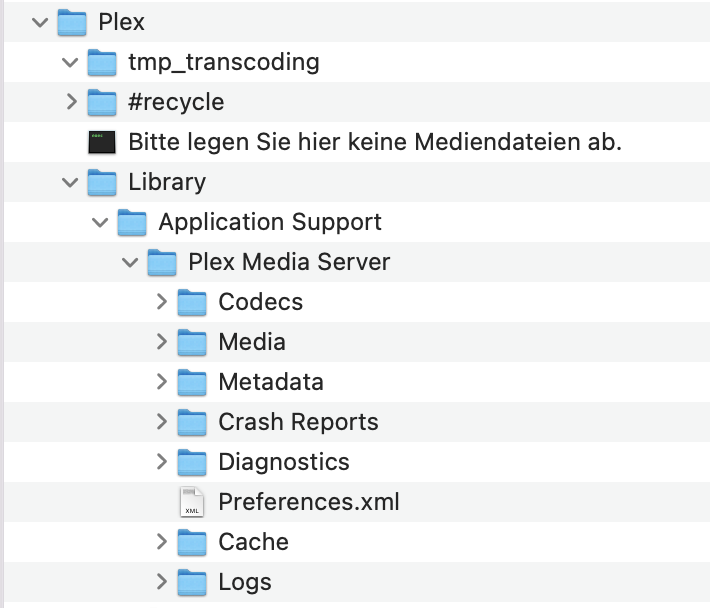
Plex/
   Library/
     Application Support/
       Plex Media Server/
         --- its stuff here ---

I followed these directions and after everything was copied and the permissions reset I started plex up again. It started up but when I went to the local plex web instance it crashed. I’ve got the Plex Server log up but I don’t see anything about why it shut down

Can you share the logs with me so I can look?

How do I do that? Should I send them somewhere or just post them here?

post here.

i will send a pm if preferred

Here’s the log, I lightly edited it to remove my email/ip

@treasureChest

Your server is running.

Jun 09, 2022 14:51:16.603 [0x7fea9130e700] DEBUG - Sync: sync list 29244844: user 1 (treasureChest), device Pixel 2, profile Plex Desktop, id 63e8accb54245fb2-com-plexapp-android, sync item(s): 31489353,31516124,31702159,31830418,31830422,31904410,31904639,31912826,31912829,31912831,31912832,32074040,32170001,32202679,32204260,32204262,32257401,32378760,32757733,33518120,33841807,34632292,35376287,35399710,35399723,36686259,36830077,36846644,40190241,40449771,40615727,40615739
Jun 09, 2022 14:51:16.603 [0x7fea9130e700] DEBUG - Sync: sync list 21715138: user 12741152 (Stormageddon Dark Lord of All), device Pixel 2, profile Android, id 9d149d8cae4916b4-com-plexapp-android, sync item(s): 34058743,35046223,35692012,37496971,38402282,38402305,40160997
Jun 09, 2022 14:51:16.603 [0x7fea9130e700] DEBUG - Sync: synchronizing 2 sync lists to generators

I do see an error in your network configuration (DSM 7 is sensitive to this)

Jun 09, 2022 14:51:14.228 [0x7fea9eb01740] DEBUG -  * 3 eth0 (192.168.1.179) (loopback: 0)
Jun 09, 2022 14:51:14.228 [0x7fea9eb01740] DEBUG -  * 4 eth1 (192.168.1.172) (loopback: 0)

You have two adapters on the same subnet. TCP/IP does allow it but not a best practice unless you know how to handle it.

DSM doesn’t handle it well at all and will confuse all your players and PMS.

The scenario which happens.

  1. Traffic is received on 192.168.1.179
  2. DSM has other traffic on 192.168.1.179
  3. It silently offloads and sends back the reply from 192.168.172
  4. The app expecting a reply from 192.168.1.179 – never gets it.
  5. The app gets something unexpected from 192.168.1.172 – and ignores it.

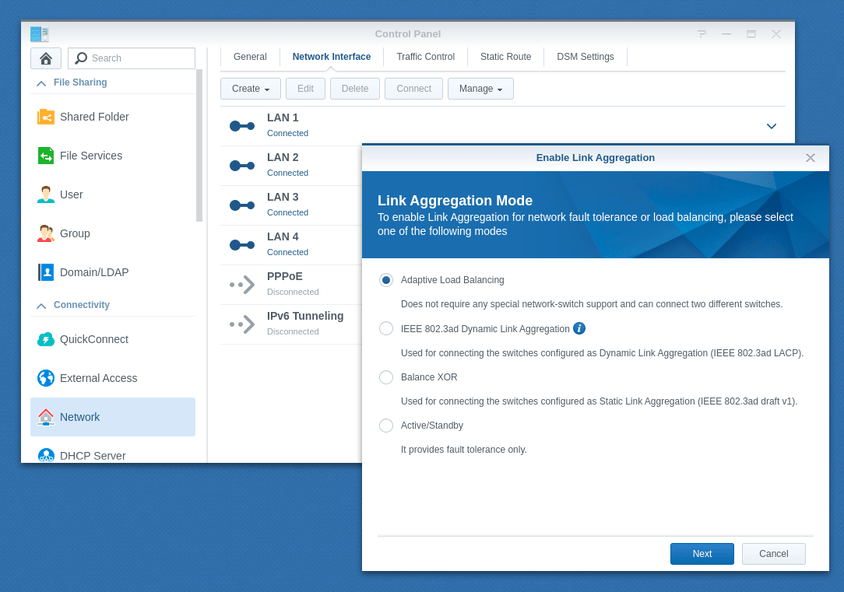
IF you need to handle more than 1 Gbps of traffic, BOND the two adapters together

This is DSM 6 (my DSM 7 system only has 1 adapter)

Network -

  • Create - Bond
    – Select the two adapters
    – Make certain the new IP address is the primary (192.168.1.179)

This is what PMS sees:

Jun 09, 2022 14:51:14.226 [0x7fea9eb01740] DEBUG - Network change.
Jun 09, 2022 14:51:14.226 [0x7fea9eb01740] DEBUG - NetworkInterface: Notified of network changed (force=0)
Jun 09, 2022 14:51:14.228 [0x7fea9eb01740] DEBUG - Detected primary interface: 192.168.1.179
Jun 09, 2022 14:51:14.228 [0x7fea9eb01740] DEBUG - Network interfaces:
Jun 09, 2022 14:51:14.228 [0x7fea9eb01740] DEBUG -  * 1 lo (127.0.0.1) (loopback: 1)
Jun 09, 2022 14:51:14.228 [0x7fea9eb01740] DEBUG -  * 3 eth0 (192.168.1.179) (loopback: 0)
Jun 09, 2022 14:51:14.228 [0x7fea9eb01740] DEBUG -  * 4 eth1 (192.168.1.172) (loopback: 0)
Jun 09, 2022 14:51:14.228 [0x7fea9eb01740] DEBUG -  * 5 docker-0a62a513 (172.20.0.1) (loopback: 0)
Jun 09, 2022 14:51:14.228 [0x7fea9eb01740] DEBUG -  * 6 docker-2cf8f3ee (172.23.0.1) (loopback: 0)
Jun 09, 2022 14:51:14.228 [0x7fea9eb01740] DEBUG -  * 7 docker-3bf3042e (172.19.0.1) (loopback: 0)
Jun 09, 2022 14:51:14.228 [0x7fea9eb01740] DEBUG -  * 8 docker-af38a368 (172.21.0.1) (loopback: 0)
Jun 09, 2022 14:51:14.228 [0x7fea9eb01740] DEBUG -  * 9 docker0 (172.17.0.1) (loopback: 0)
Jun 09, 2022 14:51:14.228 [0x7fea9eb01740] DEBUG -  * 1 lo (::1) (loopback: 1)
Jun 09, 2022 14:51:14.228 [0x7fea9eb01740] DEBUG -  * 5 docker-0a62a513 (fe80::42:eff:fe03:2f86%docker-0a62a513) (loopback: 0)
Jun 09, 2022 14:51:14.228 [0x7fea9eb01740] DEBUG -  * 6 docker-2cf8f3ee (fe80::42:1dff:fe4d:91de%docker-2cf8f3ee) (loopback: 0)
Jun 09, 2022 14:51:14.228 [0x7fea9eb01740] DEBUG -  * 7 docker-3bf3042e (fe80::42:f3ff:fef1:51e%docker-3bf3042e) (loopback: 0)
Jun 09, 2022 14:51:14.228 [0x7fea9eb01740] DEBUG -  * 8 docker-af38a368 (fe80::42:a2ff:fe48:12d%docker-af38a368) (loopback: 0)
Jun 09, 2022 14:51:14.228 [0x7fea9eb01740] DEBUG -  * 9 docker0 (fe80::42:6eff:fe36:3c29%docker0) (loopback: 0)
Jun 09, 2022 14:51:14.228 [0x7fea9eb01740] DEBUG -  * 11 dockere945f9f (fe80::85b:e3ff:fe37:5367%dockere945f9f) (loopback: 0)
Jun 09, 2022 14:51:14.228 [0x7fea9eb01740] DEBUG -  * 15 docker937b9e8 (fe80::a482:77ff:fe75:5418%docker937b9e8) (loopback: 0)
Jun 09, 2022 14:51:14.228 [0x7fea9eb01740] DEBUG -  * 17 dockera99c279 (fe80::2827:46ff:fe5b:75a2%dockera99c279) (loopback: 0)
Jun 09, 2022 14:51:14.228 [0x7fea9eb01740] DEBUG -  * 21 dockerd75611a (fe80::b4e4:2eff:fe8a:7fa1%dockerd75611a) (loopback: 0)
Jun 09, 2022 14:51:14.228 [0x7fea9eb01740] DEBUG -  * 23 docker3f7734e (fe80::68ae:27ff:fecc:b73c%docker3f7734e) (loopback: 0)
Jun 09, 2022 14:51:14.228 [0x7fea9eb01740] DEBUG -  * 27 docker4bc97ea (fe80::34d1:7dff:fe68:7712%docker4bc97ea) (loopback: 0)
Jun 09, 2022 14:51:14.228 [0x7fea9eb01740] DEBUG -  * 31 docker00c7a25 (fe80::44b5:75ff:fe9a:179b%docker00c7a25) (loopback: 0)
Jun 09, 2022 14:51:14.228 [0x7fea9eb01740] DEBUG -  * 35 dockere68e24d (fe80::94e5:d5ff:fe19:85bd%dockere68e24d) (loopback: 0)
Jun 09, 2022 14:51:14.228 [0x7fea9eb01740] DEBUG -  * 37 docker59f0989 (fe80::a442:56ff:fe06:2141%docker59f0989) (loopback: 0)
Jun 09, 2022 14:51:14.228 [0x7fea9eb01740] DEBUG -  * 41 docker464e86a (fe80::c8:4eff:fe19:1988%docker464e86a) (loopback: 0)
Jun 09, 2022 14:51:14.228 [0x7fea9eb01740] DEBUG -  * 45 docker9c169a2 (fe80::3c31:69ff:fef3:8694%docker9c169a2) (loopback: 0)
Jun 09, 2022 14:51:14.228 [0x7fea9eb01740] DEBUG -  * 505 docker871e501 (fe80::d0d1:cff:fef0:6de3%docker871e501) (loopback: 0)
Jun 09, 2022 14:51:14.228 [0x7fea9eb01740] DEBUG - NetworkService: Got notification of changed network (first change: 0)
Jun 09, 2022 14:51:14.228 [0x7fea9eb01740] DEBUG - NetworkService: Dispatch network change after two second delay.