Server Version#: Version 1.27.1.5916
Player Version#: not sure what this is.
I have a number of music albums from Celine Dion and one of them doesn’t show up in plex. They are all mp3s this time, so it’s not the m4a issue. One of the albums, called My Love: Essential Collection does not show up as an album in plex on my desktop. I want to add some songs to a playlist to play on my fire tv player, but since it doesn’t show up, I can’t. I’ve added the logs from my server. I noticed that some metadata is missing from the MP3s and I tried adding that to the files via the properties, but that didn’t help. The missing metadata was title, contributing artist and album name. I am on windows 10 with all updates from settings applied.
Plex Media Server Logs_2022-06-25_17-50-14.zip (4.8 MB)
Try searching for one of the track titles. It may be that Plex incorrectly cataloged the album under some other name/artist.
What program do you use to edit the tags in your files? Can you show a screenshot of the tags in this album? I would need to see these tags: Filename, Album Title, Track Title, Album Artist, Track Artist, Disc Number, Track Number.
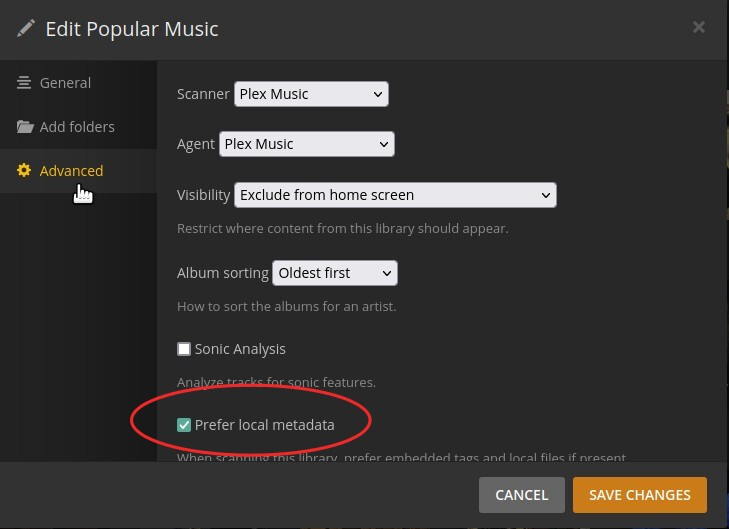
Is the library configured to prefer embedded metadata?
It does display the track under various artists and unknown album.
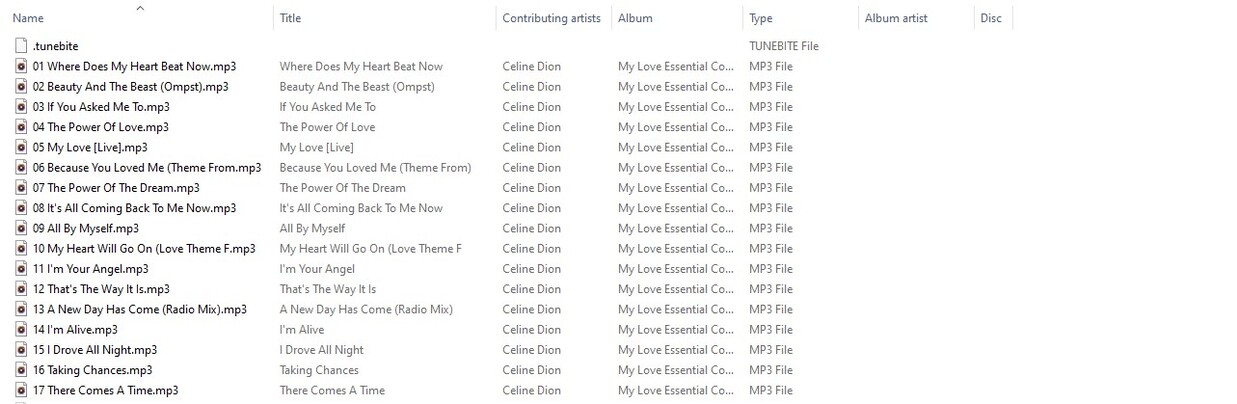
I don’t use a program to edit the metadata. I just access properties of the file and details in file explorer and add the data that way. I may not be doing that right, it sounds like. Initially, the only thing pictured was the name of the file. I added the rest. What program can I use to edit this properly? Is it free? The picture is from file explorer in windows.
I don’t know how to check if my library is configured to prefer embedded metadata. How do I do that?
Thanks so much for the help. I’ve been using plex for years, but I don’t really know much about how it works behind the scenes. I have a pretty large music and video library, but I use the music library much more.
In Windows, MP3Tag is just about the best, I think. It is free.
The setting for using local metadata can be found by editing the library and going to the ‘Advanced’ page. However, I wouldn’t recommend using it in your case, since your tags probably aren’t complete enough. I haven’t used File Manager to edit tags, but my guess is it probably doesn’t do enough.
In order for Plex to correctly identify and organize your music, you either have to have very accurate embedded tags, or the folder/filename structure needs to be something that Plex can interpret. This Help page explains what is needed in the folder/filenames:
I didn’t have “prefer local metadata” checked and I’d rather not change that, but I you didn’t recommend that anyway.
I tried renaming the tracks so that they have a dash after the track number like the documentation said, but after updating the libraries, that didn’t help. It’s still under various artists and unknown album.
Is part of the problem the fact that I have three folders in my music library instead of one? It’s weird that my other albums in the Celine Dion folder on that same folder is handled just fine, but this one album is not.
I posted my logs again in case that would help.
Plex Media Server Logs_2022-06-26_06-59-10.zip (4.4 MB)
I really think this is the only folder that’s affected, so I want to correct it. I have about 41GB of music so I don’t want to have to do a lot of work on all the folders.
One more thing. The album is actually called My Love: Essential Collection. It has a colon in the name, but it’s not possible to put that in a directory name. Is that the problem? I’m trying to find differences between this album and the other ones in the Celine Dion folder and that’s one of them.
I don’t think so, but just in case, try making it My Love - Essential Collection (replace colon with hyphen) and see what happens.
I don’t see anything in logs that jumps out at me, but I’m not all that adept at parsing log files, so maybe one of the ninjas will have a look.
Do you mean there are three entries here? If so, that shouldn’t be a problem, if they’re all valid. Can you screenshot that page for me?

These are all good things to check, so don’t give up.
I just mocked up this album on my own server by copying another album and renaming everything to match yours, so it looks like this, with the Plex library pointing at FakeMusic:

Plex had no trouble organizing and matching this album:

I tried this with the folder name as both My Love - Essential Collection and My Love Essential Collection. Plex had no trouble with it, either way.
My server uses Linux, rather than Windows, so it’s possible there’s some issue on a Windows server, but I don’t know yet what that would be.
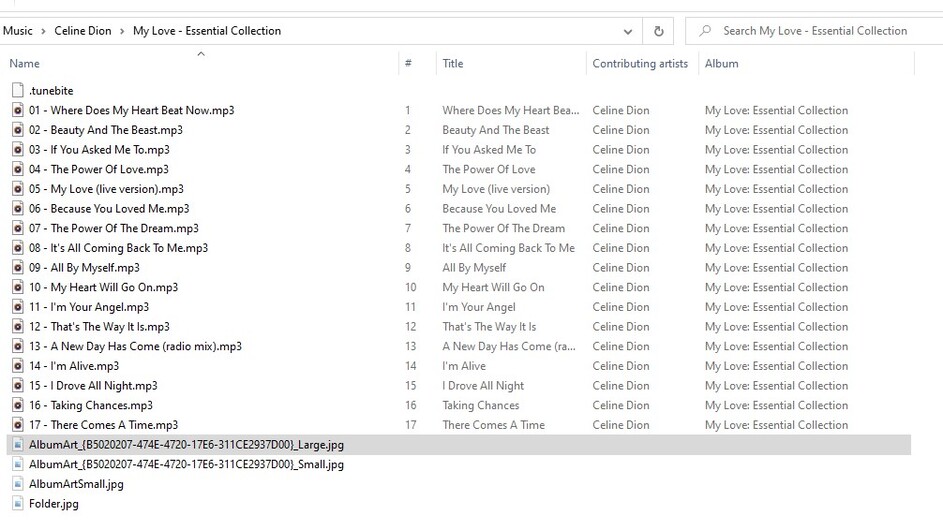
Can you arrange your File Manager showing the path to this album, like I did above, and screenshotting it? We’re getting down to “another pair of eyes” troubleshooting. 
Looking at the matcher logs, Plex is seeing and is matching them. But might be tagging them as duplicates of existing media
Jun 26, 2022 06:52:17.101 [9808] DEBUG - Match: Candidate: Céline Dion - My Love: Essential Collection (b9e4b5b1-0274-4441-a95a-ae8c58d0c358)
Jun 26, 2022 06:52:17.101 [9808] DEBUG - Match: Duplicate.
Jun 26, 2022 06:52:17.101 [9808] DEBUG - Match: Candidate: Céline Dion - My Love: Essential Collection (f4f5ebe2-3d63-3235-8d36-f93f33933853)
Jun 26, 2022 06:52:17.101 [9808] DEBUG - Match: Duplicate.
Jun 26, 2022 06:52:17.101 [9808] DEBUG - Match: Candidate: Céline Dion - My Love: Essential Collection (5023f3e4-9626-4ade-9384-5edcde599a3a)
Jun 26, 2022 06:52:17.101 [9808] DEBUG - Match: Duplicate.
Jun 26, 2022 06:52:17.101 [9808] DEBUG - Match: Candidate: Céline Dion - My Love: Essential Collection (00b88b89-6123-449c-b2eb-2468fbf3777b)
Jun 26, 2022 06:52:17.101 [9808] DEBUG - Match: Duplicate.
Jun 26, 2022 06:52:17.101 [9808] DEBUG - Match: Candidate: Céline Dion - My Love: Ultimate Essential Collection (38ca69cd-da35-4549-8d9d-5c974535b119)```
I see that Celine Dion has an accent above the first e in her first name. That shouldn’t make a difference, should it?
I don’t have an album called My Love: Ultimate Essentials Collection in my libraries. I only have the following albums in the screenshot:

I will try to make sure the track names match the screenshot that @beckfield posted and see if that helps.
I changed the track names to match what @beckfield had in his picture and it didn’t help. I updated the libraries and I also scanned the libraries. Nothing helped. They are still under various artists unknown album, but it does have a picture of a Celine Dion albums in various artists, which is strange.
Here is a picture of the tracks in the Unknown Album for Celine Dion in various artists:

Here is a picture of the tracks on my hard drive. The names are not the same. I’ve changed them but the new names are not reflected in the unknown album. The order is different, too.
I think it’s time to try the Plex Dance.
That worked. Thanks a lot. I appreciate the help.
Great! I think everything we did as far as file names, etc., was correct, but Plex still has some trouble figuring things out when filenames are changed. It used to be far worse, but there are still a few instances where it’s needed. Glad it worked out.
It said it deleted 7000 bundles. Is that a lot?
I don’t really know, but my guess would be “No.” I don’t know how big your library is, and the more you add, remove, change, reorganize, I think bundles pile up. I don’t know enough about them to even explain what they are.
