The fact that the tuner scans do not match from Tuner 1 to Tuner 2 on your sons server is not good. It could indicate a problem with the tuner card or it might be because the signal coming into the tuner card is only marginal.
In any case, on your sons server, what I think would help solve the channel mystery is to go back into the Tuner Setup for Tuner 1 and uncheck all the channels and save.
Then, go into the Tuner Setup for Tuner 2 and uncheck all of the channels except 26.1. Assign that one channel to 26.1 in the EPG data and save.
Let it download the EPG data. It should only be getting EPG data for channel 26.1
Go to the Live TV Guide.
Does it list channel 26.1?
Does it say Cozi?
Can you tune in the channel and watch the program?
Is it actually 26.1 Cozi?
If not, can you tell what it actually is?
He took it home after testing. But he did look through a backup of the sqlite database and it does show the 26.1 to 26.14 channels in the media_provider_resources table in the xml file so could it be a parsing error affecting the channels not displaying in the tuner selection?

26.1 is actually POSITV so the guide information is totally wrong for that one.
Appreciate the all advice and things to test you having been giving as well.
Do the triplet:// numbers in the database need to be unique? Because in my tuner information I see duplicates for 5.1 and 26.1, 5.2 to 26.2, etc…
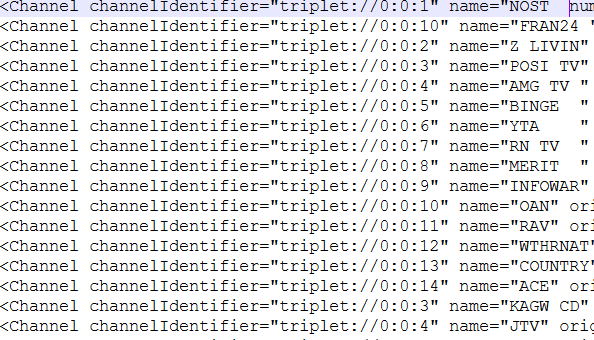
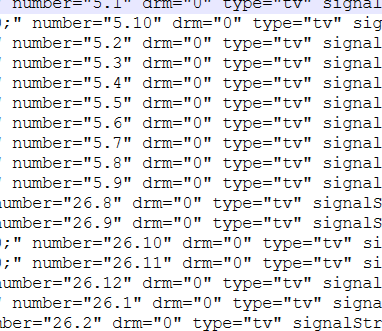
Yes. I believe that each channel identifier should have a unique triplet because it identifies the channel number, the guide source, and a unique ID from the guide source. I would expect Plex to complain about duplicates in the database.
Yes - I see triplet 0:0:3 as both POSI TV & KAGW CD
Nice work!
What the heck is POSI TV? Never heard of it. lol
Which database are you pulling this from?
I think that the next step you should take is rollback your version of PMS to 1.41.6.9685. It was the last stable version before the “security issues” started up and it works okay with the newer Plex apps. If that corrects the DVR issues, then you have a good case that PMS DVR is causing the issue.
There is an archive of past Plex server download URLs on Github:
https://github.com/axlecrusher/plex_download_urls?tab=readme-ov-file
Find the version you need and the link will start the download from the Plex download server.
I would start by deleting the DVR. I always remove the current install of PMS before installing a past version. I’ve been told recently that I don’t have to, but I still do just to be sure that there is nothing left on the server that might compromise the rollback install. This won’t affect your Libraries. All your Libraries data will remain intact. The program is installed in another area of the server.
More info I found:
It is possible to have enough ATSC 1.0 digital signal to display the live TV broadcast but
not be able to decipher the channel number identification from the embedded station data (PSIP).
Why this happens:
- Different Data Streams: The video and audio content are carried in one part of the digital data stream, while the Program and System Information Protocol (PSIP) data, which includes the “virtual channel” number, station name, and program guide information, is carried in a separate set of tables.
- Signal Sensitivity: The PSIP data needs a high-quality signal to be decoded correctly. If the signal strength or quality is marginal or has issues like multipath interference (ghosting), the tuner might struggle to reliably decode the PSIP tables.
- “Digital Cliff” Effect: Digital signals work on an “all or nothing” principle. With a weak signal, you might still get enough data through error correction to display a watchable (though possibly pixelated or glitchy) picture, but the more sensitive PSIP data, which is less frequently repeated, might fail to decode entirely. The receiver might pick up the raw RF channel frequency but cannot assign a “friendly” channel number (like 7.1) without the valid PSIP data.
- Broadcaster Issues: Sometimes, the issue is on the station’s end. Broadcasters are required by the FCC to provide proper PSIP data, but some LPTV stations can be lax in doing so, which can lead to display issues regardless of signal strength.
What you might experience:
If this occurs, your TV might display the raw physical channel number (e.g., “RF Channel 29” instead of “11.1 CBS”) or show no channel information at all, while still showing the actual video content. Rescanning for channels or repositioning your antenna to improve signal quality often resolves this issue.
