Hi, do you have any news with the logs I put in my previous message?
Thank you
Hi, do you have any news with the logs I put in my previous message?
Thank you
Sorry, missed the ping.
Your logs show that your database is corrupted again, so PMS can’t start. I can’t tell what messed up the database.
Based on the timestamps of your logs, thing were working fine until at least 2:40 pm on the 28th. Then sometime before 6 pm, something happened and PMS shut down and wouldn’t come back up.
I would recommend formatting the drive again from the Shield. I don’t know if this will prevent whatever is causing the corruption, but I’ve seen this help with Shield issues.
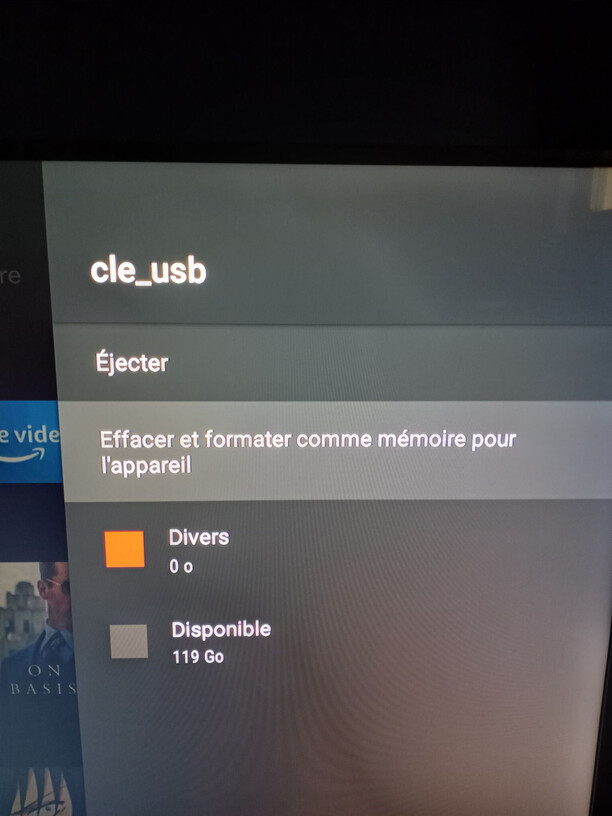
How can I format the usb on the nvidia shield?
I was thinking it was impossible to format usb key on nvidia shield.
Also, my usb key is new, so I don’t think there is a “internal” problem with it.
This is exactly the issue I’m having! It started as soon as I hooked up an external 6Tb USB harddrive (brand new) to be emulated internal storage. PMS went down after that and now refuses to come up. I had uninstalled and reinstalled both Plex and PMS prior to this and it WAS working fine until I moved the storage. Please tell me there’s another way to fix this? I really REALLY don’t want to have to rebuild my library AGAIN! (plus the puny 16Gb internal storage is just not enough!)
Go to the Shield’s main screen. At the top right you can get to Settings. Then go to Device Preferences, then Storage. You should see your USB device under Removable Storage, click on it. Then there is an option to Erase & Format.
My suggestion is to not use an external hard drive as internal storage. When the drive goes to sleep, which it will, since you can’t turn this off on external hard drives, it messes up the internal storage working.
If you moved the Plex data to the user accessible portion of the internal storage, then you may be able to recover your data. If not, you can’t access it without rooting your device.
This will make it an internal storage.
I had already try to make my usb key like an internal storage, but it still do not work.
I can redo it if you want to give you the log.
Edit: This morning, I had reboot the nvidia shield just to see if it would change something. Now, the server is up, BUT the storage location is the “internal storage”, It does not make any sense. Also, all my librairy have disappeared.
Thank you for the response. This is frustrating as several “how to” and “tips” articles I’ve read say to use an external harddrive rather than flashdrive. I went ahead and swapped out the harddrive for a new flashdrive I had on hand, and am rebuilding my collection again. I don’t care about losing my watched data, but re-making my playlists several times is probably the biggest pain. 
I appreciate the advice, maybe update the article in the knowledgebase with this? Thank you for your time! 
No it shouldn’t. Making it internal storage would be a different option.
It is written that it will become internal storage. I already try in the past this option and I can confirm you that it will make my usb key as an internal storage.
Do you want that I format my usb key to become an internal storage and give you the logs?
I know it will not work because I already try it (go see this message (Move storage location make server going down - #5 by jeremiebergeronlol_outlook_com)
But I did not share any logs, so if it can help you to spot the problem, I will do it 
Have you try to move the storage location? Because, it seems that you are sure that the problem is from my side.
Also, I have Shield Experience Upgrade, so I don’t know if it change something.
Hi, have you miss the notification?
Sorry, yeah missed that. You are right that the Shield doesn’t give an option to just format. I could have sworn that use to be possible. Anyways, I started from scratch and I was able to move the Plex data to a 128 Gb usb thumb drive I have and PMS is running.
Did you wait 24 hours?
Also, did you try to reboot and wait again 24 hours?
What I did
Results
I had wait 3 days and the server was still up.
I wanted to be sure that everything was going to be ok, so I reboot the nvidia shield.
It had work for about 24 hours. After 24 hours, the server was down again. When I saw that the server was down, I check if the usb key was still mounted and it was the case.
LOGS
When I go to my usb stick, the log are not here.
Here is the path: \LOCAL_IP\USB_KEY\Android\data\com.plexapp.mediaserver.smb\Plex Media Server
I sent you a pm with a zip of the \LOCAL_IP\USB_KEY\Android\data\com.plexapp.mediaserver.smb\Plex Media Server folder
What can I do more to help you to find what is the problem (with me or with Plex).
@anon18523487
Hi,
Did you saw my last 2 messages?
If I disturb you, please tell me so that I write to you less often
Thank you
Sorry. It was working for me for >24 hrs. However, my Shield has taken a turn for the worse and is refusing to connect to my network. I’ll need to do a factory reset and start over. I’ll update in a couple of days after I rebuild to see if there is any difference. Do you know what Shield Firmware you are on? I haven’t updated mine to the latest. There could be something there.
Server Version#: 1.22.3.4523
Player Version#: 8.17.0.25120
Nvidia Shield Version: 8.2.2(36.6.509.0)
I had retry, but with I had reboot between pretty much all step.
The server was great after 32 hours (I was checking it with my android phone). I had rebooted the nvidia shield and after 24 hours it was also fine, but when I open Plex with the nvidia shield, my librairy were gone.
So, finally, the problem is maybe the Plex application (on the shield) that corrupt the BD.
I had put on the verbose logs, so I sent you a pm because I think there are some sensitive data.
Thank you
PS: Sorry for the delay. I wanted to retest it.
Hi,
Do you have any news?
Thank you
Ps: Do not forget I sent you a pm with the logs.
Hi,
Do you have any news?
Thank you
Ps: Do not forget I sent you a pm with the logs.