Update after a few days use of Fire TV: Ver 8.15.0.23855 (1139686d)
Here is the extended list of grievances revisited:
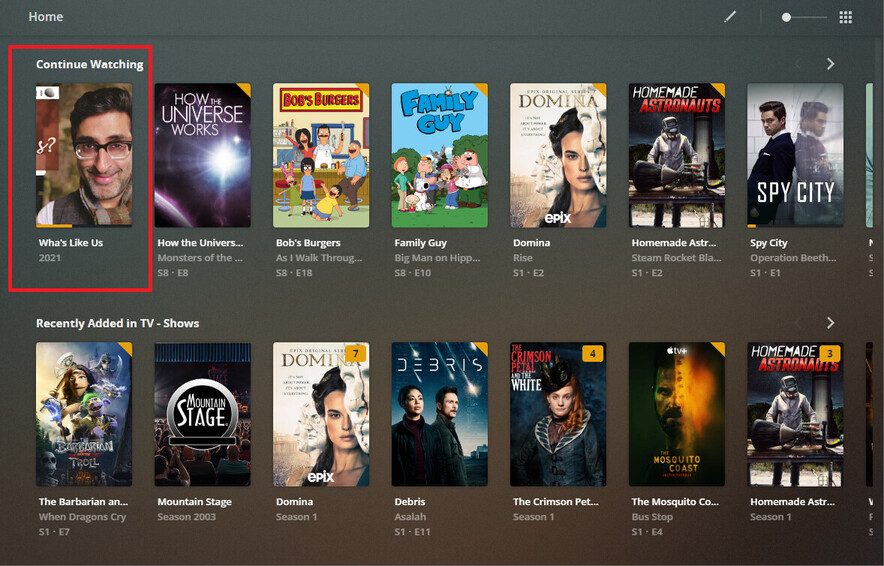
- Continue Watching is not missing from the Home hub but drops from view because of the following issues/problems:
- It has a limit of six (6) video placeholder spots. Anything beyond six(6) are not displayed
- It does not include On Deck items, only items that are in the old definition of Continue Watching videos. If you do not have any Continue Watching videos, then the hub does not appear.
- EDIT If you happen to remove all partially watched videos from your local hubs and the Home Continue Watching row disappears, it will not reappear when further partially watched videos appear in the local hub. My Home Continue Watching hub is now no longer visible nor salvageable.
- You can unpin Playlists. Hooray!
- You can not order the individual hubs.
This functionality is being transferred to the server for admins. It appears to work but has one major issue: Continue Watching is not available to Reorder. If like me you placed your preferred hubs at the top of the list, Continue Watching drops to the bottom!! (Workaround: I left Start Watching at the top of the list, unchecked, and this left Continue Watching at the top where I wanted it.) @plex needs to address this - Home screen no longer constantly resets to defaults Hooray!
- Watched videos show as un-watched in the Continue Watching of the respective hub
This issue has plagued Plex for as long as I can remember. @plex, please address this! - Crashes regularly
Update: While I am still experiencing crashes, they seem to be less often, (probably since they fixed the Playlists issue.
It does, however, still crash frequently if paused or the device screensaver (Fire TV) kicks in. Plex can not recover and displays either “An error occurred while attempting to play this video…” OR “Unable to navigate to item…” error. (… sometimes BOTH!) I press _OK and it performs a reset, repopulates the hubs (slowly) then continues on. - Duplicate hubs have been appearing and then disappearing in the Home hub
Update: Noticeably, Recently Added In TV, when I already have a Recently Added in TV Shows hub. I suspect this is an issue with a past name change of the same hub. It needs to be addressed. - Hubs not responding to (Pin/Unpin) actions.
Update: This is now obsolete given the new Hub Management at the server by the admin - No On Deck option at all in any hub!!! Not Home, not the individual libraries!! Nowhere!!!
Update: We now know that it has been merged into the Continue Watching hub, albeit unsuccessfully! - Continue Watching hub for TV Shows has a limit of six (6) video placeholder spots, the same as the Home hub. In an earlier post, I mentioned I managed to get one On Deck video to appear after resetting/restarting/clearing cache. I now am of the opinion that none of that made a difference. I believe it was me marking videos in progress as Watched which removed them from the Continue Watching list, allowing another of the six(6) spots to become available and an On Deck video to be seen. I have tested this and can confirm this to be the case. Further, since I have no way of determining the list order, I can only assume Plex is displaying the first six(6) Continue Watching/On Deck videos according to its listing parameters.
- Hub refreshing is no longer dynamic.
If I watch (or even binge watch an entire season of a show), when I return to the Plex UI, it does not reflect my activity. Only after manually selecting a different hub then re-selecting a hub does it refresh. I have tested this on all hubs and none will update until I select another hub. Very poor coding @plex
Assessment
Some improvements with other issues introduced.
@plex, you still have much more to do!
Cheers
Attention @BigWheel