Server Version#:1.32.4.7195
Player Version#: Apple Tv & Roku
<If providing server logs please do NOT turn on verbose logging, only debug logging should be enabled>
When I’ve done my movies my movies are not showing the subtitles why is that? I have thousands of movies and some have the subtitles and others don’t. How do I get this fixed?
What sort of subtitles are you using. Would you mind providing a sample. are these ones you downloaded in app or ones you added with video file in directory?
I’m not sure what you mean. I downloaded my movies either from iTunes or I used a program called DVDFab to download my DVD to my computer. I made sure when I downloaded everything to include the subtitles.
Please provide the XML Info for one of the problematic movies. Save the info as a .txt or zip it. The forum does not support .xml attachments.
Also, analyze the same movie with MediaInfo. Select the text view, then save it as a text file or copy/paste it to the thread.
This will show whether or not the media file contains subtitles and if Plex is detecting them.
FYI, here’s an example from MediaInfo. You can see there are two subtitle tracks. The first is the dialog. The second is a trivia track. Both are PGS format, the type found on Blu-ray discs.
MediaInfo Example
General
Complete name                            : O:\movies-hd\Airplane! (1980)\Airplane! (1980).mkv
Format                                   : Matroska
Format version                           : Version 4
File size                                : 24.9 GiB
Duration                                 : 1 h 27 min
Overall bit rate mode                    : Variable
Overall bit rate                         : 40.6 Mb/s
Frame rate                               : 23.976 FPS
Movie name                               : Airplane! (1980)
Encoded date                             : 2022-04-28 05:46:01 UTC
Writing application                      : mkvmerge v67.0.0 ('Under Stars') 64-bit
Writing library                          : libebml v1.4.2 + libmatroska v1.6.4

Video
ID                                       : 1
ID in the original source medium         : 4113 (0x1011)
Format                                   : AVC
Format/Info                              : Advanced Video Codec
Format profile                           : High@L4.1
Format settings                          : CABAC / 4 Ref Frames
Format settings, CABAC                   : Yes
Format settings, Reference frames        : 4 frames
Codec ID                                 : V_MPEG4/ISO/AVC
Duration                                 : 1 h 27 min
Bit rate mode                            : Variable
Bit rate                                 : 36.9 Mb/s
Maximum bit rate                         : 39.0 Mb/s
Width                                    : 1 920 pixels
Height                                   : 1 080 pixels
Display aspect ratio                     : 16:9
Frame rate mode                          : Constant
Frame rate                               : 23.976 (24000/1001) FPS
Color space                              : YUV
Chroma subsampling                       : 4:2:0
Bit depth                                : 8 bits
Scan type                                : Progressive
Bits/(Pixel*Frame)                       : 0.742
Stream size                              : 22.6 GiB (91%)
Default                                  : Yes
Forced                                   : No
Original source medium                   : Blu-ray

Audio
ID                                       : 2
ID in the original source medium         : 4352 (0x1100)
Format                                   : DTS XLL
Format/Info                              : Digital Theater Systems
Commercial name                          : DTS-HD Master Audio
Codec ID                                 : A_DTS
Duration                                 : 1 h 27 min
Bit rate mode                            : Variable
Bit rate                                 : 3 700 kb/s
Channel(s)                               : 6 channels
Channel layout                           : C L R Ls Rs LFE
Sampling rate                            : 48.0 kHz
Frame rate                               : 93.750 FPS (512 SPF)
Bit depth                                : 24 bits
Compression mode                         : Lossless
Stream size                              : 2.27 GiB (9%)
Title                                    : dts-HD MA 5.1
Language                                 : English
Default                                  : Yes
Forced                                   : No
Original source medium                   : Blu-ray

Text #1
ID                                       : 3
ID in the original source medium         : 4609 (0x1201)
Format                                   : PGS
Codec ID                                 : S_HDMV/PGS
Codec ID/Info                            : Picture based subtitle format used on BDs/HD-DVDs
Duration                                 : 1 h 26 min
Bit rate                                 : 46.0 kb/s
Frame rate                               : 0.486 FPS
Count of elements                        : 2538
Stream size                              : 28.6 MiB (0%)
Title                                    : English SDH
Language                                 : English
Default                                  : Yes
Forced                                   : No
Original source medium                   : Blu-ray

Text #2
ID                                       : 4
ID in the original source medium         : 4613 (0x1205)
Format                                   : PGS
Codec ID                                 : S_HDMV/PGS
Codec ID/Info                            : Picture based subtitle format used on BDs/HD-DVDs
Duration                                 : 1 h 22 min
Bit rate                                 : 29.3 kb/s
Frame rate                               : 0.206 FPS
Count of elements                        : 1016
Stream size                              : 17.2 MiB (0%)
Title                                    : Trivia
Language                                 : English
Default                                  : No
Forced                                   : No
Original source medium                   : Blu-ray

Menu
00:00:00.000                             : en:Opening Credits
00:04:28.851                             : en:Heart Trouble
00:07:04.549                             : en:Decision
00:10:38.888                             : en:All Aboard
00:13:21.217                             : en:Roger, Oveur
00:15:47.655                             : en:Brawlroom Dancing
00:21:42.092                             : en:Waves of Memory
00:24:50.572                             : en:Cockpit
00:27:06.916                             : en:Psych Ward
00:30:44.551                             : en:Soothing Sounds
00:33:14.617                             : en:Peace Corps
00:35:52.441                             : en:Airline Food
00:40:43.107                             : en:Automatic Pilot
00:45:48.537                             : en:Don't Panic
00:48:38.373                             : en:Striker
00:51:12.277                             : en:Mayday
00:54:08.119                             : en:Hysterical
00:56:17.040                             : en:Loud and Clear
00:58:42.894                             : en:Jive
01:01:59.882                             : en:Running Out of Time
01:06:47.545                             : en:Pressure
01:10:38.567                             : en:Coming In
01:12:17.124                             : en:The Tower
01:15:28.565                             : en:Touch Down
01:19:57.667                             : en:Have a Nice Day
01:23:02.519                             : en:End Credits

ReportBy                                 : MediaInfoLib - v23.04
CreatedOn                                : UTC 2023-06-29 06:38:19
Here is the two movies that I know aren’t either playing and both aren’t showing subtitles. I got the information from MediaInfo.
CreedIII.txt (73.7 KB)
McFarlandUSA.txt (6.9 KB)
Do none of the embedded subtitles turn on even when you try to switch manually?
Do none of them even show up so you can attempt to turn them on?
The default track for both of those movies is forced subs. There are only a few lines in those for the entire movie
I just want to make sure you didn’t turn those on expecting to see subs throughout the whole movie if they’re not clearly marked in your player as “forced”
I realize that me be silly or obvious but I’m mentioning it anyway just in case
I’m not sure how to even turn them on manually except on my TV which is the closed captions and I don’t like to see words across my screen unless I have to. So I guess I’m not following you. Sorry about that.
I found where to turn on the subtitles and it still doesn’t show the subtitles.
Creed III is just playing the audio and not the picture.
I got Creed to work by clicking on the movie to play it, pausing the movie, and then clicking on settings in the movie and changing the subtitles to English (MOV_TEXT). Am I going to have to go through all of my thousands of movies and do this to each one to make sure that if they have subtitles, they will play?
Thanks for all of your help.
If I understand you correctly you would always like for any full English subtitles to be enabled by default?
What are your selections here?
Server Settings → Account → Audio & Subtitle settings
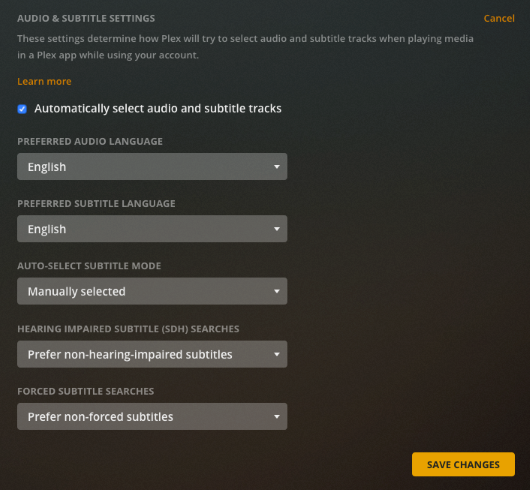
I’ve changed my settings to always enable it was set to manual. Would this correct the issue?
We played McFarland, USA and it is still missing the subtitles. What do I need to do?
Thanks
The above automatic selection does only work on items where you did NOT make a manual subtitle selection before. I’m sure that cannot be said anymore about McFarland by now.
Plex may not be able to distinguish between the two subtitle versions in your mp4 file. So it may still default to the “forced” subtitles.
I recommend you to put external subtitles beside the video file. Name it exactly like the video, except for the file name extension. (i.e. E:\Movies\McFarland, USA.srt. Bonus point for adding a language indicator.)
(Side note: It is recommended to put every movie into its own dedicated subfolder. To prevent mismatches on similarly named titles add the release year in parentheses.
This would mean for this movie:
E:\Movies
   \McFarland, USA (2015)      <-- subfolder
       McFarland, USA.mp4       <-- video file
       McFarland, USA.eng.srt   <-- regular (complete) subtitles in English
       McFarland, USA.eng.forced.srt   <-- "forced" subtitles
)
“forced” subtitles contain only lines which translate foreign signs and writing on screen, or foreign-language dialogue.
You can use many different apps to extract the subtitles from your video files. My personal preference is Subtitle Edit
Access your Plex Server using Plex Web instead of the Roku.
Go to the page for McFarland USA.
Are you able to see/select any subtitles? See first screenshot below.
If so, you should be able to select them in the Plex Roku app.
You should also be able to select subtitles while the movie is playing. See second screenshot below.
I do not have a Roku, so cannot tell you where to look in the Plex Roku app. However, if you can see/select the subtitles in Plex Web, you should be able to see/select them in any other Plex client.
I seem to remember that Roku enforces that all apps use Roku’s centralized subtitle selection logic. Look in the settings of the Roku (not the "Plex channel"s settings but those of the whole device).
Can Plex play iTunes movies or do I need to convert them? I’ve purchased movies from iTunes.
Thanks


