I have seen multiple posts about .mp3 vs .flac metadata for various artist/compilation albums. I am not having an issue with that. My issue is that I have filled in the artist tag with the main artist and the guest artist(s) separated by semi-colon in a flac file (example - John Coltrane; Miles Davis). When I import that flac file, the artist field is blank. I have determined that it is blank because the album artist is John Coltrane, and the name in the artist tag is also John Coltrane. Plex ignores everything that is right of the semi-colon, and thinks there is no need to populate the artist field, because the album artist matches the artist. This is wrong for my use case. If I use a comma instead of a semi-colon in the artist tag, the import produces a useful result by populating the artist tag (John Coltrane, Miles Davis). TL;DR, I can’t get artist tags to populate in FLAC files.
I do not have this problem with mp3s. When plex imports John Coltrane; Miles Davis in the artist tag. The artist tag becomes John Coltrane/Miles Davis. I can live with that.
My contention is that .flac should work the same as .mp3 when it comes imports. I just need something in the artist field. I have ripped 300+ CDs, and a big chunk of them have empty track artists when they should not have them. Again, I am talking about non-compilations. This issue is driving me crazy.
I edit all the metadata manually before importing it into plex. What I do in these various artist releases is keep the “Artist” field true to the file in the metadata, but update the “ALBUM ARTIST” metadata with the main artist.
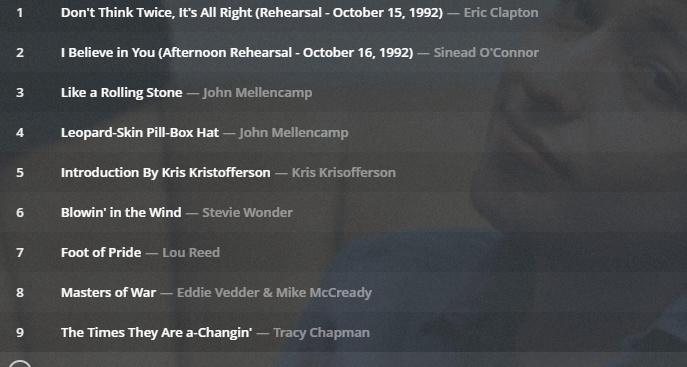
For example, the Bob Dylan 30th Anniversary Concert has a bunch of artists singing Bob Dylan songs. I kept the correct “ARTIST” Metadata so the album displays correctly.
But it all falls under “Dylan, Bob” since I consider it part of his discography since I have the “ALBUM ARTIST” meta data set to “Dylan, Bob”
I know it’s frowned upon, but I do this for soundtracks and various artists albums as well so they will show up better under the “Artists” tab. Keep the “ARTIST” titles accurate to who’s performing on the track, but update the “ALBUM ARTIST” to the name of the compilation. So instead of having an ugly “Various Artists” or “Soundtracks” folder with a bunch of albums, my library looks like this:
What that does to scrobbling/tracking or anything, I don’t know. I just know this is how I like my library organized and I haven’t had issues with FLAC or MP3 tagging it this way. If this is potentially raising some issue, someone can let me know lol.
I honestly appreciate the reply. I really do. I actually do this with compilations myself; however, I don’t know we are having the same problem. I am saying, my cd is clearly a John Coltrane album. It has 10 tracks on it. One track features Miles Davis. Because of the scanning agent, that tag information does not get imported if it is FLAC, but it does get imported if it is a MP3. I would like the MP3 treatment applied to the FLAC import, especially if I have Plex setup use the tags that are stored in the files themselves. I want to be able to search for Miles Davis, and have the track he played on with John Coltrane show up. This does not work with the current implementation of FLAC scanning/import.
I am in the middle of a 1,000+ CD ripping session because I want to preserve my collection in FLAC, and use Plex/Plexamp as the front end to it.
I don’t think you can do that unless you fix the tags yourself before importing and make sure the ARTIST tag on the track says “John Coltrane with Miles Davis” and the album artist is “John Coltrane”
EVen then it may not let you search it, but it should at least display it when you play the track.