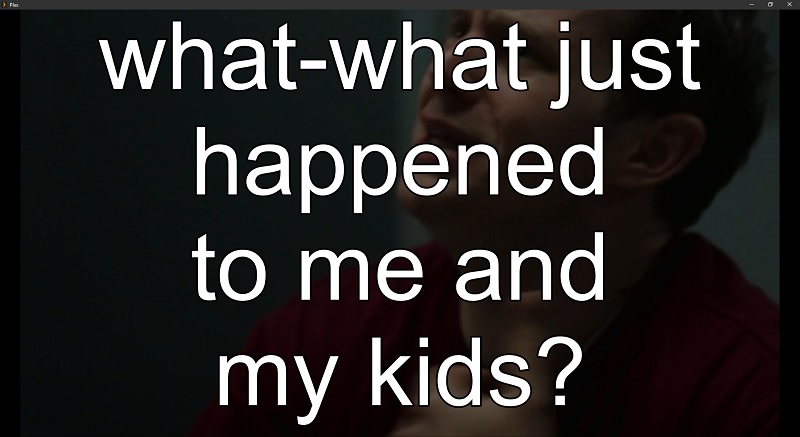
I am on PMS 1.19.4.2935 and have been using Plex for years. This year I started ripping some of my movies and shows from DVDs and Blu-rays I own. For this process I have used MakeMKV to extract from the disc to .MKV. If from DVD, this is easy. I then just send it through HandBrake to convert to .MP4 so the files take up less space. However, for Blu-rays converting from MKV to MP4 integrates the subtitles track (which is an image in MKV) into the MP4 video resulting in subtitles always on. So I’ve had to use MKVToolNix to extract the subtitle track from the MKV files giving me an MKV without subtitles, then run the original MKV through SubtitleEdit to OCR the subtitles and get an .srt. Then when using HandBrake to convert the non-subtitled MKV to MP4, I add the .srt subtitles to the MP4.
All of this has worked fine for a few months, but I recently ripped Season 1-7 of Big Bang Theory and when I went to watch the episodes via Plex, the subtitles were huge… taking up 2/3 of the screen. This does not happen when I just open the .MP4 file in VLC, nor does it happen with the original .MKV that was extracted. I ran into the problem via both the Plex web app from my computer, the PMS server’s browser, and an Xbox One Plex App.
To compound the strangeness of the problem, I went back to check some of the other shows I did previously. The first Blu-ray I tried was Avatar: The Last Airbender S1-3. After converting all 3 seasons, I watched every episode with the subtitles on so I could verify that OCR didn’t make a bunch of errors. The subtitles looked normal. I just went to check those same episodes today and their subtitles are excessively large. So something in PMS must have changed in how it is processing MP4 files and subtitles.
TL;DR
MP4 videos with a subtitle track are displaying excessively large subtitles (2/3 of screen)
Happens in both web browser Plex and Xbox One Plex (I think Fire Stick Plex too).
MKV files seem to display subtitles normally
The MP4 subtitles display normally opening the file directly in VLC (suggesting the file itself is fine).
MP4 files displayed normal subtitles a couple of months ago. Those same files (unaltered since verification) now display huge subtitles.
Unfortunately Handbrake incorporates subtitles in ASS format WITH FORMATTING - and you can’t disable it. Depending on the resolutions of original/encode - or if Handbrake decides for you about font size… you are at Handbrake’s mercy… and Handbrake has no mercy.
For this reason - I do NOT use Handbrake to do subtitles - unless I burn in a Forced Track.
I either use Xmedia Recode in a last pass to mux in srt subs - or use external srt files - so that Handbrake can’t help me out with some Hulk Subs:
…look familiar?
You could use SE to de-mux the subs, then remove the formatting and the ASS tag, then mux them back in… yea… not very efficient.
Don’t use Handbrake to do subs… unless you know what it’s going to do beforehand and can deal with it somehow.
You could also let Handbrake do it’s worst - then use a Plex Client app that will ‘Ignore’ sub formatting. <—neither of the Player Apps do it - nor do many device apps - and then it’s ‘Surprise Time’ when Hulk comes knockin’ (down your door so he can bring his subs with him).
Generally speaking - I only use external subs for mp4 files - and only embed subs in mkvs. That may be a ‘Me’ thing - or it may not be:
your file is violating the spec.
either do the mkvtoolnix container change
or find a mp4 muxer which converts srt subs into proper ‘tx3g’ subtitles
… but Handbrake will absolutely blow up your subs and there’s nothing you can do about it.
Note:
I have started using external sub files exclusively - so I can use the Subtitle Offset Feature - 'cause it won’t work for embedded subs (makes sense).
@JuiceWSA - Thank you for your response and detailed information. I have been doing some testing and I believe I can use Box4 to remove the subtitle track already embedded in the M4V files, then use MP4Box to re-mux it back in which does it properly. For new files I guess I will exclude subtitles from the MP4 when I use Handbrake to convert the MKV to MP4 then mux in the subtitles using MP4Box after the MP4 is created.
The strangest part of this whole thing is that I have files that I used Handbrake to create 2-3 months ago which I watched with subtitles ON via Plex and they looked normal. Now those same files have the large subtitles. So it seems like something changed in how Plex is interpreting those subtitles since they previously worked normally.