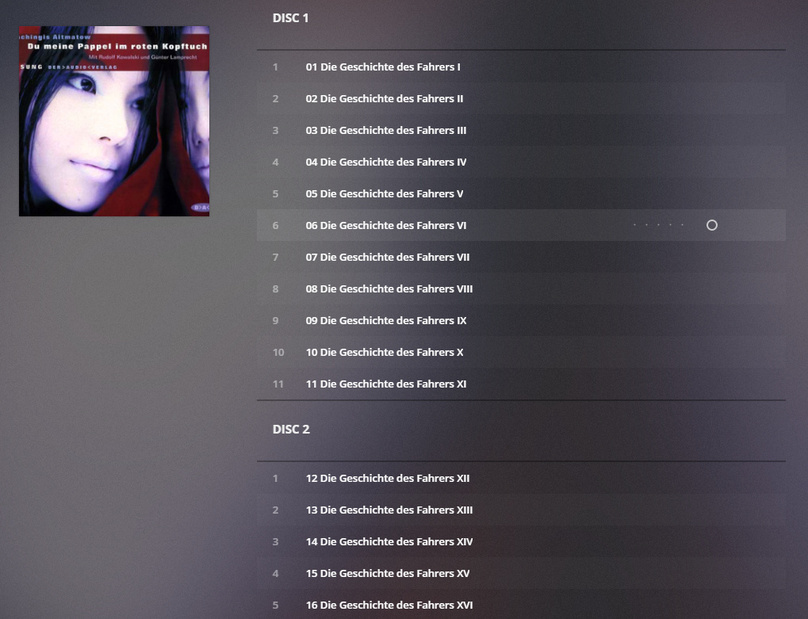
Server Version#: 1.18.0.1846
Player Version#: 4.8.3
After I refresh the metadata, the correct metadata is shown for a second then it disappears.
Example video:
I can confirm the behavior come from Local Media Assets (Album). If I turn it off, it does not happen. However, I use local assets which needs this agent.
Edit your library,
go to the ‘Advanced’ tab
activate ‘Prefer local metadata’
I have tried to both check and uncheck. It gives the same result. Also, I tried different agent order.
I rolled back to 1.17.0.1841. It works fine again.
Also scanning multi-disc albums seems to be broken after updating to 1.18.0.1846. On Refresh Metadata for a music album with multiple discs (embedded as ID3 tags) all tracks get the greatest disc number. E.g. if the album has 3 discs all tracks will be tagged as disc 3. With 1.17.0.1841 multi-disc scanning/tagging worked perfectly. Prefer local metadata is checked. This is a total showstopper!
Do you have ‘Prefer local metadata’ enabled?
Is it really save to rollback to 1.17 as I saw that the Installer was updating the library. Is the updated library compatible wth the previous server version 1.17?
I checked a couple multi disk albums on a recently refreshed artist (local metadata ENABLED) and my disk sections appear correct?
on flac files anyway
It works for me. You can backup your database before doing that. Or restore one of the backup database instead. You should found them in Plex Media Server/Plug-in Support/Databases.
Have you tagged your MP3 files with ID3 as I did or did you code the disc number in the file name? Here is a screenshot for 2-disc album in MP3Tag:
This is a screenshot of the album correcly shown in Plex before refreshing:
Refreshing then ends in an error
Reloading the page finally shows:
I don’t know, I will have to find a multi disk album in mp3, so I can refresh it.
your biggest problem is that album is an AUDIO BOOK.
I don’t use mp3tag, I only use musicbrainz picard and mediamonkey to tag.
you have track number as part of the title, that is not proper tagging.
but, that does not appear to be the problem, as you say it appears to be using the disk # as track # .
I suggest you try setting the libray to ‘prefer local metadata’ = enabled. then refresh metadata again.
I am using mp3tag exclusively and it worked for all my purposes so far.
I recommend to use simple numbers in the track and disc number tags.
(The notation 1/1 is technically a violation of the spec [although it is very wide spread].)
since that example above is an audiobook, there is no metadata from musicbrainz.
But pms should gracefully fallback to tags when no MBZ data is available, and I agree 1/1 is not proper tagging.
Good idea, but that’s what I tried, too  - with no effect
As I said, that option is enabled. Also until server version 1.17 my tagging style worked perfectly. Only since 1.8 the disc # is incorrectly parsed .
After some further investigation I noticed that refreshing metadata is ignoring the disc tag only for “old” albums (which have been in the library before updating to version 1.18…) When I add a new multi-disc album (or remove and re-add an old one) Plex scans and refreshes with correct disc numbers. However this is not a good workaround, as I have hundreds of old multi-disc albums 
Those “old” albums should have gotten converted upon the “Refresh Metadata”.
Inspect the content of the guid="..." property, inside the Plex XML info of one of the tracks.
Does it still say ‘gracenote’ or does it say ‘plex’?
Before refreshing for the album:
guid="com.plexapp.agents.none://65793?lang=xn" parentGuid="com.plexapp.agents.none://65755?lang=xn"
and for the first track:
guid="com.plexapp.agents.none://65793/1?lang=xn" parentGuid="com.plexapp.agents.none://65793?lang=xn"
After refreshing for the album:
guid="com.plexapp.agents.none://65793?lang=xn" parentGuid="com.plexapp.agents.none://65755?lang=xn"
and for the first track:
guid="com.plexapp.agents.none://65793/1?lang=xn" parentGuid="com.plexapp.agents.none://65793?lang=xn"
OK, for all com.plexapp.agents.none.
OK, this means you have still ‘Personal Media’ as your library’s primary agent.
What you rather want is to:
- set the ‘scanner’ and the ‘agent’ dropdowns both to ‘Plex Music’
- tick the checkbox ‘Prefer local Metadata’
- set Genres to ‘Embedded Tags’
- if you only have audio books in this library, clear all the other checkboxes (or leave them activated, it doesn’t matter much)
Then try and perform ‘Fix Match’ on one ‘Artist’
‘Prefer local Metadata’ is checked, shouldn’t that be enough? Does the ‘Personal Media’ agent not scan disc numbers? And why did it before version 1.18?
It does scan disc numbers. But you haven’t been using it so far. You were using ‘Personal Media’, not ‘Plex Music’.