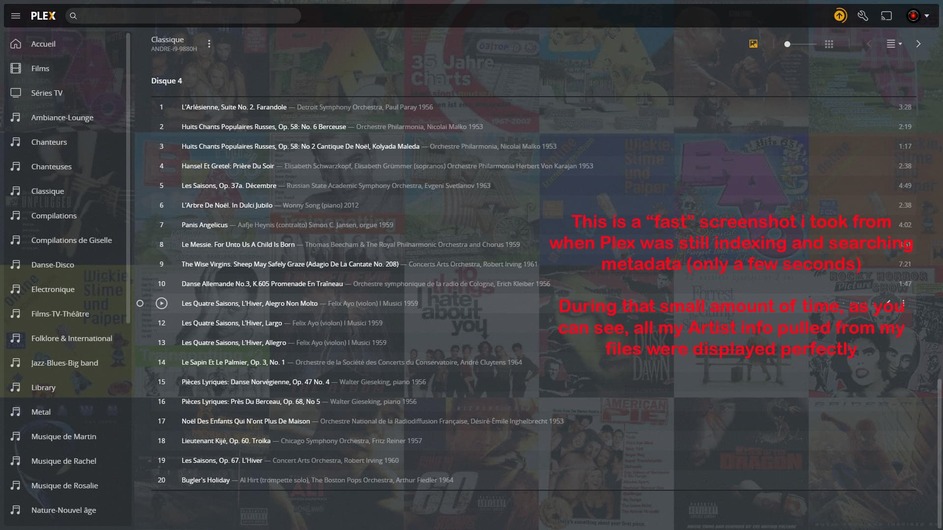
This is odd, i was used to the fact that the artist data for some of my “Varous Artists” albums were not retrieved and did not displayed at all in my Plex collection. Found out that if the album was not matched, Plex did not retrieve the data from “inside the file” either. That’s not news because this was already covered by many peoples in other posts.
What is strange for me is that while adding a new CD to an already existing boxset, the artist data DID APPEARS for a few seconds, during the initial metadata process but then, Plex removed the info after it found out that the album coud not be matched. So, now that i saw that, i know that Plex IS indeeds able to read the Artist data from inside my files. I just want Plex to keep it there after.
My files are pretty standard since i ripped all of my CDs using Exact Audio Copy (EAC)
Please look at my screenshots to see what i mean. Please bear in mind that for all i am talking about in this post, it’s always when Plex did not find a match, or i did not find match using Plex engine.
Thank you in advance for any “enlightment” you might add.
Is the library containing this set configured to prefer local metadata? I’ve found that Plex is pretty accurate when this is enabled, if your tags are in excellent shape.
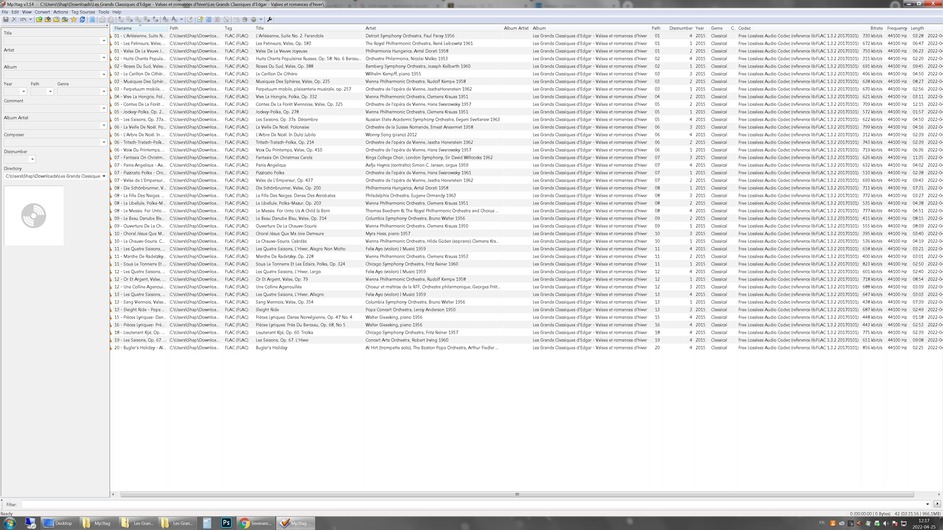
Do you have an app, such as MP3tag, that can show us more of the tags embedded in these files?
We need to see:
* Album Title
* Track Title
* Artist (artist of each individual track)
* Album Artist
* Track Number
* Disc Number
This How-To explains some of the things I’ll be looking for in your tags.
You said this is a new disk being added to a box set. In this case, it is very important that the discnumber is correct in every disc in the set, and the album artist is “Various Artists” throughout the set.
The thing with “prefer local data” is that i turned it off because it made Plex “stall” on certain albums probably because of corrupted data. Also, when i started the library “classical music”, there were much better chance that the online database contains more correct data than the ones i entered. It’s not the case now because i’m much more detailed when i entered data for these. So, after reading what you posted, i decided to remove the entire album, re-scan the library WITH prefer local data and, as suspected, Plex stalled on another particular album and so, refuses to add the one i just reinserted. (yes i emptied the trash before doing the re-scan). So, the only way for Plex to “see” this album is to uncheck prefer local metadata. I thought that by renabling it again and choose “refresh metadata” only for that album would have made the artist info appeared but no. I’m puzzled.
If ‘prefer local metadata’ is not enabled, then it’s very important that the folder/filename structure is precisely right, as that is what Plex depends on to identify the album. In this case, though, it appears that this box set does not exist in the MusicBrainz database (at least, I didn’t find it on a quick search), so Plex isn’t going to find a match, even if we get the folder/filenames right. So Plex should be able to fall back to the embedded tags.
I see that the folder name matches the album title, which is good. But it appears that the folder is duplicated in the path. I don’t know if that’s an issue, but it’s odd:
I’m also wondering, where in that path is the Plex Library pointing?
One thing I see is that ‘Album Artist’ is blank. I’ve found that this should be fine, and Plex should automatically assign the album to ‘Various Artists’ because the track artists are not all the same. But others here, including some of the Plex Ninjas, insist that the field should be populated, so you might try putting “Various Artists” in the Album Artist tags for every track.
Something else I just noticed: In your MP3Tag screenshot, the column heading for what appears to be the track number is “Path.” Not sure if that means anything, but it’s making me wonder.
Ooopss, no… maybe i should have mention this… I’m at work right now. So i installed locally MP3Tag and i downloaded from my NAS at home the entire album on my local WORK computer. It was a zip so that’s why the “double folder name”… Sorry for the confusion.
Ok, i carefully re-read your message. Yes, i will try putting “Various Artists” in the Album Artist tags. And, me also, i was wondering about where that “path” came from. I sure wish that this album from 2015 was “matchable”, that will have prevent me all these problems. Thanks, i’ll get back to you tonight.
Your help is very much appreciated and, if some of this solves my problem, i will definitely apply it to many of my "unmatch"other albums with the same problem.
That would require someone adding the release to the MusicBrainz database. If you’ve never done that, you might look through their Beginner’s Guide and see if it’s something you want to try. It’s a bit of a learning curve depending on your skills, but their community is pretty helpful. I’m involved over there a fair amount, too.
YES YES YES !!! Ohhhh I can’t thank you enough. It worked !!! I just added “Various Artists” to each track’s “Album artist” field and that definitely solve my vanishing “Artist name” problem.