I noticed last week when playing my music on plex that the artwork was wrong, When i looked through my music all of my artwork was changed to 1 of my music file cover art. i didn;t make any changes on plex and i have all the correct coverart on the files themselves.
i also have settings set to “local metadata” i tried removing all my music locally and then putting it back in the folder i also tried deleting my music folder from plex and setting it up again and everytime all my music just shows 1 image even though locally they are all correct. I’m kind of stumped how i can get the proper artwork back or why this happened in the first place as it was fine for years.
If you recently added some music files they may have had some bad info. If not… There was probably some bad stuff that didn’t blow up until now, and your luck ran out.
Errors in tags like Artist, Album Artist, and Title can cause all kinds of problems. Plex is very fussy (even capricious) when it comes to music data. And the problems that you see may not be obviously connected to the problematic files, too.
I’d consider this a warning (opportunity?) to go over everything and make sure you are following the rules. It sucks but there’s probably not a single button to click that solves this issue for you.
The situation got even stranger so i did go through everything and because i’m very OCD everything is named perfectly, I also just noticed it’s not grabbing my local metadata for movies either i added a few movies to it’s folder and it didn’t use my art now it didn’t do the exact same thing as the music where it used all the same art but still something strange with the metadata. After trying everything removing the folders locally and deleting it on plex and re adding and deleting the local cache folder etc i still was having the problem. i also downloaded a third party app to make sure the spelling was all correct which it was. But i thought of something. A couple weeks ago i did swap out my SSD in my computer so i cloned the old one to the new one and i thought maybe something became corrupted during the cloning process, So i plugged in my external HD and deleted all my music locally and copied over my backup from before cloning the drive to see if that would fix it, Unfortunately it didn’t. So the only thing i can think of is something became corrupted within my plex installation during the cloning and i’m tempted to uninstall my plex server and reinstall it however i’m dreading setting everything up again, especially if it doesn’t work. Wondering what the best next step might be or if there’s a way to just install the missing/corrupt files? thanks
Well this half worked. I tested with adding a new movie and it does use my local art for that so i was excited but then i tried adding a new song with my own art and it used the same cover it changed all my music to.
I also will note the other day i went through all my music on the plex dash app on my phone and was able to manually switch the covers to the local artwork, It’s just so strange it’s still switching anything new to that same cover. also the new song i added i checked plex dash to see what other artwork was in there and it had my local art as well as the proper album covers etc but it still chose to use this one cover that is not the band i used.
Plex uses “album art”, not “song art”.
i.e. if for some reason all tracks in your library are assigned to the same album, they will appear with this album’s cover art.
There are no songs in Plex which are not assigned to an album, nor without an artist.
If you have tried to achieve that anyway (with some trickery), it could explain your troubles.
I’d verify the folder structure where your music is stored.
If you’ve found that all your music were assigned to “Various Artists”, and you’ve subsequently renamed that “artist” to something else, you are in quite a mess.
The song i added was just to test if it would use the local metadata i added to it. it did have all the required info for the album. i have probably 100 different musicians but everyone of them suddenly changed to just 1 bands album cover. everything is named properly and if you read above iv’e done a lot of troubleshooting. my music was not assigned to various artists all other metadata is correct i’m not sure where you got that from. the only thing wrong is the artwork for every single artist.
Switch the Windows file explorer to show “hidden” and “system” files.
Now look at the root folder of your music library.
Are there any jpg, png, or other graphic files in there? If there are, one of them might be the same that shows up for all your artists.
I checked for any hidden files the only hidden file was an itunes folder because that’s the location of my library, Decided to copy all of my music to another folder so i could have my itunes folder in one and the other stricktly to sync with plex thinking that might fix it when my plex refreshed same issue all artwork is the same image from the same 1 band. frustrating
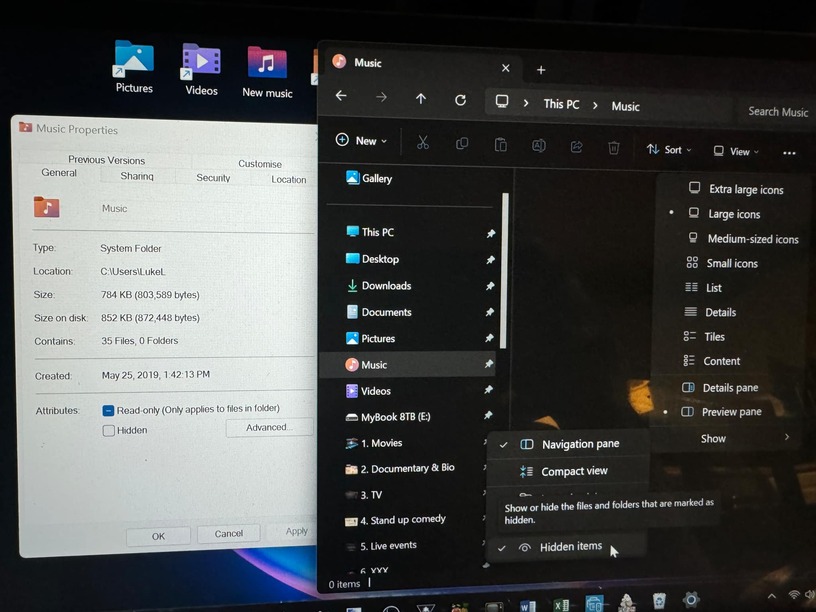
Ok so situation got even stranger i deleted all my music from my music folder again and when i went to the properties i noticed it said “35 files” and as you can see i have it set to view hidden files that clearly are still not visable. I’m assuming this is the problem i’m just unsure how to delete or clear these files that i can’t see.
I found the issue so hopefully if it happens to someone else in the future they can fix it. I removed all my files from my music folder after copying it to an external HD I also had checked to see hidden files but when I clicked properties it said there was 35 files in the folder but even with hidden files viable there was nothing there. The fix was going to the folder > options > view > uncheck “hide protected operating system files (recommended)
And then I was able to see a pile of old thumbnails sitting in there which I could then delete and now all my artwork is displaying properly. I’m not sure why it happened suddenly but it’s fixed now. Cheers