Hello there,
I just linked my Tidal account with Plex. I can play the music using Plex but when I leave to go play my games, because I want to listen to music while playing, it’s not working.
Can someone please help me with this issue.
Thank you
Hello there,
I just linked my Tidal account with Plex. I can play the music using Plex but when I leave to go play my games, because I want to listen to music while playing, it’s not working.
Can someone please help me with this issue.
Thank you
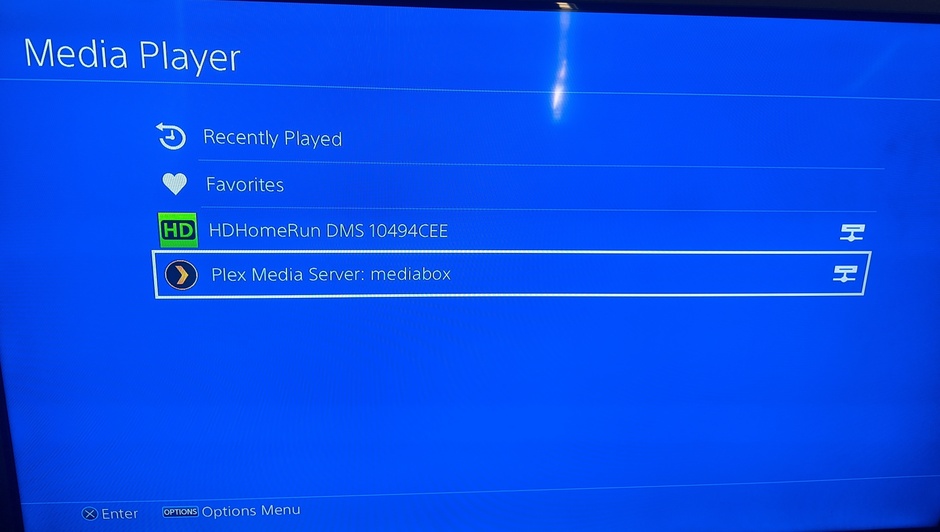
I thought that only worked with the PS4 Media player app. You can turn DLNA on your Plex server to have it available in the PS4 Media player app
How do I turn it on? Is it on my ps4 settings or on my Plex settings. Because I tried enabling the DLNA from Plex but when I click on show advanced in sertings, I don’t have the option to turn the DLNA on.
In your server settings. should not have to click “show advanced”
Then it should show in the PS4 Media app here
OK thanks I did that. But then, I do not have access to my tidal music when I select Plex Media Server: Macbook Pro.
I select music, then there is Music Channels, Music Queue, Recommendations, Preferences, Remote Music, Shared Music.
None of them have the about to access my Tidal Library.
Thanks for your help.
Oh sorry. I spaced the fact you were using Tidal content. Yeah DLNA Will only work with local content.
Sorry I don’t think there is any way to keep the Plex app playing while you are playing a game
Sure there is. I know plenty of people that game while listening to Plex. The vast majority of those do NOT make the mistake of trying to game on the same computer where Plex is running. It is simply foolish in the extreme to have the computer running Plex be used for any other regular task.
Computers with enough power to run Plex are quite cheap now days and you have a choice. Good performance or saving a few dollars/pounds/marks/yen/dinars.
I do have a few computers that multitask but they only run one processor intensive process running. Such as Plex running with MediaMonkey.
So if you run Plex on one computer and Game on another you will have little problem particularly if you use a device such as a Roku or Fire TV as your playback device.
Of course he could use a different device. We are not talking about the server or trying to play a game or the music on his server computer. We are talking specifically about the Playstation 4. The Plex player app on the PS4 will stop while playing a game the PS4 as will afaik every third party app on the PS4.
Sony’s own media player app which they separate from others will but third party apps don’t often have the same abilities. Just like Sony prevents anything but their app from playing Mp3s. Try to use the Plex Web app in the PS4 browser to play an MP3 and it will not work. That is why our dedicated PS4 app has to have the server convert it to an m4a.
In that case he could just buy a cheap device like a Roku or Fire stick for the music playback. That solves the problem as well.
I am sorry I misunderstood what was being attempted but it seems to me the solution is very simple, use separate devices for separate functions. You can get a cheap player and also a converter if you need one for a total of less than $60.00 and you can then start playback on the player and then do anything you want on your gaming device.
BTW: For this use I would recommend a Fire device or an Android based device as the Rokus automatically exit if not interacted with for a period of time.
I use a separate computer for music and audio playback and I do NOT use Plex at all for that. I find that MediaMonkey and a stand alone app or two serve all the needs I have. MediaMonkey plays all my audiobooks and local music and I have apps for Pandora or any other audio app I need for stuff not held locally.
I just do not believe in shoehorning everything into one app and then trying to make it work. And, no, I do not care if my food touches each other. (TV reference about OCD)
I don’t listen to music while playing games - 'cause I’m busy trying to stay alive and that takes all my concentration focused on the task at hand.
Just step the difficulty up from ‘Don’t Hurt Me’ - and you’ll know what I mean…

Note:
I could music/stream and game at the same time - but it keeps getting me killed.
Guests and Friends - who aren’t playing - stream and do whatever just fine without me knowing about it. If something starts transcoding out in the world - I’m gonna know about it - and correct it - one way or another.
This topic was automatically closed 90 days after the last reply. New replies are no longer allowed.