Server Version#: ** Version 1.23.1.4602**
Player Version#: Plex App Nvidia Shield 7.28.0.15447
OS: MacOS Big Sur 11.3.1
So for the past several weeks, whenever I am watching something on Plex on my Nvidia Shield TV (the tube), at some point during the video (sometimes an hour into it, sometimes 30 min, sometimes 30 sec) the video stops playing and I go and check my computer and I have no Internet connection. This is only occurring on my computer; my router has been working perfectly fine through all of this, and all other devices in my apartment are unaffected. The internet connection remains disconnected until I restart my laptop, then it goes back to normal (until I start watching something on Plex of course).
When I first was having Wi-Fi issues, I ran the Wireless Diagnostics on the computer and it said it’s a potential DNS issue. I tried fiddling with different DNS addresses on both the Router & Computer but nothing has fixed the issue. I don’t know how Plex could be causing DNS issues though, and I certainly don’t know how it could disable my computer’s internet capabilities. The only thing semi-related to DNS that kinda fixes the Wi-Fi issue is that when I click “Renew DHCP Lease” under Wi-Fi settings on the computer, the Wi-Fi goes back on. But if I do the same thing w/ Ethernet, it says Ethernet “has a self-assigned IP address and will not be able to connect to the Internet”. In both cases however, Plex still won’t work on the streaming device until I completely restart the computer.
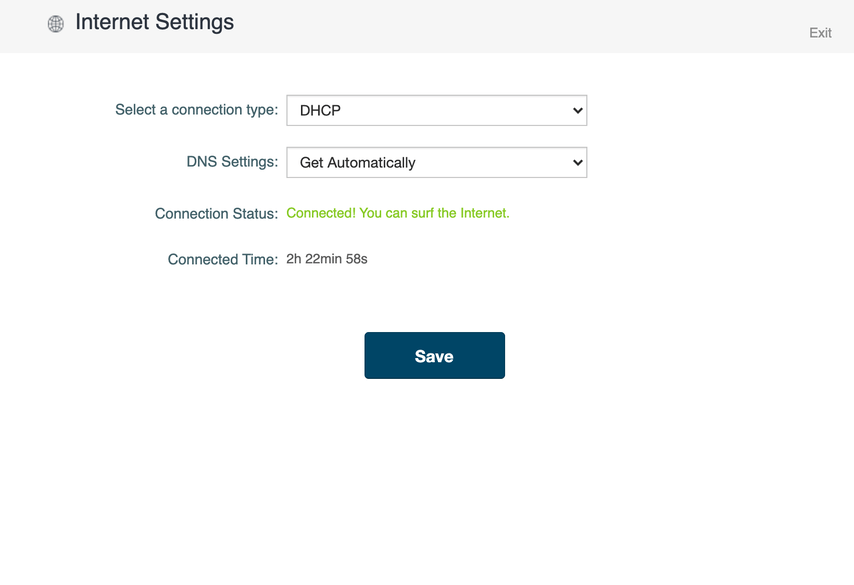
Some more info: the DNS settings on router are set to Automatic (same on computer). I have tried both GoogleDNS & CloudFare but they didn’t change anything. Computer is connected to Router via Ethernet with Wi-Fi enabled as well. Router is a MediaLink AC1200.
For all I know, all I need to do is fiddle with some Plex settings and everything will go back to normal. I am not very knowledgable in this area though. Please let me know if you have any ideas on how to fix this. I can provide more information as well if you need it! Thank you for reading.
Thank you for the reply. So to clarify, you would like me to set my Macbook’s IP address to manual and turn off Wi-Fi? I just tried that and I couldn’t get any internet connection to work. Let me know if you want me to try something else. Thanks
Hi again. So I finally configured it correctly and now I have a fixed IP, but the issue still remains. My computer’s internet gets disconnected within an hour of using Plex.
If this is the case, one side of the router has the ISP address and the other the LAN IP addresses, you can set your computer to any address in the same subnet they DHCP is offering, fixed not possibly changing everyday or when things restart.
To resolve this issue Create a new Ethernet and wifi connection for the Mac with a different LAN IP’s. Then reserve them in the router. (Server Wifi and Ethernet addresses) This will prevent it occurring again. Your Shield should have a LAN address outside of the DHCP Reservation along with all other devices on that LAN. Mobiles, TV’s, Network AV receivers and so on…
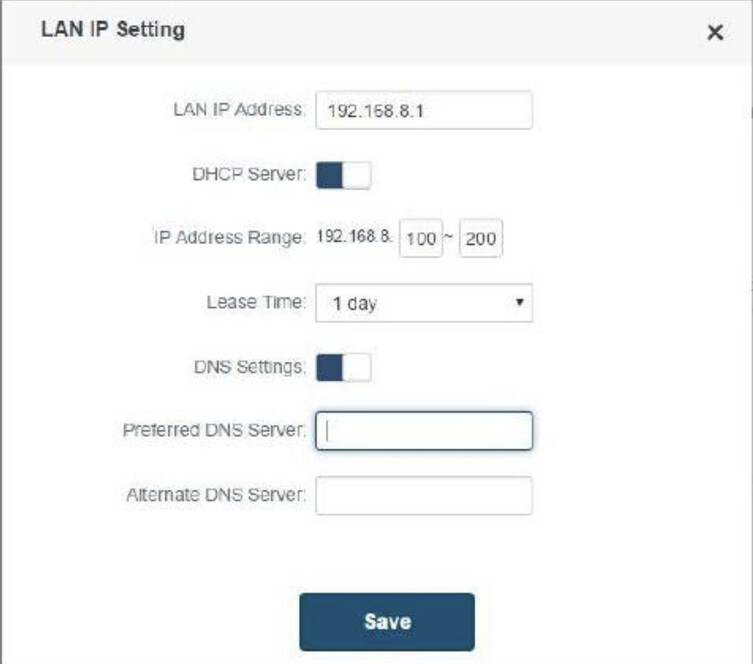
Example only: 192.168.8. ( 10 ~ 99)
Save, Restart everything after reserving, including the router.
Hi again. Sorry I didn’t respond sooner. I wasn’t able to test the new settings out until the past couple days. It was working perfectly for the first 2 days, but all of a sudden it has reverted back to the same issue.
Something different occurred this time though. When the issue reoccurred an hour ago, the movie froze like it usually does so I opened my computer and sure enough the wifi/Ethernet is disconnected. I then exited out of the Shield Plex app and re-entered it, and weirdly enough I was able to see my Plex library, and resume the movie. I also am able to connect directly with my Plex server by going to 127.0.01:32400 on the web browser which I was unable to do before. So I suppose that is a positive change, being that I am still able to use Plex even though my computer’s internet capabilities are not working (until I restart it). But the issue of my Plex server causing my computer’s internet to disconnect remains.
I also want to confirm that I set up my computer/router according to your instructions. What I did was:
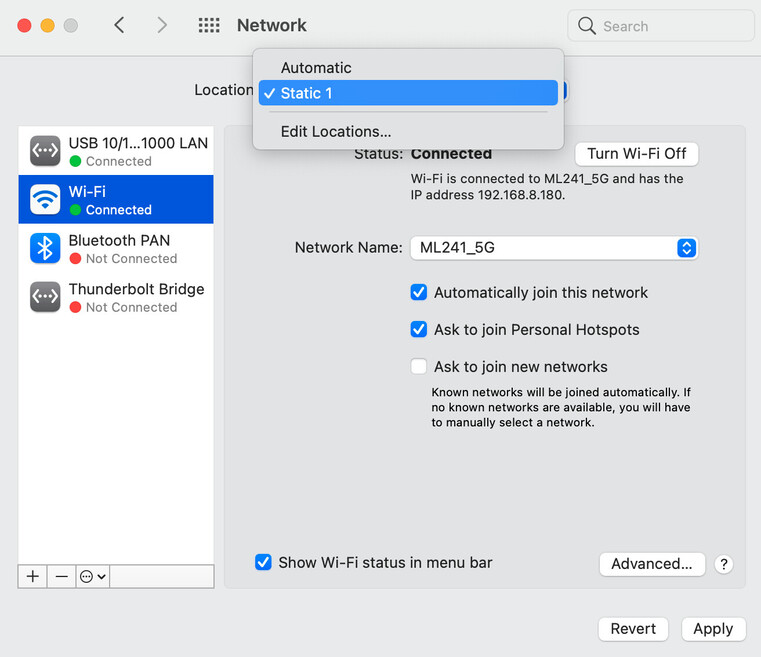
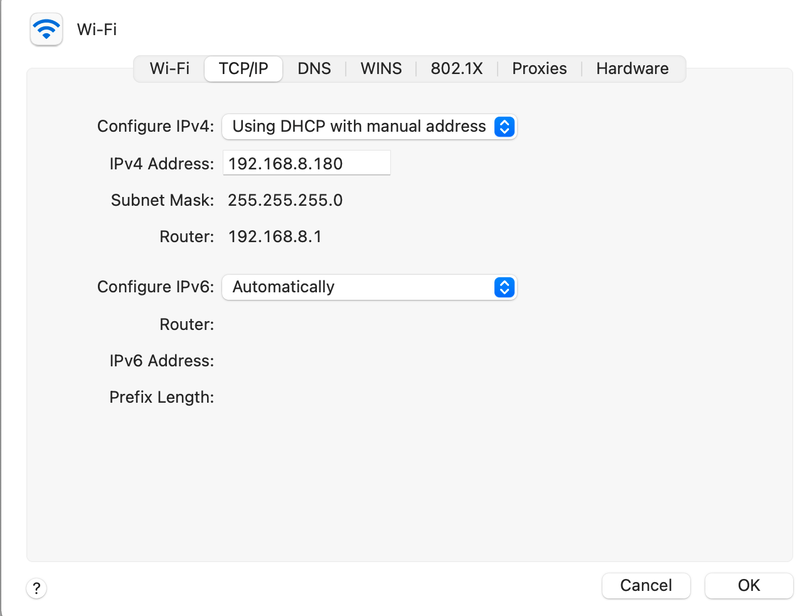
Set a fixed IP address on my Macbook for both Ethernet and Wi-Fi in the 192.168.8.(100-200) range
Go into my router settings and click DHCP Reservation and reserve those IP addresses
Go into the Shield Wi-Fi settings and make that a fixed IP address in the 192.168.8.(10-99) range, and repeat that for my phone, TV and any other device. I also reserved those IP addresses in the router.
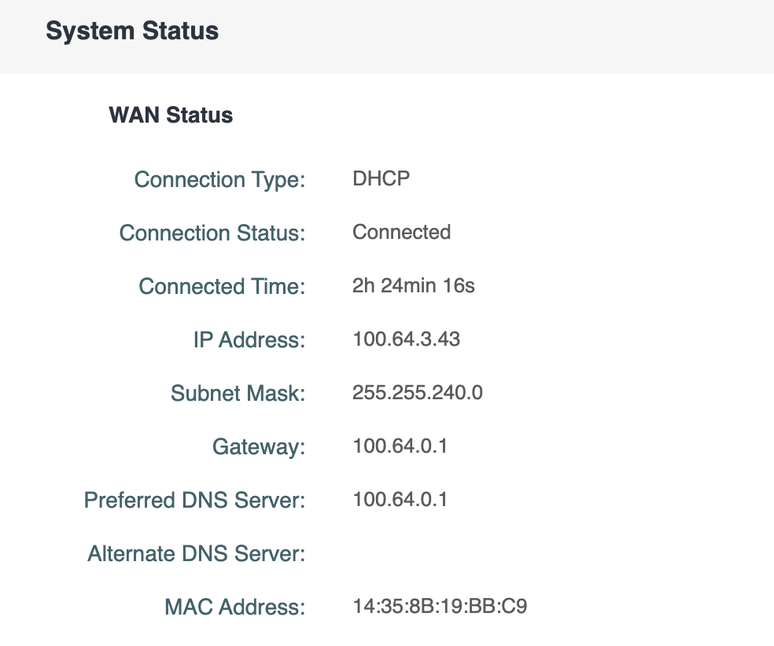
Also, upon digging though my router settings I found that the WAN has a completely different IP address range and subnet mask than my router. Should I put my router/LAN in the same range as the WAN? Could that possibly be why it still isn’t working? Just throwing out ideas. Not very knowledgable in this area.
Here are some relevant screenshots of my computer and router setups.
I appreciate the response! I will definitely test out using a fixed address outside the DHCP range.
So to answer your questions:
I don’t have a great reason why I have both active. It uses Ethernet by default since it’s the strongest connection, but I keep WiFi active just incase something goes wrong with Ethernet I suppose. For example with this Plex issue, I was able to reconnect to the Internet by renewing the DHCP lease for the WiFi instead of restarting the whole computer. I wasn’t able to do that with Ethernet, so in that regard the WiFi was useful.
Yes this happens with both Ethernet only connection as well as WiFi only. I’ve tested both
If you know the range on the router that DHCP is using, set devices you want fixed outside that range or update the range if there was a need to make a smaller DHCP pool unless you have slews of devices that would get IP’s on your network. I’d also consider setting fixed IP’s on clients, like set-top-boxes, Smart TV’s, Sticks, if they have the ability to do that where Plex clients are installed.
There should be a setting for Ethernet to Configure IPv4 “Manually”, along with the DHCP settings on that pop=up menu. Use Manually for Ethernet, WIFI can use DHCP still if you want. Its how my Plex Mac is setup and I never have any problems with connectivity.
For DNS, if you can determine your ISP DNS server IP’s, you can use those or there are of course public DNS from Google and perhaps others… For DNS its a performance issue, the faster lookups occur, the better web performance is.
Hi again. Wanted clarification on something. So when you say I should try a fixed address outside DHCP range, which device(s) address should I change? For example, my current setup (per another user’s recommendation from this forum) has my MacBook Ethernet & WiFi in the 192.168.8.(100-200) range with all other devices (Shield, Smart TV, etc) in the 192.168.8.(1-99) range. Was your recommendation to try to put my computer in a different range as well? Either the same as other devices (1-99) or a new one (201-300) for example?
All of my devices are outside the DHCP range. The current DHCP range is 192.168.8.(100-200). My devices are in the (1-99) range. All the devices have fixed IP’s as well. I have also changed the DNS to 1.1.1.1.
I am grateful for you and everyone else’s responses but none of the suggestions have fixed the issue unfortunately.
I hear you. I don’t have an Android phone so that isn’t the issue either. If you have other suggestions let me know. Still dealing with the issue. Thanks
Starting at the top, your original message said you’d be watching a video on your Shield and the video stops, and you’d check the computer and somehow you determined that you lost the connection to the internet. Now unless you were streaming over the internet to the Shield, I am assuming that your Plex server and Shield are on the same network and the Internet should be a don’t care. If that is wrong, and I didn’t see that, then there must be some reason why you loose that connection only when your streaming with Plex.
I am not going to review the whole thread, but if the problem persists and the only time this occurs is when your watching Plex, perhaps its time to look into the Plex logs at the time of a failure and see what they say. Perhaps its time for a clean install of Plex on that system?