Server Version#: 1.14.1.5488
Player Version#: Unsure
I am sorry if this is not the correct place to post this help request, but I am in a bit of a pickle. Also, I searched and I haven’t found much in the way or solutions for my issue.
I’ve been using plex on windows for a few years but this problem has only started popping up in the last week or so. Basically, I will be streaming content and then I get a playback error on whichever device is streaming; generally my xbox one. When I go to restart the stream or restart the xbone app, I get that the server is unreachable. So then I go back to my PC and I see that in the tray in the bottom right of my desktop, my internet connection will have an orange triangle above it saying that I am connected to the internet but I have no access to the internet. I try and run the windows troubleshooter and it gives an error that it can’t even launch the trouble shooter. Sometimes, the trouble shooter will launch but it states that the ethernet port is unusable. The only way I have found to get my ethernet port to function again is to reset my PC. I tried resetting my network or the actual ethernet port on the pc, and I also have tried everything I can think of in the networking settings options in windows. While this is happening, my internet in the house is still active and functional. All of my other devices work fine and connect to the internet. If I close the plex app on my xbone, I can open netflix or hulu and stream content just fine. The only thing that is affected is my actual windows 10 PC with plex installed.
I do not know where to find the log or crash report, but I can add them to the post.
My computer is newly built, but using older parts. The router/modem is ~ 4 months old. I have tried several cables. What are ways that I could test if either the modem or port is failing?
@drslevy I do not have any internet security apps that I am aware of. This PC pretty much only connects to the network to stream plex to my other devices.
@nokdim I haven’t done anything to my IP address that I am aware of. this specific PC is just hard wired to the modem, which has the router built into it. It is a verizon fios modem for gigabit internet if that matters. I have not gone in and changed any parameters on the router. This is a second router I have received from them due to the first one breaking, but both routers had nothing done to them. I tried to just keep it as “plug-n-play” as possible. also, I do not know what a nic is, so I would wager that I do not have a spare. When you ask about the cable, do you just mean the ethernet cable from this pc to the router? If so, yes I have switched cables around. I can reproduce the issue and I will attempt to ping my gateway.
This is a Windows driver problem and not a Plex problem. The cause is typically that Windows automatically installs a Microsoft signed driver for the Ethernet (or Wireless) card, and it’s really really rubbish.
My Plex laptop has been suffering the same issue, but I got around to fixing it this week. In my case the problem was that the Laptop had previously been running Windows 7 and had been upgraded to Windows 10. The Broadcom Netlink Extreme gigabit card was using a Microsoft driver, and Windows claimed no better driver was available. I had to download manually a driver from Broadcom and force the computer to accept the MUCH NEWER driver, because even initially the computer still claimed the downloaded driver was not as good as the Windows driver.
The Laptop will now finally stay connected to Ethernet. You will find Googling for this problem - it is incredibly common and affects multiple brands of laptops.
I hope this post helps you to find a solution.
(For what it’s worth, every time Network troubleshooter ran on both the Ethernet or WiFi card, it would claim the problem was that the Gateway was unreachable, and the only fix was to reset the network adaptor)
A NIC is a “Network Interface Card” in layman’s terms the port the cable plugs into… If you have a laptop its probably not replaceable but any system you can get a USB Ethernet Adapter
Sounds like you swapped cables and ports on the modem to eliminate that as a cause.
This is possible. i was thinking that either the Network card is defective or windows is throwing a hissy fit. i would check the manufacturers support site for updated drivers and try that first. @revaew
Yeah - for info: despite the Windows driver and the more up-to-date driver from Broadcom both having similar dates in 2015. The Windows provided driver was version 15.x and the Broadcom driver was version 17.2.x.
I really wish I had solved this earlier, because it’s been going on for years. I hope the WiFi issue is as easy to solve, because it has EXACTLY the same symptom. Despite being connected to WiFi and the access point confirming that, Windows suddenly - with no pattern or warning, decides it cannot access the internet or any network resources. It still has an IP address but no traffic flows. The Laptop was fixed by getting a USB dongle for WiFi and disabling the internal one - but obviously the culprit again - is a driver one, and not a hardware one (since the WiFi issue is actually present on an Acer laptop and 2 HP laptops)
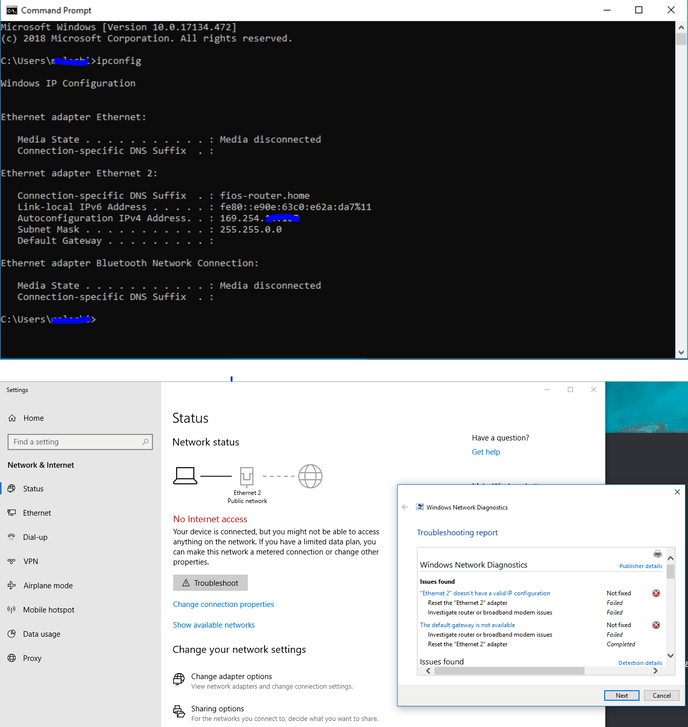
I double checked, and I have the newest driver. Here are screenshots of the issue and my ipconfig. There is no default gateway and if I ping both of the addresses that I see, I get no errors.
The 169.254 IP Address you showed in your screenshot indicates that the computer is not getting a valid IP Address from your router. Seems like a network issue with your router since it should be setup with DHCP services so devices connecting to the network are provided an IP Address to use. You should really investigate the router setup and verify the DHCP settings of the router .As was mentioned you should also consider setting a DHCP Reservation for your Plex Server is always assigned the same IP Address on your network.
@johnm_ColaSC The router is working fine with every other device on my network though. The issue is only with this particular PC. Also, this only happens after streaming from plex. I can play stream netflix, or any other online activity fine for seemingly endless amounts of time. The minute I stream my plex library from this PC to any other device, then the issue pops up and it is the only time I have the issue. The screenshot is after my PC drops the connection from plex streaming. I obviously do not know much about the issue, but the only way to reproduce the issue 100% of the time is to start streaming plex. I will google and see what a DHCP service/setting is though, so hopefully I can be more helpful.
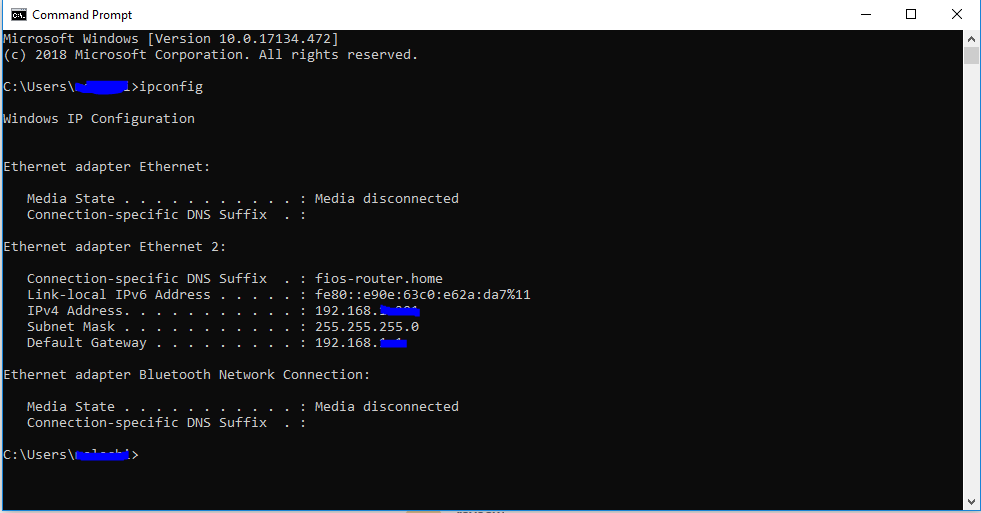
This IP config screenshot shows a different printout when I am not having the issue (i.e. have not tried to stream plex)
An off the wall suggestion, if you have Hyper threading enabled turn it off. I have a Haswell processor that does the same thing with Plex when Hyperthreading is turn on. A plex server thread will crash and take down the interface.
@nokdim my second screenshot shows a 192. address. the 169. address is only after I have started streaming plex and this particular PC loses connect ability. So I have no issues at all when it is a 192. address. But when I start streaming plex, this PC loses connection and i get the 169. address. I am currently trying to set up a static IP address.
@pl_5309 I will have to look and see about the hyper-threading. Is that a setting in the plex server interface?
@nokdim I believe I have set a static IP address. I followed the guide at This website I pinged a few websites and it seemed to work fine. I will attempt to replicate the issue again.