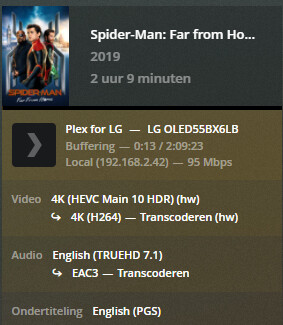
First day everything went fine, but now it doesnt work anymore. I tried reseting the app and google stuff but nobody knows the anwser, there is also no way of turning the HDR on in the telivision itself. I use the WebOS app you can download out of the webstore.
Don’t you have another audio option. TrueHD and Atmos are usually transcoded since few clients can play it.
Other than that I would check the bandwidth. Are your server and Tv connected to a gigabit ethernet? If the tv is on wifi, it has to be 5g/n at least
You’re running into the limitations of the Plex client for LG TVs and the LG TV itself.
Plex app for LG TV
Enabling image based subtitles, PGS & VOBSUB, results in a video transcode.
If the audio is transcoding, enabling any subtitle results in a video transcode.
If the audio is not transcoding, enabling SRT or VTT subtitles will not cause a video transcode.
SSA/ASS Subtitles: If Burn Subtitles = Automatic, enabling SSA/ASS subtitles results in a video transcode. If Burn Subtitles = Image Formats Only and audio is not transcoding, SSA/ASS subtitles will not result in a video transcode, but some formatting may be lost.
LG TVs
2020 & newer LG TVs do not support TrueHD or dts audio formats. If you play media with one of those audio formats it will be transcoded by the Plex Media Server to a supported format (EAC3, AC3, etc).
2019 & older sets support dts and dts-HD, but not TrueHD.
Plex Media Server
Transcoded video is converted to 8-bit H.264, which does not support HDR.
If TrueHD or Dolby Digital Plus audio is transcoded, any accompanying Atmos information is lost.
Therefore, when playing HDR media using the Plex LG app:
Do not enable image based subtitles.
If possible, avoid TrueHD & dts audio. If they cannot be avoided, do not enable subtitles.
Note:
Movies on Blu-ray discs with TrueHD audio also include a Dolby Digital (AC-3) version of the audio track.
Movies with dts-HD audio also have a dts version of the audio track. They do not have to include a Dolby Digital version.
There is no on-screen indication for Atmos audio when playing Dolby Digital Plus + Atmos audio (the Atmos format used by Netflix, etc). TrueHD + Atmos (the format on Blu-ray discs) is not supported by the TV, so there would not be any indication for that audio format anyway.
The only onscreen notification is for HDR or Dolby Vision video (I’ve no DV movies on my Plex server. The TV displays “Dolby Vision” when streaming such content via Netflix & Amazon Prime Video).
The video will not transcode.
The TrueHD audio will transcode to a supported format. Atmos information is lost in the process.
Not possible if TrueHD + Atmos.
If available, choose Dolby Digital Plus + Atmos. I’ve never seen Dolby Digital Plus + Atmos on Blu-ray discs, only on streaming media.
The issue is the TV does not support TrueHD + Atmos audio. If you use the LG Plex app it will always be transcoded and the Atmos information lost. There is no workaround.
If you want TrueHD + Atmos information, you have one choice: Use an Nvidia Shield Pro (as mentioned by @TeknoJunky).
The Nvidia Shield is the only Plex client that supports TrueHD + Atmos audio and HDR video.
Connect the Shield like this:
Nvidia Shield ← HDMI → Atmos compatible Receiver/Soundbar ← HDMI → TV
Do not buy the non-Pro “tube” model. It has issues with high bit rate media such as 4K HDR movies.