Yes. Auto → OFF
Your LAN is IPv4 only. No need to clutter it up with IPv6
Yes. Auto → OFF
Your LAN is IPv4 only. No need to clutter it up with IPv6
Yeah I’ve rebooted and completely shutdown before. Should I try that again after changing these settings?
OK I’ve done that now
You know the PiHole can resolve DNS… but the Syno can’t (WEIRD)
Let me review here. One sec please.
It’s never easy or simple isn’t it
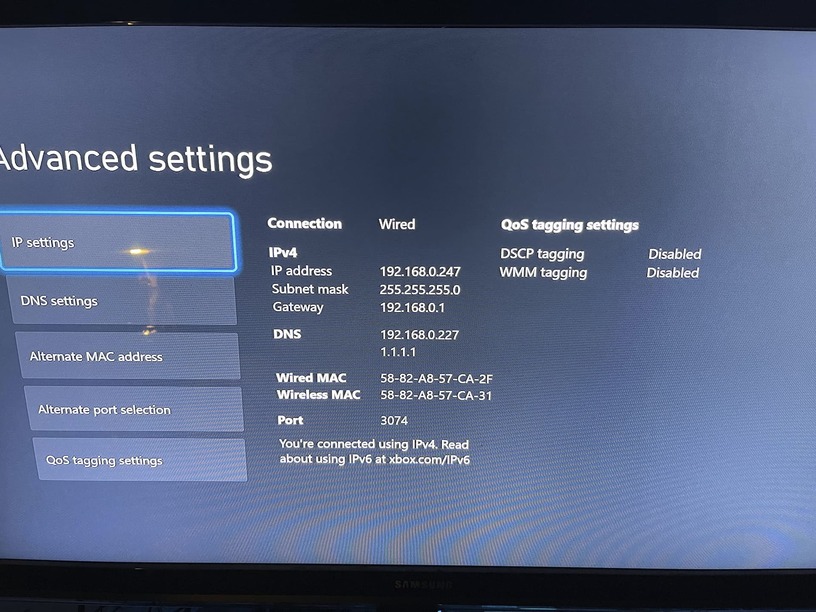
Look at the Xbox IP config. Compare it to the Syno config.
Except for IP address, they should match .
Once we find it…

The DS1019+ has two ethernet ports.
What’s the other one doing? Unplugged ?
Yeah it’s unplugged
Make them match, except for the IPv4 addr (of course)
I would opt for 1.1.1.1 over 8.8.8.8 DNS too
( I miss DSM 6. We used to have two dns servers)
I miss it too. I updated the DNS on the NAS to 1.1.1.1 and it still can’t find the hostname
Need to think… Your Syno is being a 
It’s being a pile of 

SSH back into the syno:
try : traceroute www.google.com
How do you go about ssh’ing into the NAS? I’ve never done that before. When I did it previously it was in the PiHole itself
Nevermind on how. I figured it out
Control Panel → Terminal & SNMP
Enable SSH
using Putty from windows, or ssh ip.addr.of.syno from your pihole
– ACCEPT the ssh cert it will offer you. (needed for SSH to run)
at the login prompt, type your syno username (case sensitive)
It will want password – WARNING – there will be NOTHING echo’d.

If you get it right , you’ll get the shell prompt.
Get it wrong and you’ll wait 10 seconds then try again.
that’s blocked
Your DNS lookup is blocked.
change the DNS resolver back to google and try again.