Syno NAS Plex Media Server Install Fails to Claim or See my Server - HELP!

Server Version#: 1.40.1.8227-7000
Player Version#: Various - iPhone, Firefox, Tivo, Samsung TV

I had Plex running fine on a Syno NAS DS412+ … then Upgraded to Syno NAS DS1522+ in order to use DSM7.x and forward.

I built the new NAS from scratch and have not been able to get PLEX to run on anything Tivos and Samsung TVs say the PMS is not on line. I’ve installed and reinstalled, and tried numerous things from the forums … no luck. I even purchased a second Plex Pass under a different email address to see if that would help. Very frustrated …

Attached are logs from 2 different installs, 1st install normal … install comes up and I see my server but I can’t claim the server. 2nd Install and claimed server as part of install … Server comes up but cannot see my local server to add media.

Help anyone.

PlexIssuesNormalInstThenClaim.zip (1.1 MB)
PlexIssuesClaimWithInstall.zip (1.1 MB)

DSM 7 changed everything -

  1. Installation now has a menu to aid in management, especially claiming
    (because everything else changed)

  2. Username changed and lost all our privileges at installation time/

  3. Shared folder where the metadata is stored changed

  4. How to grant permissions to media changed.

  5. So much changed that the installation scripting had to get smarter

When you installed,

  1. Did you use the “Install using Plex Claim Token” radio button and get a claim token to put in the box ?

  2. Before the second installation attempt, did you change all the permissions in the Plex shared folder so things would migrate automatically from DSM 6 → DSM 7 during installation ?

1 Like

Thanks so much for responding …

I installed first time with “Claim Token” during install. I made sure before running the install that all my media folders had permissions, per the many notices here and after the install. When complete that first install resulted in a server where I was able to sign in out but I could never see my own server or an option to add media from it. Logs => see the one labeled “PlexIssuesClaimWithInstall”

Second time I logged out of plex and unclaimed the server thenremoved the Plex Server folder on my Syno NAS completly before starting install, then installed normal and when started I could see my Syno Server and add media etc but I could never sign in and or claim the server. I could connect to the PMS from an iphone app, plexamp, and firefox cleints, but not from Tivo or Samsung apps. Log ==> labeled “PlexIssuesNormalInstThenClaim”.

I would think that I should be able to erase all PLEX installed bits and start fresh but after many attemps to do so it still behaves as noted above depending on the installation choice of claiming or not the server during install.

@thufer2002

I looked at your Plex.tv account.

I saw two old instances from LONG ago (8 years) back in the 0.9.8 days

What you did would have worked had those ancient servers been hiding in Plex.tv
( I will write that up for them to look at and resolve)

I’ve cleaned them out (deleted them) because they’d not been seen in so long.

This will give you a perfectly clean slate to start with as far as Plex.tv is concerned.

Cleaned off old install re-attempted both scenarios, same result. When claiming after a normal install I see two red messages (as Ive seen before) that says … “Something went wrong” and “Could not claim server”.

Logs of both attempts below:
PlexIssuesClaimWithInstall02.zip (1.1 MB)
PlexIssuesNormalInstThenClaim02.zip (1.3 MB)

@thufer2002

Mar 30, 2024 15:34:50.051 [140673731963704] WARN - [HttpClient/HCl#2] HTTP error requesting GET https://plex.tv/api/v2/server/access_tokens?auth_token=xxxxxxxxxxxxxxxxxxxx (6, Couldn’t resolve host name) (Could not resolve host: plex.tv)

Your Syno has a network / DNS lookup settings problem.

Not sure what to check …

The following done as root on the syno via a terminal seems to work …

ash-4.4# ping plext.tv
PING plext.tv (103.224.182.248) 56(84) bytes of data.
64 bytes from lb-182-248.above.com (103.224.182.248): icmp_seq=1 ttl=51 time=17.7 ms
64 bytes from lb-182-248.above.com (103.224.182.248): icmp_seq=2 ttl=51 time=17.10 ms
64 bytes from lb-182-248.above.com (103.224.182.248): icmp_seq=3 ttl=51 time=20.3 ms
64 bytes from lb-182-248.above.com (103.224.182.248): icmp_seq=4 ttl=51 time=16.8 ms
^C
— plext.tv ping statistics —
4 packets transmitted, 4 received, 0% packet loss, time 6ms
rtt min/avg/max/mdev = 16.807/18.198/20.335/1.307 ms
ash-4.4# traceroute plex.tv
traceroute to plex.tv (34.248.180.89), 30 hops max, 60 byte packets
1 192.168.22.1 (192.168.22.1) 0.896 ms 3.916 ms 4.005 ms
2 SAC2V1A.lan (192.168.1.1) 8.110 ms 7.646 ms 8.097 ms
3 142-254-183-193.inf.spectrum.com (142.254.183.193) 24.524 ms 17.235 ms 17.215 ms
4 lag-62.simicacd01h.netops.charter.com (76.167.26.89) 19.704 ms 19.693 ms 19.582 ms
5 lag-23.vnnycajz01r.netops.charter.com (72.129.14.178) 25.211 ms 33.600 ms 29.890 ms
6 lag-29.rcr01lsancarc.netops.charter.com (72.129.13.0) 29.785 ms 22.148 ms 22.008 ms
7 lag-46.lsancarc0yw-bcr00.netops.charter.com (209.18.43.62) 22.104 ms lag-26.lsancarc0yw-bcr00.netops.charter.com (66.109.3.230) 22.096 ms lag-46.lsancarc0yw-bcr00.netops.charter.com (209.18.43.62) 19.426 ms
8 lag-800.pr2.lax00.netops.charter.com (66.109.7.225) 35.278 ms lag-3.pr2.lax10.netops.charter.com (107.14.19.41) 16.354 ms lag-800.pr2.lax00.netops.charter.com (66.109.7.225) 16.345 ms
9 lax-b23-link.ip.twelve99.net (62.115.175.88) 23.257 ms lax-b22-link.ip.twelve99.net (62.115.156.224) 23.059 ms lax-b23-link.ip.twelve99.net (62.115.175.88) 23.152 ms
10 ash-bb2-link.ip.twelve99.net (62.115.121.221) 70.399 ms lax-b22-link.ip.twelve99.net (62.115.143.39) 156.181 ms ash-bb2-link.ip.twelve99.net (62.115.121.221) 76.336 ms
11 phx-b5-link.ip.twelve99.net (62.115.125.73) 162.287 ms prs-bb1-link.ip.twelve99.net (62.115.112.243) 162.187 ms

Scratching head …

LOOK CAREFULLY !!!

You pinged P L E X T . T V

Not correct.

Show me

netstat -rn
ifconfig

In Control Panel - Network –

  1. Check each adapter
  2. The ONE adapter you’re using (which shows as connected)
  3. Should have the LAN IP of your modem router as Default Gateway.
  4. Your DNS settings should be AUTOMATIC – OR – Set to the IP address of your modem router

Thanks for helping … much appreciated.

In Syno Networks my router (192.168.22.1) is the value set in both places noted above. I’m using automatic so the manual section is grey … but it holds the same value.

Heres the output of the 2 commands:

ash-4.4# netstat -rn
Kernel IP routing table
Destination Gateway Genmask Flags MSS Window irtt Iface
0.0.0.0 192.168.22.1 0.0.0.0 UG 0 0 0 eth0
169.254.0.0 0.0.0.0 255.255.0.0 U 0 0 0 eth1
169.254.0.0 0.0.0.0 255.255.0.0 U 0 0 0 eth2
169.254.0.0 0.0.0.0 255.255.0.0 U 0 0 0 eth3
192.168.22.0 0.0.0.0 255.255.255.0 U 0 0 0 eth0
ash-4.4# ifconfig
eth0 Link encap:Ethernet HWaddr 90:09:D0:46:4A:F9
inet addr:192.168.22.87 Bcast:192.168.22.255 Mask:255.255.255.0
UP BROADCAST RUNNING MULTICAST MTU:1500 Metric:1
RX packets:932338808 errors:0 dropped:0 overruns:0 frame:0
TX packets:523381239 errors:0 dropped:0 overruns:0 carrier:0
collisions:0 txqueuelen:1000
RX bytes:660267882435 (614.9 GiB) TX bytes:393868917869 (366.8 GiB)
Interrupt:77

eth1 Link encap:Ethernet HWaddr 90:09:D0:46:4A:FA
inet addr:169.254.104.6 Bcast:169.254.255.255 Mask:255.255.0.0
UP BROADCAST MULTICAST MTU:1500 Metric:1
RX packets:0 errors:0 dropped:0 overruns:0 frame:0
TX packets:0 errors:0 dropped:0 overruns:0 carrier:0
collisions:0 txqueuelen:1000
RX bytes:0 (0.0 B) TX bytes:0 (0.0 B)
Interrupt:76 base 0xe000

eth2 Link encap:Ethernet HWaddr 90:09:D0:46:4A:FB
inet addr:169.254.58.16 Bcast:169.254.255.255 Mask:255.255.0.0
UP BROADCAST MULTICAST MTU:1500 Metric:1
RX packets:0 errors:0 dropped:0 overruns:0 frame:0
TX packets:0 errors:0 dropped:0 overruns:0 carrier:0
collisions:0 txqueuelen:1000
RX bytes:0 (0.0 B) TX bytes:0 (0.0 B)
Interrupt:75 base 0xc000

eth3 Link encap:Ethernet HWaddr 90:09:D0:46:4A:FC
inet addr:169.254.3.85 Bcast:169.254.255.255 Mask:255.255.0.0
UP BROADCAST MULTICAST MTU:1500 Metric:1
RX packets:0 errors:0 dropped:0 overruns:0 frame:0
TX packets:0 errors:0 dropped:0 overruns:0 carrier:0
collisions:0 txqueuelen:1000
RX bytes:0 (0.0 B) TX bytes:0 (0.0 B)
Interrupt:78 base 0x2000

lo Link encap:Local Loopback
inet addr:127.0.0.1 Mask:255.0.0.0
inet6 addr: ::1/128 Scope:Host
UP LOOPBACK RUNNING MTU:65536 Metric:1
RX packets:1100579 errors:0 dropped:0 overruns:0 frame:0
TX packets:1100579 errors:0 dropped:0 overruns:0 carrier:0
collisions:0 txqueuelen:1
RX bytes:266088184 (253.7 MiB) TX bytes:266088184 (253.7 MiB)

ash-4.4#

Great, thank you.

Looking at the text output shows the values the Linux kernel is using (independent of how it may look in any GUI)

At the command line,

  1. nslookup plex.tv
  2. You should get multiple replies; IPv4 and IPv6

Would you try that please ?

results …

ash-4.4# nslookup plex.tv
Server: 192.168.22.1
Address: 192.168.22.1#53

Non-authoritative answer:
Name: plex.tv
Address: 52.213.10.112
Name: plex.tv
Address: 34.248.180.89

ash-4.4#

I ran another experiment tonight, I set up a small PMS on my Macbook which is on same network as the Syno NAS. This installed fine and came up and just worked … so from the ether cable through my router and out I’m good. As you said there’s something not right in the Syno network setup and I tinkered for a few hours tonight and can’t figure out whats not playing well in the sandbox. Continuing to scratch head.

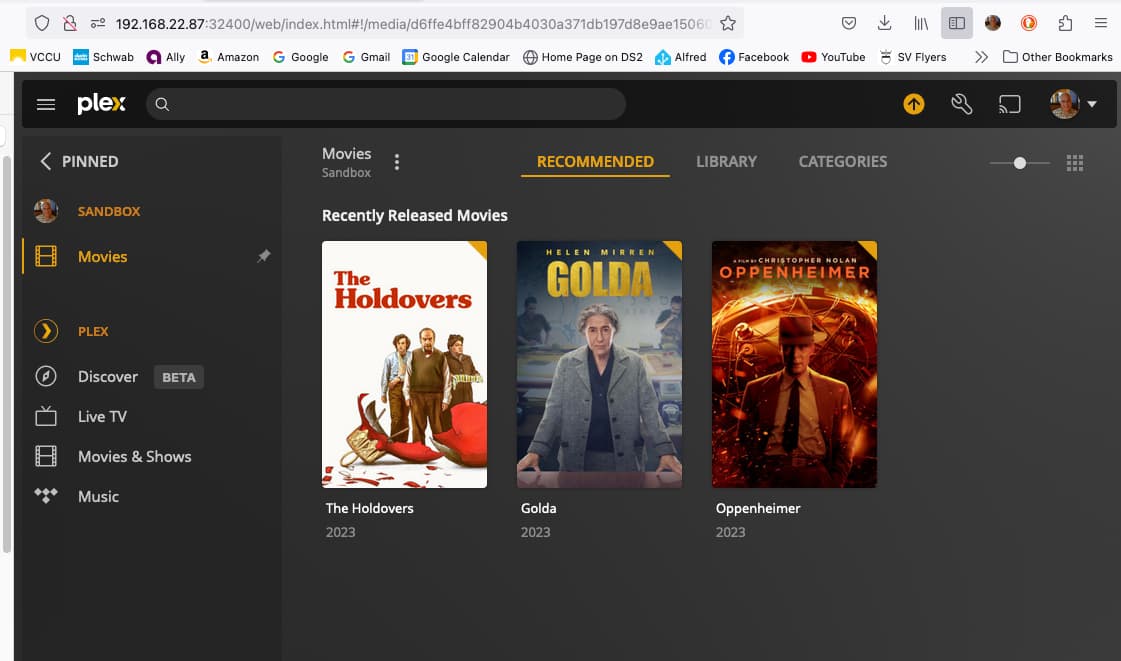
Chuck, dug out 2 4TB drives and set up a sandbox as discussed. Fresh install, Syno default DSM 7xx image did not pick or change any special settings. All worked fine, PLEX install with basic stable release 1.40.1.82227000 worked right away … three movies server … Yippy

Logs from Install etc attached below.
Screen shots of PLEX Up, LAN1 settings, and Network Details attached.

I’m busy tomorrow from 5PM PST through 10PM PST; Wednesday wide open … let me know next steps … Thanks again.

Logs.zip (1.2 MB)


Very clear to me, You got a bad DSM install.

Next steps

  1. Pull the sandbox drives
  2. Put your drives back in
  3. Backup your configuration (control panel - backup and restore)
  4. Reinstall DSM (which does not wipe data when done correctly)
    • DSM is in partition 1 of the HDDs
    • Swap is in partition 2 of the HDDs
    • “Volumes” are in partition 3 of the HDDs
  5. Now reset it

How do I reset my Synology NAS? (For DSM 6.2.4 or above) - Synology Knowledge Center.

You want MODE 2

  1. As you press the reset button and hear it beep

  2. Allow the beep to complete. If you let go mid-beep then the process fails and you must restart the box to start over

  3. The sequence: beeeeep — Pause — beeeep, beeeeep, beeeep, LET GO

  4. Let go immediately after the 3rd beep completes by itself.
    – You’ll quickly see they give several seconds between beeps
    – You do not want the 4th beep else you’ll lose the data too

5 Using the Synology Assistant - Reinstall DSM

  1. Sign into it / Use the Syno Assistant if needed

  2. If your volumes are messed up, control panel - backup & restore

    • Restore your volumes & shared folders (selectable)

Just to be sure … My manuals for the Syno 1522+ says to press reset wait for first beep then release then press and hold till three beeps … (maybe the release in the middle is just a waste??)

? Which should I follow … manual or your email?

the manual is correct. typing error on my part
would be harmless and not reset

Pause → Release
t

Ok, I need to do the backup via hyper backup first, so it will be a day or two before I attempt this. I will reply again once done and give a status update. Appreciate all the help to date.

All better … reset and re-installed DSM … Yeah all is fine now, thank you so much for the time and support.

This topic was automatically closed 90 days after the last reply. New replies are no longer allowed.