I am using Plex Version 1.23.2.4656 - although the kernel panics have been happening since I got the machine in Sept 2020 and after Apple gave me a new iMac in Dec 2020. I am on MacOS Big Sur 11.4, but, the problems happened in 11.3, 11.2, etc…
The Kernel Panics usually happen overnight or when I’m away from my machine and the crash reports sometime list ‘Plex Transcoder’ as the process running when it panics, but, there are 5-6 other processes that come up including: Safari, Chrome, CalendarAgent, backupd, webkit, etc…
The kernel panics have increased in regularity from 1-2 a week to now 1-2 per day. I’ve done the safe mode, diagnostics, recovery, reset PRAM, reloaded the MacOS…
Are there settings in Plex that I should be aware of to help out with performance on MacOS?
Don’t let them shift the blame for something that’s their responsibility. An application should never be able to induce a kernel panic even if it tried. If it can, that’s the fault of the OS or the hardware (either way Apple’s fault) because it is the OS, in combination with the hardware, that guarantees that no application, no matter what it did nor how hard it tried, can be detrimental to others (and panicing the system is certainly a detriment). This is absolutely Apple’s fault no matter what the actual cause is.
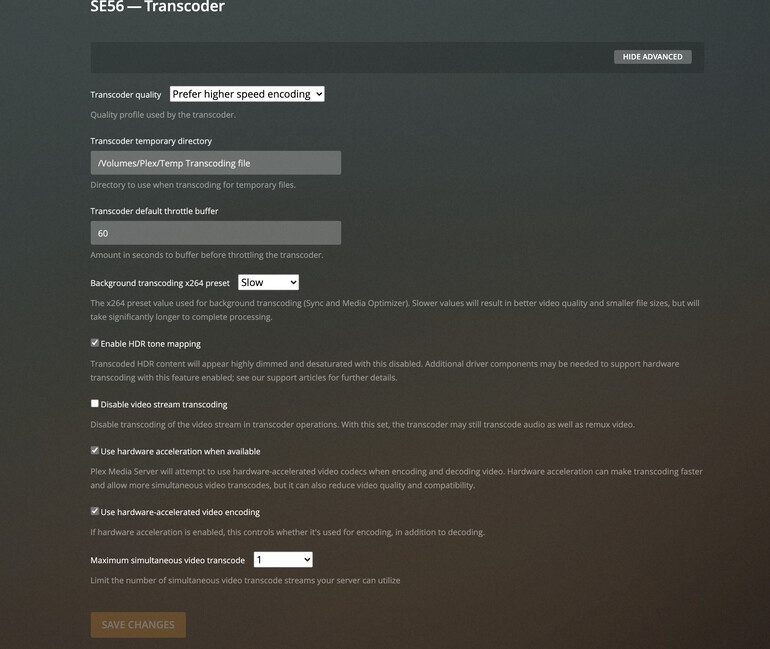
That aside, one possibility is the graphics hardware/drivers are faulty and causing the panic. If that’s the case, disabling hardware transcoding could work around the problem (but that still means you have faulty hardware/drivers).
Thanks gbooker02 - I have been saying that all along - hence the reason they swapped out the first Mac in Dec… I will disable hardware transcoding and see if that makes a difference - thus proving the point of hardware issues.
After reading this discussion a similar problem was occurring to myself on a 27" iMac 27".
I found it was after Scheduled Maintenance and decided to nuke my Plex install, which a couple other forum subscribers found also. There problem was resolved.
I do agree with gbooker, there something wrong with the Apple product, but after a plex rebuild the problem disappeared. You can try this with a test of PMS and keep the Root library Plex files required in a proper uninstall separate to swap out if test proves negative on a fresh Plex install
These are my Transcoder settings, my setup transcoding is rare, I save my collection to eliminate the need.
Thanks SE56 for the insight and personal experience. I am trying Gbookers suggestion first and if that isn’t successful, I now have plan b thanks to you