Jesus H Christ on a popsicle stick. I clearly stated it was my opinion. I wasn’t speaking for anyone but myself. I made it very clear.
What exactly don’t you understand about “That’s just my opinion of course?”
Jesus H Christ on a popsicle stick. I clearly stated it was my opinion. I wasn’t speaking for anyone but myself. I made it very clear.
What exactly don’t you understand about “That’s just my opinion of course?”
请问什么时候会恢复简体中文语言的支持?是否有计划?这对我来说很重要
running testflight 2025.30 still cant download files says connection failed
here are the server and client logs
plex-log-2025-12-01T02_05_31.968Z.zip (16.0 KB)
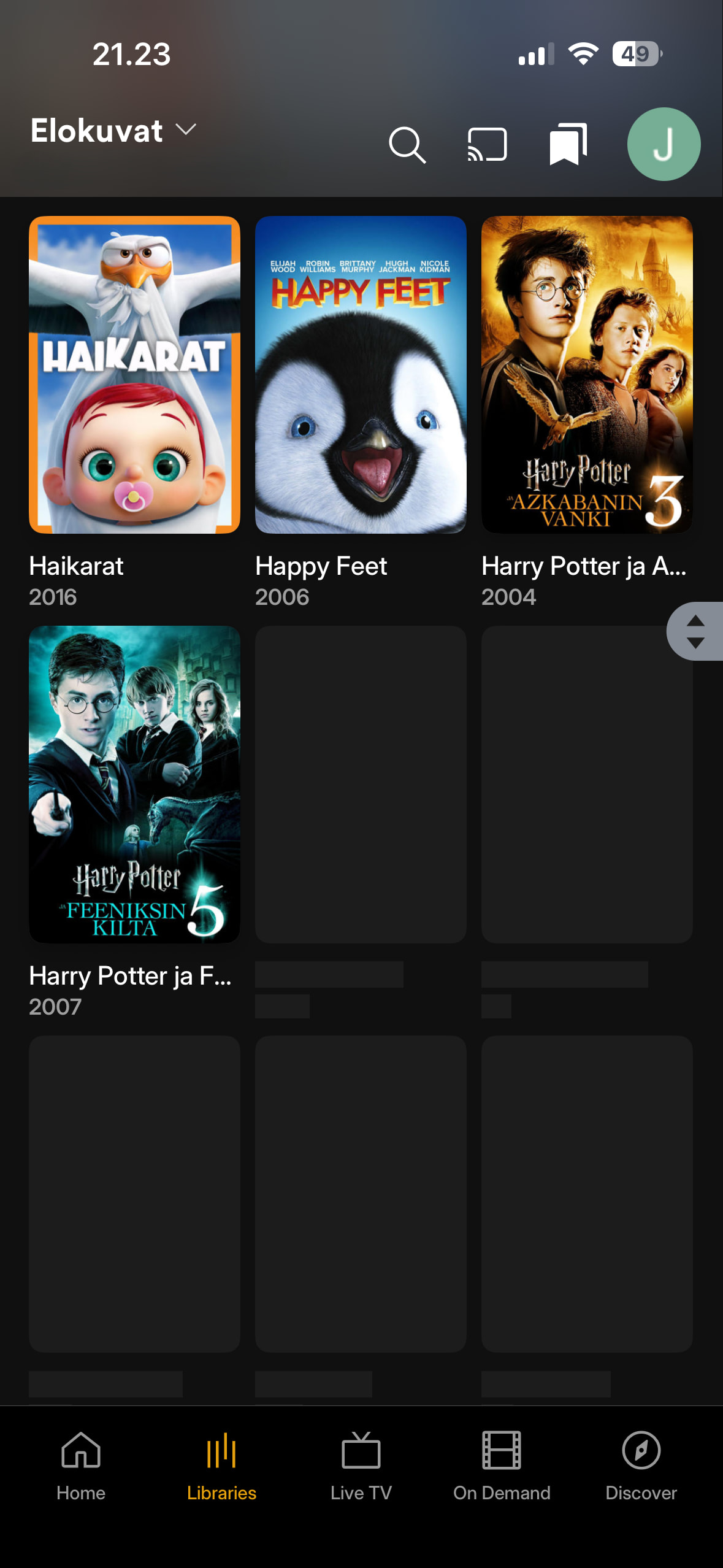
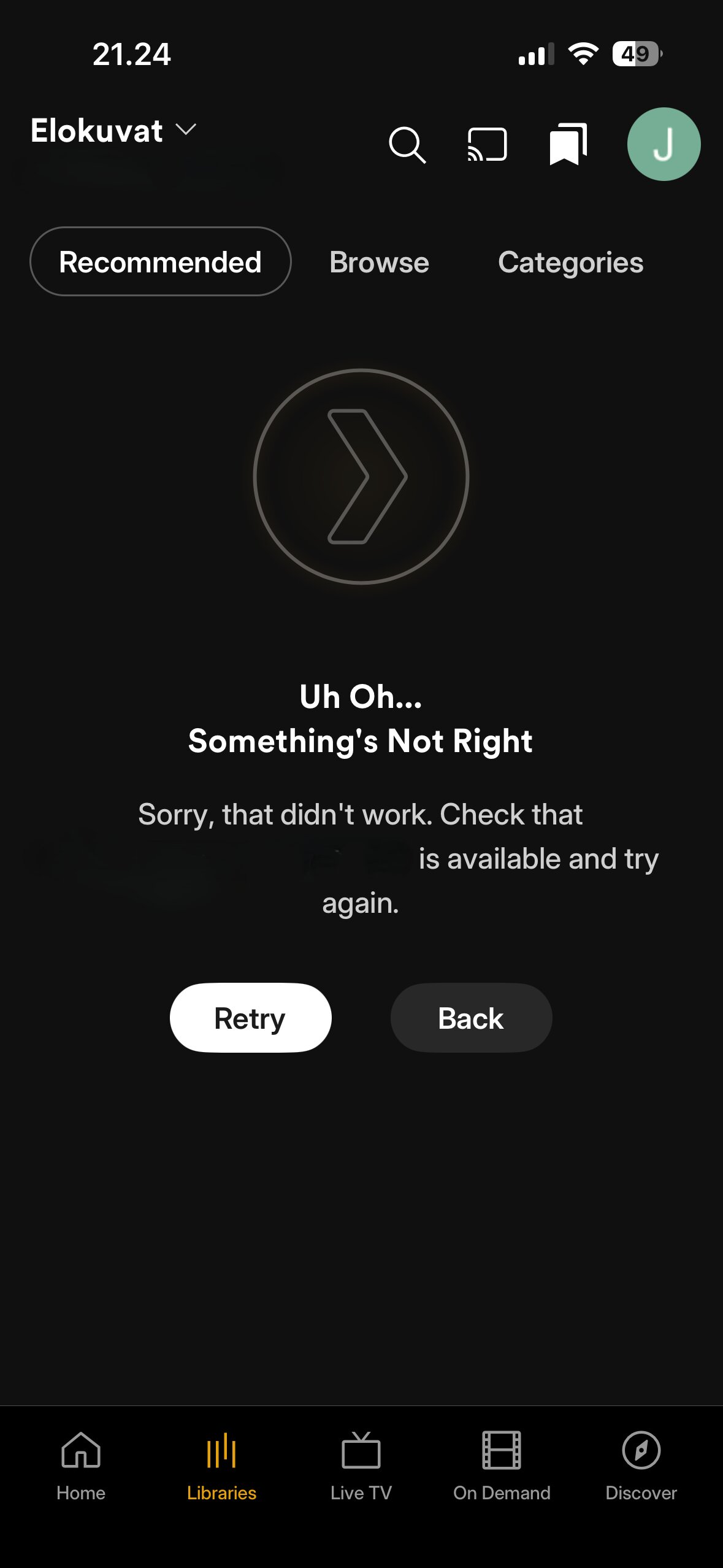
Browse is now working little bit better with Movies than with previous versions. It does not crash instantly when selecting Browse, but it gives “Uh oh Error” after you browse movie titles few rows down.
Here what it looks like when you browse some rows down before the application crashes with Uh Oh error:
Selecting Recommended crashes the application instantly.
Any of these issues are not visible with iOS application version 8.45.
Why? Just use labels and apply restrictions. I started using Plex so I could restrict access for my kids. I never used Libraries to do so. It’s all about the labels.
I use these labels:
Age 0, Age 3, Age 5, Age 8, Age 10, Age 12, Age 14, Age 16, Age 18, Age 21, Age 25
As you children grow, you just change what labels they have access to.
They work on collections too.
Again, just use labels.
Do you really expect everyone to manage metadata for each individual file? Do you know how long that would take in some collections? Maybe you have the time to do that, but I don’t, and I don’t expect many other people to, either.
Are you being real, the time you spend here no wonder your short of time. 
If someone has time to put files into specific library folders, they have time to instead use labels.
You can select multiple titles and change their labels too.
And yes, I do know how long it takes to convert to my system.
But heck, just use a label “Kids Allowed” and mass select all your titles in the Kids folder/library and apply that label. Two minutes, done.
Some people are just too lazy or too stuck in their ways.
But heck, just use a label “Kids Allowed” and mass select all your titles in the Kids folder/library and apply that label. Two minutes, done.
So in order to use the collection effectively, I need to put it in a separate library first? Or do the same amount of filesystem work that would meet my needs already and then do extra metadata management on top of that?
I have collections disabled entirely in my library. I don’t find them useful or desirable.
Still, as undesirable as I find collections, I’m fine with Plex maintaining them alongside other ways of organizing media. You find them useful, and I think that’s great. If Plex removed the feature, I would be upset on your behalf. I don’t understand your level of vitriol here for my preferences.
Feel free to mute me at any time. Otherwise you’re just as guilty of what you accuse me of.
It looks like you were tired of Plex long before I was: Hey everybody, I'm tired of Plex and their BS "Customer Service". What's a good alternative? - #8 by SE56 What are you still doing here?
I’m upset about the same treatment from Plex that you were, and on top of that other forum users like you are taking Plex’s side here.
The discussion was about how people are using separate Libraries to create Kid Safe areas instead of using labels. That is what I was addressing when you jumped into the conversation and decided to take a stance of pretty much calling my method ridiculous. You said it would take too long, so I presented how quickly it can be done in the context of separate libraries already existing.
Labels are the proper method as designed by Plex. Yes, Libraries can be used to provide restriction, but they aren’t a proper method since they separate your similar type content into different folders. Then as your kids grow older, you would need to move movies between folders to allow your kids to see them.
Libraries should be based on similar type content and that is all: Movies, TV Shows, Music, Photos, Home Videos, Audiobooks, etc.
Labels tags are for access restrictions and more. For example of other tags, you don’t have an Action movie library or Western movie library; instead you have Genres.
Your choice.
How do you list out all your Action movies then? Or, how do you display all your Best Picture Winners? How about all your Walt Disney movies?
I find these collections very useful and desirable, and my users to do. Our choice.
Some other helpful collections related to the conversation. These are simple to create with the Labels I mentioned earlier:
You started the hostility between us:
Another option is to use Common Sense Media Ratings, now that Plex has included them.
However, I don’t find them suitable for my kids, so I still go with my custom Age labels.
I misread it because the quote was malformed on my end. I will accept responsibility for that - my bad.
There was nothing intentionally hostile in that message from me. I’m sorry my tone made it seem that way.
From my perspective, you suggested that many people are using libraries incorrectly, which I strongly disagree with. Libraries provide a simple “one to many” way of managing permissions and categorizing content. As soon as you delve into managing it on individual pieces of media, that becomes a “many to many” relationship and in some collections the many can be quite large. It’s just not effective at scale.
Your choice.
It is my choice - as long as Plex allows me to have one. That’s precisely why I and so many others are upset with the navigation menu becoming a UI afterthought.
How do you list out all your Action movies then? Or, how do you display all your Best Picture Winners? How about all your Walt Disney movies?
Plex already provides filters and metadata for all of those options. I use Plex to manage metadata for me, not for me to create another layer of metadata manually on top of it.
Additionally, am I supposed to drop my personal drone videos into the movies category? (I know there’s the personal media library type, and that’s what I use, but I’m making a point here.) I’m not keeping separate genres of movies in separate libraries. I have very different media types I’m managing in Plex (remember, “One place for all your media”?), and a long list of libraries isn’t the problem - it’s what Plex was designed for.
I’m fine with the way you use Plex - really - but I’m not accepting that I have to do it the same way, and I don’t appreciate being told I and people like me are doing it “wrong” and that Plex making our use case more difficult and uncomfortable is expected - it’s not. It’s why they reversed course in 2018.
Or at least that’s what I felt was being communicated on your side. If it was only about ratings alone in separate libraries, I withdraw my argument.
Thank you. Sorry we got off on a bad footing.
My goal is NOT to tell people what to do; my goal is to help people understand where Plex appears to be going and what options are available to reduce their pain points as things change. It does get frustrating when people refuse to adapt and just keep venting about how they must be served. I don’t think that went well for people who didn’t adapt to horseless carriages or replacing slide rulers with calculators (I know, extreme examples, but they get the point across).
However, I do respect their ability to do as they please within Plex.
We are all going through similar things as Plex moves us to Clearlogos and SquareArt. We don’t have to embrace these changes, but I’m sure it will be helpful to do so moving forward.
As an apparent programmer yourself, you understand the technology behind Plex. A large part of it is the database. Looking at Plex from a database perspective, it becomes clearer where Plex is moving things to, it’s just a matter of them providing the UI to allow it to happen. As in programming, we need to constant adapt to new technologies and techniques. We can’t just say, “Cobol works great!” or “DOS is all I need!” It’s fine to stay with those and get the job done, but to complain about being left behind, isn’t going to work forever. Is it wrong to stay behind? No. However, that is accepting the possible consequences.
FYI, Plex introduced Smart Collections with the PMS 1.22.3 release that came out on December 26, 2019. I believe the ability to control “visibility” of collections on the Home page came out around then or sometime afterwards. So, 2018 was before Plex had provided a decent way to group content in the UI other than libraries or into static collections. And Before collections, we really only had libraries. The UI needed to focus on Libraries still.
Smart Collections created a whole new shift in thinking about our Plex content. When introduced, a light went on for me about the possibilities of grouping my content and I fully jumped in. Since then I’ve seen Plex mostly embracing this shift (except Elan, who is still forcing us to create a Christmas music library to separate that content, argh).
Hopefully Plex will continue developing in this manner with the possibility of Nested Collections, integrating Editions under one title and making Collections a stronger entry point into our content.
BTW, when you talk about large libraries; trust me, I’ve got one. I know all too well just how much work certain tasks take.
If I may, most of my users, and I assume many others, can’t figure out how to use the filters and they don’t usually have access to the Advance Filters.
Also, “Best Picture Winners” is not in the metadata by default, it must be added to Labels or Genres. A Walt Disney list of movies isn’t just filtering by a single studio name. “Saving Mr. Banks” or “Freaky Friday” will not be on the list, for example, because their default studios are not “Disney.” There are about 100 movies that are Disney but would not pull up on a simple Disney filter.
Also, Collections provide a way to “save” those filter options so your users don’t have to keep re-entering them each time.
My users’ favorite collection on my server is “Top Rated Movies.” It is a collection of movies that are rated 75% or higher on both Critics and Audience from Rotten Tomatoes. Not even the Advance Filters let you do that currently.
Tear-jerkers and Criterion are two other fun ones.
I guess I can see Collections being another layer of metadata, but honestly they seem more like saved Advanced Filters. And no, I would never want to create collections manually. Kometa is the secret; each collection is just a small script:
Walt Disney Movies:
tmdb_discover:
with_companies: 2|3|32|670|3166|3202|3475|4436|5391|6125|13571|15935|18511|20193|40148|41712|52126|71124|81026|88716|89347|91233|99981|101999|103374|104966|107038|107039|109755|112149|112779|121483|126540|130098|135745|141906|158079|158526|160956|164864|164892|171656|171657|175458|177000|177195|178202|202949|203967|206180|209687|213974|214202|217297|218661|219391|236319|240533|241652|241784|241787|244321|247550|248841|248842|249725|257184|258193|260805
limit: 10000
sync_mode: sync
Again, I’m not saying anyone needs to change, but I’m trying to help them remove a pain point and also see other benefits of making the change.
(Okay, that was way too long a post.)
Pretty sure the Filters are available in every Plex app, even if you’re not a server admin.
I just checked on IOS under a regular account and they show as expected - can filter by basically anything you want that’s already in the metadata. Only thing you can’t do is filter by multiple items at once - something they should probably add.
Filters are but not Advanced Filters. The Roku app and Android app only allow you to filter by one piece of metadata, for example. I assume all non-browser/desktop apps are the same.
And again, most users wouldn’t know how to use them or wish to keep jumping through setting them up each time they wish to filter.
A proper Walt Disney list of movies is impossible without Advanced Filters or providing a custom tag to filter on (69 different studios).