I went back and tried other files. It is direct playing mkvs. It still doesnt output dts though. I am attaching the logs, I tried 3 different dts versions.
firestick4kmxlog2.zip (323.8 KB)
I have the same symptoms as @Sittingmongoose. My FS4k Max gen 2 just arrived and i’m not getting DTS passthrough, instead it transcodes to DD+. I have FS audio settings as “best available”. On emby app for example i have Dts passthrough. What is the version of plex with the fix?! i have this version of plex installed 10.3.0.4685. Kodi also outputs fine in IEC mode. Not RAW. Anyway everyone of them in the start of the file with DTS will show DD+ for less than a second then change to DTS, this happens on Emby and Kodi. But on plex it stays DD+.
UPDATE: It works on 9.31.0, i see DTS on my receiver with that version.
UPDATE2: I see 10.4.0 is out and it says
FIXES:
LiveTV: prevent repeated network requests for airings that fail to load.
Player: prevent crash when resizing video screen.
-> Player: ensure DTS isn’t passed through on FireTV Stick 4K (2nd Gen).
LiveTV: airings that span over a day could end up in repeated network requests.
[TV] The focus would be unstable in the manage muted/blocked users list.
[TV] Focus could get lost while viewing the people page.
So, are you removing DTS pass-trhough or my english is very bad?
Ok so PCM would be the expected format as DTS passthrough is not actually supported by the device even though it stated it does. The reason there was no audio to begin with was because we enabled DTS passthrough support when we were told it was supported as we had no devices to confirm with as it was before the devices were officially released. After users reported no audio we disabled HW support for DTS so it is now using SW decoding to play DTS which will result in PCM.
1 Like
It should not be transcoding DTS if it is then something else is causing that such as an unsupported video format. Can you confirm with another title?
I cannot comment on support on other applications as they may be using an implementation that we cannot, we rely on the device supporting passthrough and when we enabled it the device was unable to play the format (There was no audio being played) therefore it has been disabled which should result in PCM being used.
1 Like
After a bit of a mixup in the tech specs provided by Amazon, all documentation clearly states, that passthrough of DTS and DTS-HD (basic profile) is supported.
So please get that sorted ASAP.
I think there is some confusion here.
You already have DTS working on the Firestick 4K Max(newest version) and the newest Firecube. So your two comments are wrong.
The problem is, in the newest beta release for the fire devices, you guys broke DTS support. So if we switch back to stable it works, but the newest beta does not.
So whatever you all changed in the newest beta broke DTS support.
1 Like
Well, what a confusion going on here. LOL Fire Stick 4k Max gen2 and Fire Stick 4k gen 2 can do DTS pass-through, info here, i can verify that it works in Kodi and emby and justplayer and mx player and vlc. On plex web client it worked in 9.30.1 and still works there, but when i update to 10 it stops working. Is it stable? No, but it works and i think plex web client should enable DTS pass-trough because Amazon is updating their firmware with that info that it can do DTS and DTS-HD pass-through. For now if i use plex web client 9.30.1 i can get DTS pass-through fine so i’ll stick with that version even knowing it’s buggy lol But it think you should enable DTS-passthrough in 10.5 or 10.4.x, whatever you want.
Now answering your first question, yes whenever i use “best available” my receiver shows DD+ because Fire Stick transcode everything to DD+ when pass-through of that audio format isn’t available in the video player, so everything is going to be transcoded to DD+, thats the Amazon way. But, if you guys sort everything in the pass-through department with DTS, DTS-HD, it will never transcode anything to DD+, it only transcode AAC and probably Opus. Plex server doesnt transcode anything, thats the confusion? No, plex server isnt transcoding, the transcode is done in Amazon Fire Sticks and probably Fire Cube when “best available” is enabled and the player in question can’t pass-through that audio format, in this case as plex web client disabled DTS pass-through my Fire Stick is transcoding DTS to DD+ which is fine in a device that can’t do DTS pass-through but we all know by now the new Fire Sticks can do it.
Another useful info is the DTS pass-through on the new Fire Sticks is done with IEC mode and not Raw mode, so whatever you enable for DTS in the next version make sure is Android IEC and not Android RAW or Fire Stick will not pass-through anything.
4 Likes
I’ve written it many times before.
The problem with DTS 5.1 or 7.1 is due to the plex app.
Everything works on my Fire TV Cube under Kodi.
No matter whether Dolby Atmos or DTS, no matter what Cinema audio format, it works. Frameratswitch also works without any problems.
I have posted these two pictures several times and prove that everything works under Kodi 100%.

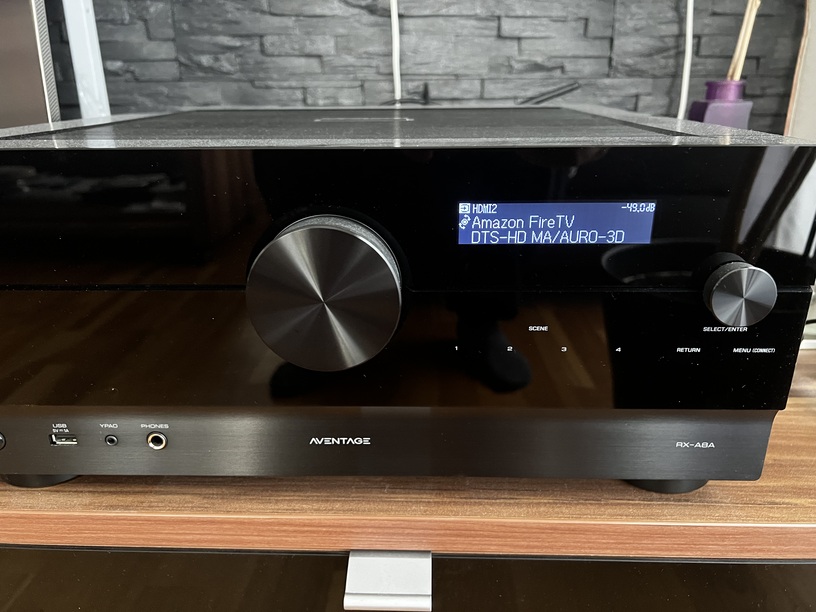
Dear plex support,
please finally start solving this problem that your forum is already full of.
Thanks
Here is a link to a new build where we have reenabled DTS passthrough on both new Fire TV Sticks. Please give it a try both DTS and DTS-HD formats. DTS-HD will play as DTS as the devices only support the passthrough of the basic profile.
Otherwise, it will be in the next beta later this week.
1 Like
Thank you. It works for DTS and DTS-HD fine now. But there is still an issue in the audio pass-through department, you did it well for DTS and DTS-HD pass-through, you edited or enabled the Android IEC mode, but i think all other audio formats are in Raw mode, because i’m not seeing Dolby Digital pass-through and Fire OS is transcoding it to DD+ because it doesn’t do Dolby Digital pass-through in Android Raw mode, neither Dolby Digital Plus so every audio format must be in IEC mode for Fire Sticks to pass-through without transcoding to DD+. But for now both DTS and DTS-HD pass-through are working fine on this 10.5.0. 
Understanding how Fire Stick audio settings works might help. So we have under audio settings 4 options which are Best available, PCM, Dolby Digital Plus and Dolby Digital. The last three are easy to follow, it states that Fire Stick will transcode every audio and i mean every audio to that audio format. It does that at system level and has some kind of post processing happening to adjust audio/video sync issues. Ok, so when you choose “best available”, no matter what you do, Fire Stick will always choose Dolby Digital Plus transcoding by default because for Fire OS that’s the best sound available. But best available also states that if you have audio pass-through enabled and a receiver it will pass-through all the audio formats the receiver can decode, but they need to be in Android IEC mode, no Android Raw at the moment. So imagine when you have something with Dolby Digital format or even Dolby Digital Plus, if Android Raw mode pass-trough is enabled instead of IEC that audio will be transcoded to Dolby Digital Plus standard, meaning even something with Dolby Digital Plus will be transcoded. You can test it only in Kodi because when you open kodi audio setting while playing you can see if its really doing audio pass-through or not by stating that all audio enhancements are available or not. If audio enhancements are available to change it means audio pass-through is not happening and yet your receiver is receiving Dolby Digital Plus, only not the Dolby Digital Plus you wanted. In plex and other apps you play something with Dolby Digital Plus and you think you are getting audio pass-through but instead it can be transcoding it to Dolby Digital Plus the same way and your receiver says it’s receiving Dolby Digital Plus. Now if you test something with Dolby Digital Plus Atmos at 768Kbps and you see Dolby Digital Plus 640kbps in your receiver you know that transcoding is happening even when you enabled audio pass-through.
PS: I’m saying transcoding but as this is done at system level and it’s using Dolby Digital and Dolby Digital Plus certified encoders i think we can agree it’s doing Dolby Digital and Dolby Digital Plus encoding, but they should be avoided as they use basic profiles with Dolby Digital Dynamic Range Compression enabled and more, who knows lol
6 Likes
The Link is broken
Download from the beta release announcement.
Use the Amazon AppStore apk.
Dudes
Ive installed this build on my firestick 4k max 2ng gen with wifi 6E and Im still unable to passthrough DTS
If I run Kodi im able to playback DTS passthrough content.
Could you please provide Plex build that allows me to passthrough DTS content?
This “PlexForAndroid-10.5.0.4869-e4d35e3-armeabi-v7aAmazonRelease.apk” version does DTS and DTS-HD pass-through. Put the stick Audio Settings in “Best Available” and plex audio pass-through in HDMI mode and make sure (not needed) everything is disabled in audio transcoding on both server and client to facilitate DTS pass-through. If you can’t download it because link is gone just download plex official 9.31 here as it’ s the last one that works with DTS Pass-through. OFC before installing it just disable apk store auto-updates because it will update ASAP.
PS: You need to uninstall the official plex app before installing this “beta” as it doesn’t update over it and you might think it was successfully installed but it wasn’t.
Can you provide some additional details?
Which build? It is displayed in the lower right corner of the Settings screen.
To what is it connected? TV, receiver, etc? If TV, passthrough to a soundbar, etc?
What is the audio setting for the FireStick? Best Available, etc.
What is the audio setting for the Plex app? Passthrough = HDMI/Optical/Disabled?
What happens when you play DTS or DTS-HD audio? Is it transcoded by Plex Media Server (look at Plex Dashboard)? Do you have any indicator on the audio equipment of audio format, etc?
Does the current public beta not have DTS enabled on the firestick/cube builds? I thought the update was pushed recently. Or is that just for stable?
DTS seems to be working, however DV7 compatibility gives black screen. Do we know how to fix this yet, like in Kodi, where you can force it to play DV content whilst ignoring the HDR10 layer
There’s still an old issue with plex and amazon Fire OS which is with Best Available on it will never do Dolby Digital Plus and Dolby Digital pass-through, instead it uses it’s one Dolby Digital Plus encoder to fool us to think it’s doing pass-through but it’s not. Only Kodi has it corrected in the IEC mode, If you don’t trust me try to play something on plex with Dolby Digital AC3 and see what Fire Stick does, it will output it in Dolby Digital Plus EAC3 and this is odd because everything is fine in any other android device i have including nvidia shield, chromecast 4k, mi box s, etc. Only Fire TV devices have this issue on plex but at least DTS was fixed for now. We can only hope LOL
2 Likes
I’ve ordered it and will give it a try. Was a toss up between this and the nvidia shield. I’d go for the shield except its from 2019 and I figure a new model is overdue. Given the price discrepancy, I’ll try this and if its OK I’ll hold out for a 2024 shield down the road.
The firestick arrived. It does pass through DTS and Atmos, but it also upscales all 5.1 content to 7.1. If I play the same 5.1 content on my appleTV with Plex, it plays in its native 5.1 content. Why the upscale?
