Plex team, nice try but please revert to old app. The new app is practically worthless. It crashes all the time, favorites channels are gone and even if you add them back are not consistent across devices I use. To name a few issues… There are more but you get the point. I started looking into converting to Emby, and have been a plex fan for years but the new app is bad!
Please revert back or provide the option too use old or new and let your users decide instead of being forced into an app that does not work and is less featured than previous.
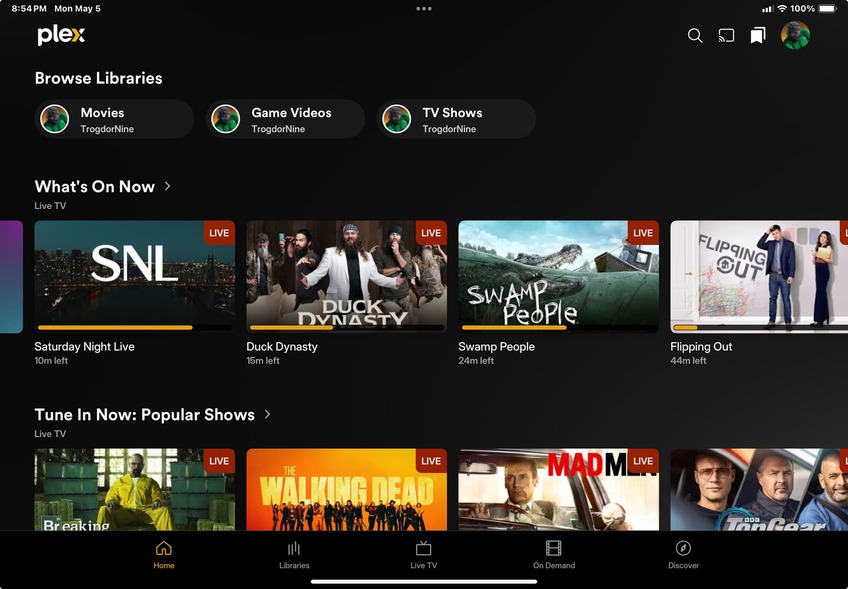
Have to agree, this update genuinely sucks ass. I just forcibly took it and used it for the first time - on iOS, all the crap I removed from my Home screen is now showing and cannot be removed. I checked every setting on the server and on the device. My libraries are there, but “Recently added” and “Continue watching” are gone and I have to manually open up individual libraries while all this Rental etc. stuff from the internet takes up the home screen.
I’ve used Plex on Xbox and on Windows/browser in the past 24 hours and neither one of them is like this. The second screenshot is the way Plex normally looks after I removed all this crap on the home screen - Popular Shows, What’s On Now, etc. are now un-changeable parts of the home screen on iOS app.
How do I get rid of all the crap that is. Is displayed whenever I open the app? I have to hunt for my own libraries and then for the video I was watching every time I open this app.
I get it, you want/need to make more money but trying to scrounge from your existing users (specially life time users) will backfire.
As of now, I’ve started telling my friends, a lot of them) to avoid Plex explicitly because of this.
You can’t, that’s what my post just now was about. I’ve scoured every setting in the app and in the server, I’ve cleared the app cache, deleted it and reinstalled it. The old home screen is gone in the app. It will show your libraries at the top but that’s the only place they’ll ever be,. Even the screenshots they show when you install the app now and swipe through the “Welcome to the new Plex” don’t match the actual app. This is on iPad, I haven’t looked on my iPhone but I’m betting it’s the same.
I may cancel my sub after this. If my friends have a crap experience trying to navigate content, then there’s no reason to be paying for it. They already have a hard enough time finding content when it’s easy to find.
You do it from the server side (disable Online Media Sources in the admin tool) and you favorite your libraries (tap and hold “Libraries” at the bottom of the screen) to get just your libraries and that should get Continue Watching to work as well.
You need to mark libraries as favourites for “continue watching” or “recently added” to show up. Long pressing on the “libraries” button at the bottom and then pressing see all libraries should let you do that.
Agreed! The app is terrible now. I can no longer cast from my phone to my Sony Bravia tvs. Can no longer “start at the beginning or watch live” while a recording is still underway. The app is literally broken and useless now. Curious if this is an attempt to purposely be broken so we are forced to purchase these options in the future. Think it’s time to move on to another platform.
I don’t believe it’s intended behaviour. I didn’t have to favourite previously pinned libraries, it just carried over. So it may be a bug. If not, then I agree the initial onboarding should be better.
Live TV seems even more broken on iOS than Android, both are bad though. In iOS I am having issues if a Plex is already tuning a channel for another user, that the use on iOS can’t select join in progress or watch live, it just defaults to live. On Android mobile it just goes to live and also doesn’t let you select anything.
@plex team, when is this crappy iOS version fixed?
I’m not a beta tester that signed up to test your first draft, first sprint version. I’m a paying customer that expects a finalized product that when upgrades has at least the same features and functionalities as previous versions. I’m ok if want to go ahead with a visual upgrade, but you need to make sure it isn’t technically the level of a primary school bug-fest. I really expected better quality control.
Don’t know about you guys, but I am having problems with the following.
Switching from Phone Audio to Bluetooth (Or vice-versa)makes the sound stop, I have to pause, play again and usually the sound goes out of sync, so I have to close the app altogether and start the episode over again.
Sound is frequently out of sync from the start. I have to restart the app.
If I pause, let the screen go dark and come back to it, it sometimes fails to bring back the image. I have to close the app and restart the episode.
I’d rather the app stops play when the screen goes dark and me manually resuming from there instead of these issues.
Overall it works fine, but these things are annoying.