Hello! I’m running 4.37.2 on Ubuntu 16.04. I had to re-IP my network from 192.168.100.0 to 192.168.200.0. Now when I bring up Plex in any of the apps (Roku/IPhone/IPad) or browser and I don’t see my of my content. (I do see Plex provided content, like podcasts). Instead I see "daisy is currently unavailable. Verify you have a network connection and that the server is online, or see our tips for further assistance.
Yes, I have restarted the network on daisy.
Yes, I have restarted plexmediaserver.
Yes, I can otherwise access the Ubuntu box (via ssh etc.).
Yes, the drive with the content is mounted:
root@daisy:/mnt/sdc# cd plexroot/
root@daisy:/mnt/sdc/plexroot# ls -l
total 272

drwxrwxrwx 47 plex plex 184320 Jun 27 23:43 movies
drwxrwxrwx  3 plex plex   4096 Mar  7  2018 Music-Concerts
drwxrwxrwx 98 plex plex   4096 May 27 11:26 TV

...
Yes, I can see the processes running, along with a lot of “got nothing” messages:
root@daisy:/home# service plexmediaserver status
● plexmediaserver.service - Plex Media Server
   Loaded: loaded (/lib/systemd/system/plexmediaserver.service; enabled; vendor preset: enabled)
   Active: active (running) since Fri 2020-07-10 19:47:41 PDT; 1 day 19h ago
  Process: 11534 ExecStartPre=/bin/sh -c /usr/bin/test -d "${PLEX_MEDIA_SERVER_APPLICATION_SUPPORT_DIR}" || /bin/mkdir -p "${PLEX_MEDIA_SERVER_APPLICATION_SUPPORT_DIR}" (code=exited, status=0/SUCCESS)
 Main PID: 11538 (Plex Media Serv)
    Tasks: 78
   Memory: 284.6M
      CPU: 1h 8min 23.056s
   CGroup: /system.slice/plexmediaserver.service
           ├─11538 /usr/lib/plexmediaserver/Plex Media Server
           ├─11569 Plex Plug-in [com.plexapp.system] /usr/lib/plexmediaserver/Resources/Plug-ins-77cb9455c/Framework.bundle/Contents/Resources/Versions/2/Python/bootstrap.py --server-version 1.18.7.2457-77cb9455
           ├─11615 /usr/lib/plexmediaserver/Plex Tuner Service /usr/lib/plexmediaserver/Resources/Tuner/Private /usr/lib/plexmediaserver/Resources/Tuner/Shared 1.18.7.2457-77cb9455c 32600 /waitmutex
           ├─14139 Plex Plug-in [com.plexapp.agents.thetvdb] /usr/lib/plexmediaserver/Resources/Plug-ins-77cb9455c/Framework.bundle/Contents/Resources/Versions/2/Python/bootstrap.py --server-version 1.18.7.2457-
           ├─14616 Plex Plug-in [com.plexapp.agents.localmedia] /usr/lib/plexmediaserver/Resources/Plug-ins-77cb9455c/Framework.bundle/Contents/Resources/Versions/2/Python/bootstrap.py --server-version 1.18.7.24
           └─14649 Plex Plug-in [com.plexapp.agents.plexthememusic] /usr/lib/plexmediaserver/Resources/Plug-ins-77cb9455c/Framework.bundle/Contents/Resources/Versions/2/Python/bootstrap.py --server-version 1.18.
Jul 12 15:03:00 daisy Plex Media Server[11538]: Got nothing for: Bugs Bunny Nips the Nips Banned
Jul 12 15:03:00 daisy Plex Media Server[11538]: Got nothing for: Bugs Bunny Rabbit Stew
Jul 12 15:03:00 daisy Plex Media Server[11538]: Got nothing for: Bugs Bunny Rhapsody Rabbit
Jul 12 15:03:00 daisy Plex Media Server[11538]: Got nothing for: Bugs Bunny Whats Opera Doc
Jul 12 15:03:00 daisy Plex Media Server[11538]: Got nothing for: Bugs Bunny Whats Opera Doc
Jul 12 15:03:00 daisy Plex Media Server[11538]: Got nothing for: Bugs Bunny 51st Special Cartoon Network Banned
Jul 12 15:03:00 daisy Plex Media Server[11538]: Got nothing for: Bugs Bunny Foghorn Leghorn Weasel While You Work
Jul 12 15:03:00 daisy Plex Media Server[11538]: Got nothing for: Bugs Bunny Mpeg4 Baseball Bugs
Jul 12 15:03:00 daisy Plex Media Server[11538]: Got nothing for: Bugs Bunny Baseball Bugs Xxxx
Jul 12 15:03:00 daisy Plex Media Server[11538]: Got nothing for: Bugs Bunny and Marvin the Martian Haredevil Hare
Any assistance is appreciated!
Mod-Edit: took the liberty of adding some code tags around your snippets to make it them easier to read.
Plex is not a big fan of different subnets… so if your server is on 192.168.100.x and your Plex client on 192.168.[101-200].x they won’t see each other by default.
As a Plex Pass member you can specify that certain subnets are to be considered part of the same LAN (see Settings > [Server Name] > Network > LAN Networks on your Plex Media Server).
Comma separated list of IP addresses or IP/netmask entries for networks that will be considered to be on the local network when enforcing bandwidth restrictions. If set, all other IP addresses will be considered to be on the external network and will be subject to external network bandwidth restrictions. If left blank, only the server’s subnet is considered to be on the local network.
My apologies for not being clear. Everything is on 192.168.200.0. Server and clients. The 192.168.100.0 network is no longer used. The new router I got felt it was conflicting with the 192.168.100.1 IP the modem on the other side of the router was using. Tried to change things up on the modem side but in the end I lost that battle, got a moving van, and everything on this side moved to 192,168.200.0. So everything is on the same subnet, just a different one than before.
I replaced my old dlink DIR-655 with a TP-Link AC4000 since the dlink hasn’t seen a firmware update in too many years and it has known vulnerabilities. So there’s only one router on the network, right where the old one used to be.
Modem -  192.168.100.1
    |
Your router (also 192.168.100.1)
    |
Your devices
Please show me the topology. I think the problem is that you have a router inside the modem (which is a NAT router by itself where you should only have a switch)
May i make a recommendation to grossly simplify this for you?
Return the new router.
In its place, buy an 8 port unmanaged gigabit switch (I can give you some models if you like)
Edit the main modem’s LAN IP to be 192.168.200.1 (to match your equipment). If you cannot, change your equipment to match the 192.168.100.1 of the Internet modem/router.
Thanks for the advice. I’m actually smitten on this router. It has many features I find useful. Every other device on my network and all the other servers running on daisy (httpd, sshd, etc) are working fine and are reachable from Internet using port forwarding. I don’t want to get rid of the router just because Plex is having trouble. I’m fairly certain there are others out there using this router with Plex successfully. Again, I appreciate your advice and the time you put into crafting your responses.
Double routers means you can’t have automatic Remote Access . You’ll need two sets of manual port forwarding.
The inner router will need be on the 192.168.100.x WAN (DHCP from the ISP modem – to match whatever it provides) and then your new router can be on the 200 (or whatever you desire as long as it’s not the same as the Modem.
What specifically isn’t working? “No Content” is vague
The modem (Motorola Surfboard) gets a DHCP address from the ISP.
Modem talks to new router using 192.168.100.1 (I have tried to configure the modem to use a different IP but it seems to be non-configurable).
Then the new router, the only router on the network, talks to everything else over 192.168.200.0. The router is also doing DHCP duty with most clients getting pooled addresses and daisy having a DHCP reservation on 192.168.200.5.
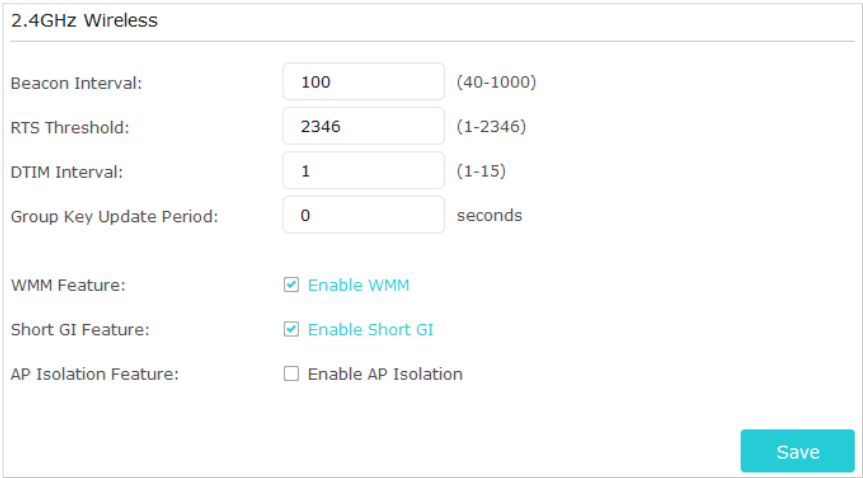
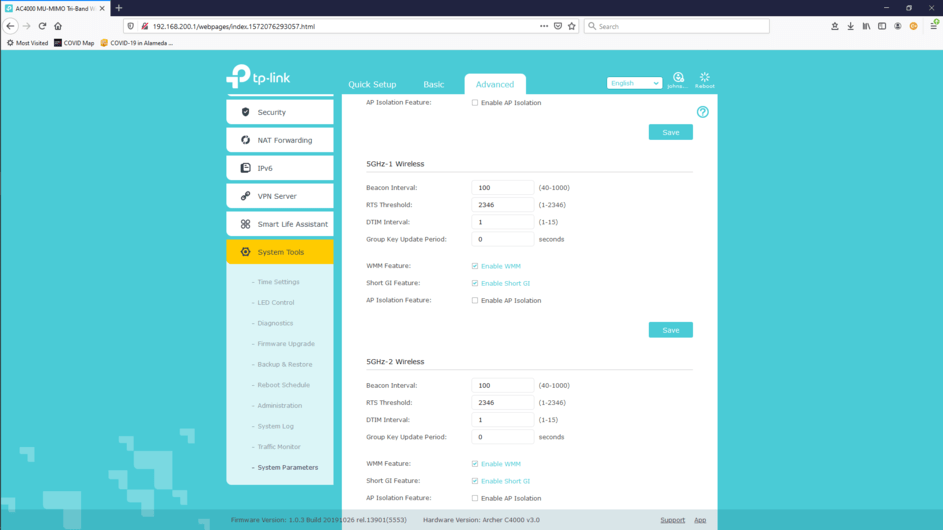
The TP-Link AC4000 has an AP isolation feature; if enabled, it may need to be disabled for wireless clients to be able to communicate with other devices on the network.
If it has separate 2.4 GHz and 5 GHz configuration sections, make sure it’s disabled in both.
You may also want to consider placing your existing modem/router combination (the Motorola Surfboard) into bridge mode. That, or configure a DMZ host on it pointing to the WAN IP address of your new router.
Placing the Motorola modem/router into bridge mode would essentially disable its router functionality. Setting up a DMZ host would automatically forward all unsolicited inbound traffic to the designated host/IP address.
Hi Philip. Thanks for the input. AP Isolation is off on all three bands. The server itself is on a wired segment. I’ll look into bridge mode for the mode.
And the problem is: When I re-IPd my network, sure daisy got her new IP of 192.168.200.5, replacing 192.168.100.5. What she didn’t get was a new default route so she had no idea where the gateway was:
root@daisy:/tmp# ping 1.1.1.1
PING 1.1.1.1 (1.1.1.1) 56(84) bytes of data.
From 192.168.100.5 icmp_seq=1 Destination Host Unreachable
From 192.168.100.5 icmp_seq=2 Destination Host Unreachable
From 192.168.100.5 icmp_seq=3 Destination Host Unreachable
root@daisy:/etc# ip route show default via 192.168.100.1 dev eno1 src 192.168.100.5 metric 202
10.8.0.0/24 dev tun0 proto kernel scope link src 10.8.0.1
169.254.0.0/16 dev eno1 scope link metric 1000
172.16.61.0/24 dev vmnet1 proto kernel scope link src 172.16.61.1 metric 204
172.16.202.0/24 dev vmnet8 proto kernel scope link src 172.16.202.1 metric 205
172.17.0.0/16 dev docker0 proto kernel scope link src 172.17.0.1 linkdown
192.168.100.0/24 dev eno1 proto kernel scope link src 192.168.100.5 metric 202
192.168.122.0/24 dev virbr0 proto kernel scope link src 192.168.122.1 linkdown
192.168.200.0/24 dev eno1 proto kernel scope link src 192.168.200.5
root@daisy:/etc#
Removed prior default route:
root@daisy:/etc# ip route del default via 192.168.100.1 dev eno1
root@daisy:/etc# ip route show
10.8.0.0/24 dev tun0 proto kernel scope link src 10.8.0.1
169.254.0.0/16 dev eno1 scope link metric 1000
172.16.61.0/24 dev vmnet1 proto kernel scope link src 172.16.61.1 metric 204
172.16.202.0/24 dev vmnet8 proto kernel scope link src 172.16.202.1 metric 205
172.17.0.0/16 dev docker0 proto kernel scope link src 172.17.0.1 linkdown
192.168.100.0/24 dev eno1 proto kernel scope link src 192.168.100.5 metric 202
192.168.122.0/24 dev virbr0 proto kernel scope link src 192.168.122.1 linkdown
192.168.200.0/24 dev eno1 proto kernel scope link src 192.168.200.5
root@daisy:/etc#
After removing old default route, above, add proper default route:
Thanks for the assist everyone. I just needed to get into a good ol’ troubleshooting session. So Plex comes up clean on this. Wasn’t Plex’s fault. None of daisy’s stuff could see Internet.
BUT … that begs the next questions. Didn’t I get Plex so I could run my own media server within my LAN? If I am watching a movie and both client and server are on the same network then why is there this stupid friggin Internet access requirement? Now I am getting concerned aboout privacy and what data Plex are capturing from me.
So the question now is: How do I run Plex, view my media, within my LAN, without an Internet connection. Autonomy is important to me.