Is there any way to show ‘up next’ or ‘recently added’ episodes from my various libraries on the mobile app homepage? The new homepage is 100% irrelevant to me now - it used to behave like the TV app and let me easily continue watching series or watch new stuff I’ve added to my fileserver but now I have to go to the ‘recommended’ tab of each separate library. It’s a step backwards, I have no interest in watching anything shown on the homepage, I want to watch ~my~ stuff, not on demand TV. Can we please have the ability to edit what appears there?
You need to add Libraries that are relevant with Favourites.
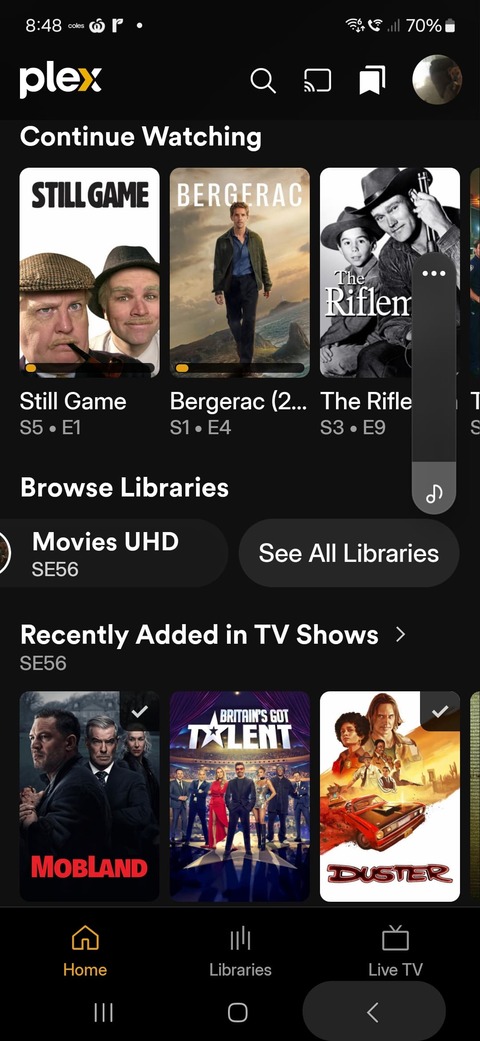
So on Home page Press See All Libraries to start.
Add your Favourites, via ⋮ Ellipsis.
The order required for home page, Click on Libraries bottom of display then click on Library (example TV shows) top of Display Left.
Click on Reorder at bottom, drag to order from Grid Icon on the right,confirm.
On Demand can be turned off at Server Level. Online Media Sourcesin Server settings.

After fixing all that, Message me to find out were Player settings and Downloads are found.
Cheers
Thanks so much for replying, I really appreciate it. It seems I’m using a different version as I don’t have a ‘see all libraries’ button after the horizontal scrolling ‘Browse Libraries’ row which is right at at the top of my home page under the Plex logo.

I’ve turned off everything in ‘online media sources’ and all I see now is the horizontal ‘browse libraries’ row, but with no ‘see all libraries button’ at the end’.
1 Like
Use any library and Long press Library Title top Left to being Home screen customisation if I remember correctly.
If you wish to update to best version currently available go to Play storeclick on plex installed for Beta instructions and download the latest Beta. It’s Free.
2025.17.0 (966828405). It is by far the best version yet and 18 can not be far away which is available for iOS devices yesterday. I have that on my iPad Pro M4 and it is working well except for some Live TV features
To know which version your running…
Avatar (top Right) / About
Many thanks, favouriting the libraries on the beta version worked. Perfect!
1 Like
on iOS there is still a bug, that after every single App start the favoriting of the libraries has to be done again…
what version of the app are you on now? 18 is available on TestFlight
This topic was automatically closed 90 days after the last reply. New replies are no longer allowed.
