So the new Plex app for android under downloads how do I delete media without deleting everything else in downloads. There are on options to delete individual music (songs), TV show, TV episodes, albums, series, ect. unless you delete all downloads?
You can only delete download jobs, not individual download items of those jobs:
- if you have downloaded a single movie, you can delete that movie (movie = download job)
- if you downloaded an album, you cannot download individual songs/tracks from that album (album = download job)
I have download TV show and Movies and Music at different times but I cant delete any of those unless I delete all my downloads. Example download some TV show At then at the end of November and before that I had some other music and then at the being of December I download some Christmas song. I Can’t delete the Christmas song from my downloads with out deleting everything else I have download before and after .
How did you try to delete them?
Have you seen the Items tab in the download section and can you see the option to Delete from the context menu (long press) or when swiping an item to the left?
From the menu>Downloads on Device>the 3 dots on the top upper right corner Delete offline content. That’s the only way I found you can delete and it delete all of your downloads.


You’re on the Libraries tab in the Downloads section.
Switch to the Items tab to delete “download items”.

Thank you. That worked. I thought you were taking about like under the 3 dots. I was not looking down there. It usually says recommended. Now I just have to filter through my media. I was not looking down there.
Also if you are offline, you can long-press on an item and there is an option to delete. I’m not sure why this is only available when offline?
That option isn’t restricted to being offline. I’m online and have an option to delete the download jobs after long-pressing them.
When online and in Downloads → Libraries → Movies if I press and hold on a movie there is no option to delete, only Play/Queue options.
When offline and in Downloads → Libraries → Movies if I press and hold on a movie there is an option to Delete, and options to Play/Queue.
Yes, you can delete from the Items section while online and offline, however for me on an android device the option to Delete a single item from the Library is only available when offline.
Seems you’re mixing up the Library vs. Items tabs in that Downloads section. There’s no delete option in Library… just in Items – independent of your online/offline status.
No, I’m not mixing them up. Attached are the screenshots. When offline there is a Delete option after long pressing on an item in the library. When online the option is not available.
The offline one you can see in the top right the airplane mode, and the online one you can see my wifi connection.


I’ve forwarded this for clarification. For all I know there should be no option to delete downloaded items from the Library tab of the Downloads section.
I’m wondering if what you see is maybe the option to delete that item for good from your server (I have disabled that option on my server, which could explain why I’m not seeing this; though I don’t think that should be offered in the downloads section)
Pretty sure this is for deletion off device only. I’ve done the exact steps taken and I get message prompts indicating exactly what will be happening if I move forward with the deletion. However, I will say that I have received an additional error indicating that there was an issue with not processing that deletion as required.
I don’t have my Plex Server setup with Remote Access and I DO NOT have media deletion active (checked) in the server settings. I also only received the Delete option while on Airplane Mode. This deletion option in the menu is NOT available when back on LTE cell service.
But there is definitely something that won’t allow the PLEX app to delete the video file off the device. The mechanisms involved are not working properly.
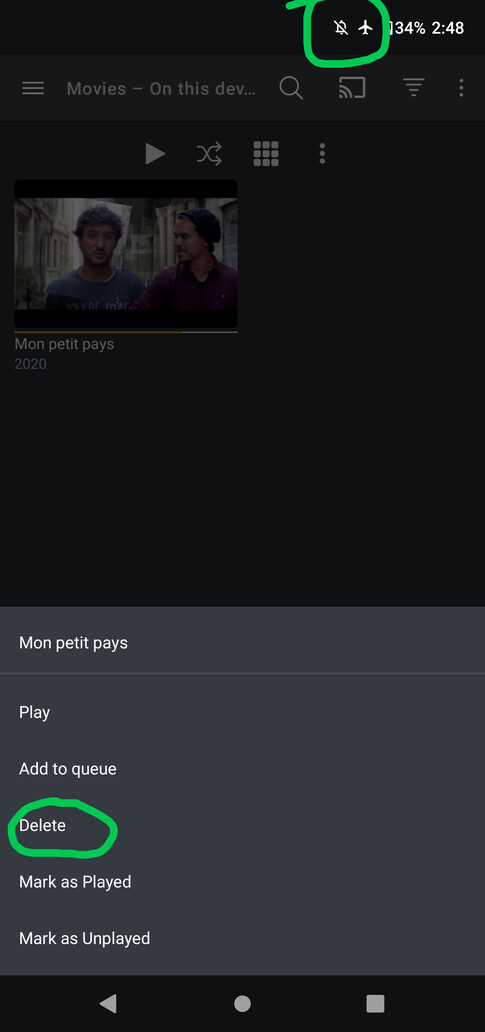
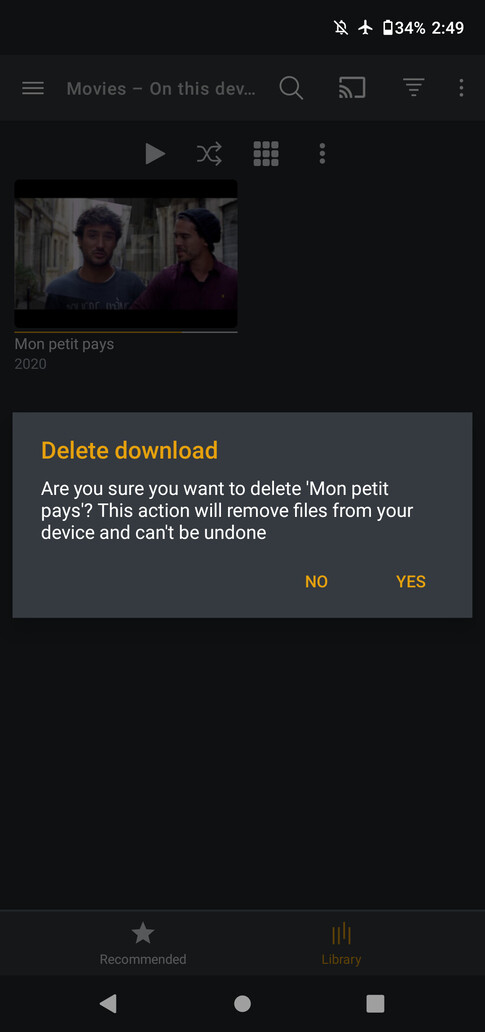

When I turn off Airplane Mode and return to my LTE cell service as I said before above, the option to delete the download off the device is no longer displayed in the menu. Piggy backing what @ottoguy has tried to imply originally. I’d say this is abnormal behavior.
The screenshot below is:
Downloads (On Device) →
- Downloads page
- Select Movie Library
- Press and hold video thumbnail
- Menu with no option to Delete

This topic was automatically closed 90 days after the last reply. New replies are no longer allowed.
