
I didn’t match them manually I just renamed the movies and scanned my library and this only happens with the 2 movies that didn’t match properly.
I just tested the fix match manually and this works fine, I can see all the posters & backgrounds of the new movie. The only problem I saw was that the selected poster & background of the previous matches are also visible in the posters & backgrounds of the new movie all the other ones who weren’t selected have been removed. (and I cleaned the bundles an restarted the PMS after each match). This are the files that are kept for ant-man when I manually match that movie to something else. You can see that it only kept the selected poster and background all the other ones have been deleted.
d1050a480be4ef7bd0bbfa99cd230d9d0d1684d.bundle.zip (1.4 MB)
I hope that the new scanner agent would read and write NFO files for compatibility with other applications and easy migration to other hardware. Those NFO files should be stored with the media, could be user select-able I would guess.
All my movies have all the information in NFO files currently because I use TMM to manage my movies because Plex doesn’t or won’t do it. There are so many features that were asked for over the years to add to the core movie experience that just were ignored.
I hope this is a positive sign of change on Plex’s part.
So, it looks like everything matched correctly, but like 1/10 of them don’t have a movie poster and instead are a screenshot or maybe a small part of the movie poster. here is a screenshot. Why would this happen?

It’s likely the same bug with local artwork. It’s picking up fanart images as posters, I have fixed this and a build should be out later today to test with.
@drzoidberg33 I had a very similar issue to alexandre. 3 of my 2259 movie files had mistakes in their filename. After running the scanner I was able to use the “unmatched” and “duplicate” filters to find the problem files. I then corrected the filepaths/names and updated libraries. The scanner then correctly identified the movies, however, it did not update the poster or show alternate options when manually trying to select a poster. I cleaned bundles and optimized database, then updated libraries again, still no luck.
For context here is one example, I had M:\Movies\The Amazing Spider-Man (2014)\The Amazing Spider-Man (2014) - which after scanning I updated to M:\Movies\The Amazing Spider-Man 2 (2014)\The Amazing Spider-Man 2 (2014). I could list the other movies if you think it will help, but because it was a naming mistake on my part I didn’t think it was relevant.
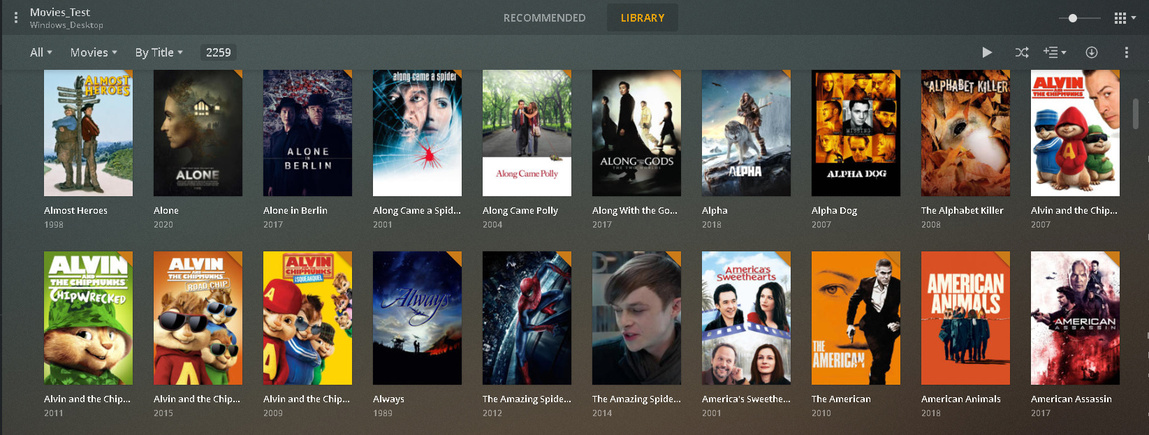
Thanks for the report! This is next on my todo list to look at.
I have movies where the title used is the french canadian instead of french. Match is OK but for Jurassic World (tt0369610), localization for title is not good
One thing i would LOVE to see with this agent is the ability to scan Kodi movie.nfo files for the imdb id or tmdb id only and populate the metadata from the multiple sources.
Before people start questioning why i use NFO files, there is a simple explanation for this. I have a MASSIVE library. I have created all the nfos with the proper movie so anytime i need to rebuild the library because of mishaps or anything else, i have all the proper information.
Without the NFO, there is no way for me to see that this movie or that movie was wrongly matched. Having 50 movies is easy to see what is wrong but when your library is in the 5 digits, it’s virtually impossible.
Hope you guys take this into consideration. Right now i am using the xbmcnfoimporter agent but it would be nice to use the native agent
Just tried it out and the scanning speed is impressive. The accuracy is also much improved. Previously my libraries would have issues with TV Movies. I didn’t want to put them in with TV shows because they were released as a single movie (Stephen King adaptations). Great work!
I found your issue with the missing posters/art when renaming the files. Will be rolling out a fix for that tomorrow hopefully.
I’ve updated the download links in the first post - this build should fix the problem with local fanart being applied to the movie posters.
Thanks, we’ll take that into consideration with our localization efforts. We’re aiming to improve with regional language differences like this and is already being discussed.
We already scan any .nfo file in the movie folder and extract the imdb id to use for matching. We don’t currently use tmdb id but that is something I’m looking on adding.
Thanks for the kind words, there has been a lot of work behind this and it’s good to see the team’s efforts starting to pay off. This new set up also makes is a lot easier for us to fix things a lot quicker and more easily.
More of a silly question…
If there’s multiple local posters (or any kind of local artwork) named in accordance with the naming schema (e.g. poster.jpg, poster-2.jpg, poster-3.jpg… poster-n.jpg), my current logic is to add newer (nicer/better) versions with a higher number. Does Plex pick the 1st file (e.g. poster.jpg) on purpose over “later” versions?
Maybe I’ve just interpreted too much in those sequence numbers 
This isn’t new thing… it only came back to my attention when starting to setup a new test-library.
There isn’t a specific order right now, it will just pick whichever one gets listed first in the folder, although it is a good point you bring up as it would be nice to know which one would be selected first and I don’t currently see anything about this on the support page.
I can add this to my todo list.
It would be particularly nice to know which poster came from which source. So I can tell for sure which ones are my local posters and which came from somewhere else.
Bonus points for some clues about file size and/or pixel count.
First observations:
- very fast, very accurate – like it
- maybe more of a Plex Web thing… even after processing the files (displayed in the activities popup), Plex is still downloading more information. This also includes local extras etc.; those showed up some minutes after the “scan” was done (and already had me worried)
- in older versions, there was a final message saying "more content might still be downloaded
I’ve found a number of movies that properly matched and downloaded metadata except for posters (even if those are available via The Movie Database (if that’s still being used); e.g.:
- https://www.themoviedb.org/movie/653528-family-guy-blue-harvest
- https://www.themoviedb.org/movie/625651-something-something-something-dark-side
I have currently setup 2 libraries – one in German and one in English. However both libraries only match videos in English language (posters however are downloaded in German if available / no local poster overriding this).
Same for Fix Match (despite defaulting to German in the 1st library when checking search options) – results are all in English
=> titles are actually showing in German; descriptions don’t.
Installed the latest version PlexMediaServer-1.19.5.2875-671c4eae8-x86
Removed the first test Movie library…
Verified that send crash reports and enable debug logging were enabled.
Created a new Test Movie library.
This time it seems to be even faster…
Using less memory
CPU has a lower usage around 80% vs 90% before
network is much lower…
disk I/O is lower…
It’s loaded over 800 movies and I haven’t see a single frame vs poster at this point
It also seems like it’s downloading the metadata as fast as the scan since they seem to be almost in sync.
Last time the scan finished long before the metadata was all loaded…
I am still seeing lots of posters when I choose to edit a movie. mainly duplicates
I’ll update once it finishes…
