Server Version#: 1.40.1.8227
Player Version#: Plex Web 4.126.1, Plex for Win 1.89.1.107-20abacd1, Plex for Roku 7.16.5, Plex for Android 10.11.0.183
I have a new Plex server instance in a Debian 12 LXC on Proxmox. This is a fully new Plex server instance with no database migration, and I have copied my recorded “TV Shows” library from my old Plex server instance to this new instance.
The problem is that when playing TV Shows from this new Plex server instance it is showing closed captions by default for all of my Plex Home users. The admin user does not show closed captions by default when playing from this new instance.
Interestingly the same Plex Home users do not get closed captions by default when playing from my old Plex Server (also on Linux). All of these behaviors happen when using clients Plex Web, Plex for Win, Plex for Android, and Plex for Roku.
I’ve tried changing/updating the subtitle settings under the user accounts, and also have tried changing the “Languages” settings under the server settings.
I have noticed that there does appear to be a bug with the “Languages” settings where if I make changes to anything for one server, and then switch to the other server, the “other” server will show the same changes.
The UI makes it appear that different Plex Servers should be able to have different “Languages” settings, so I’m wondering if this is a bug and these setting changes are not being applied as they should.
@BigWheel - Thank you for your response! After more investigation I’ve narrowed it down to two distinct but related issues.
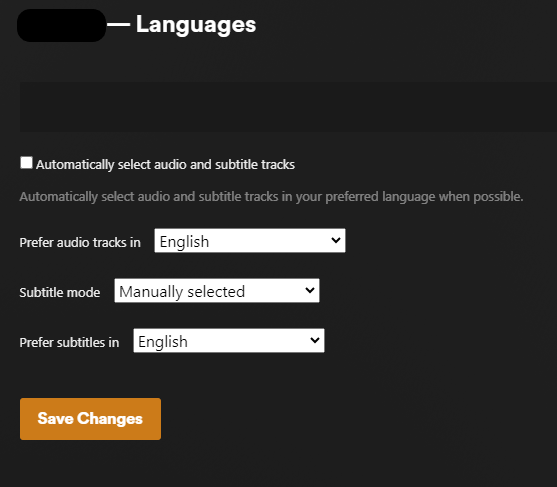
The first is that any changes made in the “Settings → (Server) → Languages” settings for a server apply to both of my servers. (Screen snapshot below.) For example, if I make changes in the screen Settings → “Server 1” → Languages, click on “Save Changes”, and then go to Settings → “Server 2” → Languages then the changes for “Server 1” have been made also for “Server 2”.
The second is that for my new Plex server, for one of the managed users in my Plex Home, all imported and newly recorded episodes in both my TV Shows and Movies libraries are defaulted to showing subtitles at the episode level. This managed user in Plex Home has existing for years, and has never had (and does not currently have) this issue with my old Plex server. Another of my managed users in Plex Home doesn’t have this issue. This is a large number of episodes for me and I can’t find a way to mass change it in the GUI, so I’m going to try to find this field in the database. I’m also going to have to see if this continues to happen as I add new files/recordings.
I’ve gotten to a workable state on this for my use case, but I can’t declare this resolved because there are a couple items that still feel like bugs to me. I’m documenting what I experienced and found in hopes that this will help someone else that encounters this problem, and that these issues may be addressed. Please let me know if there is more information I can provide.
TLDR;
In Plex Web → Settings → (Server Name) → Languages the settings appear to be server specific in the GUI if you have multiple servers, but for me a change in any fields on this screen for one servers applied the change to all servers for my account.
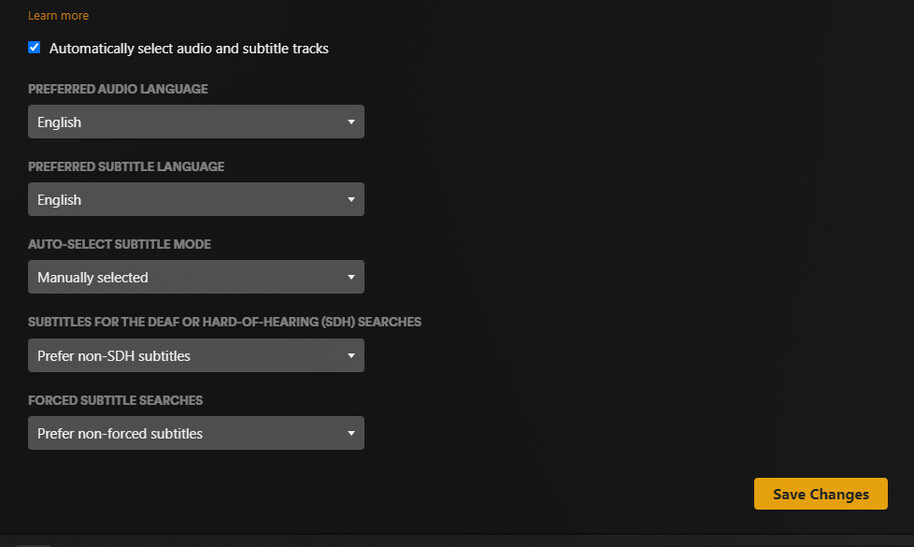
There are subtitle settings that are used, but may not be visible in the GUI. These settings are in Plex Web, then click on your user icon at the top right, then “Account Settings”. Under “AUDIO & SUBTITLE SETTINGS” if “Automatically select audio and subtitle tracks” is unchecked then the settings are hidden, though still needed.
For issue #2, the workaround is to check the box next to “Automatically select audio and subtitle tracks”, then make the changes needed to the fields that become available, click “Save Changes”, then uncheck “Automatically select audio and subtitle tracks” and then click “Save Changes”.
Click the details below if you dare.
Probably more info than you want!
Issue #1: As previously described, any change to “Settings → (Your server name) → Languages” when a change is made for one of my servers, it is instead applied to both of the servers under my account. While I don’t have a need to have these settings different between servers, I can see use cases where this would be needed.
Issue #2: Under User → Account Settings → Audio & Subtitle settings, if you have “Automatically select audio and subtitle tracks” unchecked then there are settings that are hidden/not available but that I found are still used and impact functionality.
What I found when I started looking in the database is that in the “accounts” table, users that were not defaulting to showing subtitles had different values for fields that were hidden in the GUI. Despite “auto_select_subtitle” not showing in the GUI, I could see it was set in the database to “1” for the user where I couldn’t turn off default subtitles, and “0” for users that didn’t default to showing subtitles as in the screen snapshots below.