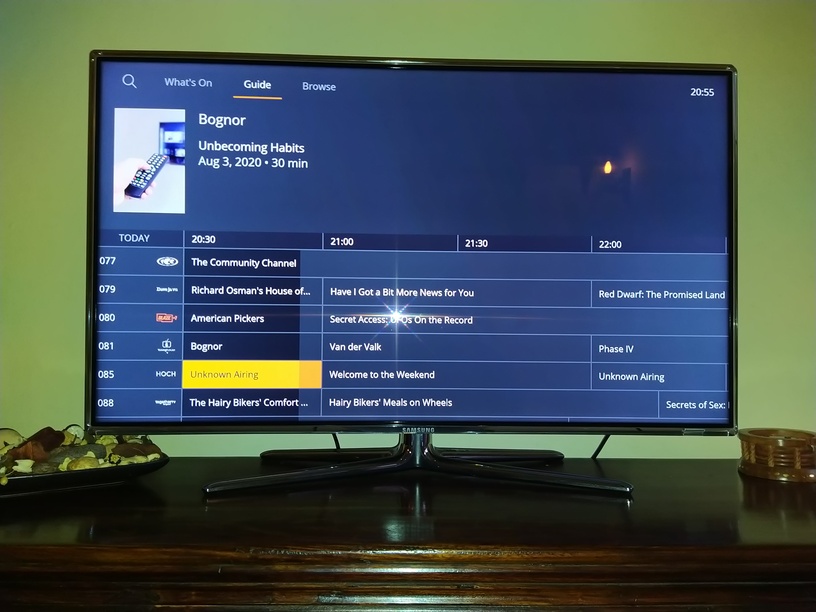
a) If the guide contains an “Unknown Airing” when scrolling through the channel list, then the programme from the previous channel is still displayed in the summary at the top of the screen rather than an “Unknown Airing” placeholder.
This can be seen in the following image where Channel 081 has a programme called “Bognor” and I have moved the highlighted channel to Channel 085, but the summary has not updated so it still shows the image and information relating to “Bognor”.
Ideally the guide wouldn’t contain any “Unknown Airings” but that is another issue
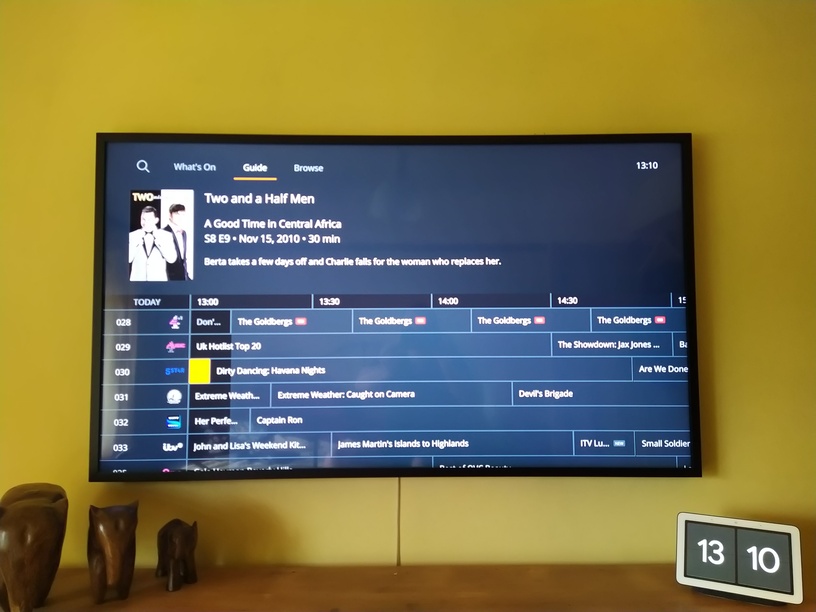
b) If the guide contains a programme which finishes after the start of the current 30 minute window but has already finished it appears to be highlighted in preference to what is currently showing.
For example: I have just moved the highlighted channel from Channel 029 to Channel 030 and as you can see, in the following window, Dirty Dancing Havana Nights in the correct show for the current time but the previous programme (Two and a Half Men) gets highlighted in the grid and it’s information displayed in the summary area.
These images are of my two Samsung TVs - The first is connected to my Xbox One so it shows the Xbox One Preview App whilst the second is of my The Frame and is showing the native Tizen 5 Preview App. Both problems exist in both apps.
This issues are very minor compared to other issues / unimplemented features but I just wanted to mention them so they are captured somewhere
@sLumpy
Ever since Live TV has been changed to forcing a transcode, I’m having buffering issues within 15minutes of playing, to the point where it ends playback with a failed message.
I’m not sure what’s causing it, but It was running fine when it Direct Played. I’m having to use a Chromecast for LiveTV.
Edit-
I also have the same issue with the Xbox Tizen App. My brothers Shield, all Desktop apps and the Chromecast all play fine.
Can you provide more info? Logs (enable log to server in the app first), xml, and TV model would help, otherwise I’m shooting blind trying to reproduce.
Not likely. I’ve logged an internal issue to fix music player stopping when browsing photos though.
We have a fix for this for 2020 TVs in the next release.
I assume you’re on a 2020 device? We had to switch from DASH to HLS for playback, otherwise you get stuttering and video playback issues. We’re still investigating with samsung, but HLS is temporary for now, since you get issues like the one you’re experiencing.
Does this happen with the non-preview version of the app too? We’re not doing anything different here that I know of.
“When playing an AVI video, resume or skip forward more than a few minutes, I get a playback error after some time ‘buffering’. It looks like a timeout?”
It’s actually become worse with LiveTV since the latest release. It used to go for around 15 minutes before buffering, now it’s unwatchable at every few seconds. This is with both Early Access and the old app. The Xbox which also has the new Tizen App still goes for around 15 minutes, but then starts buffering as well. As I noted, other devices are working fine.
Thank you for your feedback so far, today we’ve released an update that will redirect current Tizen users from the existing public release to this preview by default. You will still be able to opt-out of the preview and return to the existing public release via the user menu.
If you have additional feedback to share for this preview, please open a new thread using the tizen-preview tag with the relevant information, including samples for playback issues.