Server Version#:1.40.3.8555-fef15d30c
Player Version#:[null]
OS: Windows Server 2022 Datacenter
Issue: unable to create a new server
Steps to reproduce issue:
- Downloaded the media ( PlexMediaServer-1.40.3.8555-fef15d30c-x86_64.exe ) from the downloads page.
- Installed PMS to non-standard location and followed these instructions to create the appropriate registry key.
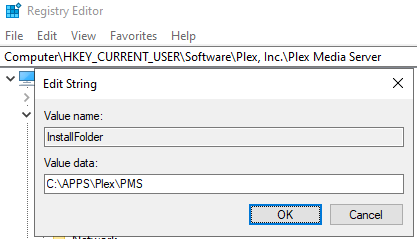
- Started PMS
- Authenticated with my Plex account after the browser popped up to https://app.plex.tv/auth/…
- Then this pinwheel’d forever

- While waiting, I noticed the “More >” tab appeared and disappeared frequently:


- Next, I opened the System Tray and launched Plex by clicking “Open Plex…”

- Upon launching the local Plex installation from the previous bullet point, I was met with the “Not authorized” message.
- I performed what is stated in the support article.

- After this, I started PMS again, logged in and the issue persists.

I have tried this multiple times on multiple machines and tried older binaries, all with the same result. What’s interesting is, my old server doesn’t appear to exist. When I click on the “More >” tab, I can see my friends’ servers listed and below that I just see “Plex” and unable to interact with this:

I have also tried claiming a new token using plex.tv/claim, however, this seems to relate to situations where there is a server that just needs to be reclaimed. The support articles seem to indicate there is a prompt to enter a claim token, but I’ve yet to be presented with one. My server doesn’t seem to exist and I don’t have the option to create a new one. Regardless, I tried creating a new token and used a SSH session to apply it like I’ve seen in other discussion threads and my result is always “401 Unauthorized” when using the command curl -X POST “http://my_host_name:32400/myplex/claim?token=newly_created_token” where “my_host_name” is my server IP address & the “newly_created_token” is always something “claim-*”
I also tried sifting through the logs using this support article and it doesn’t appear to be certificate related as I found where Plex identified it was missing a cert, generated a new one and installed it successfully.
Again, this is a new PMS installation on a new server. (My old server bit the dust.)
I’ve spent a number of hours investigating this so I figured someone else my have experienced it and can lend a hand.
