OK, I’m taking the dive into Plex. But, I need guidance.
My digital environment.
Windows 10 desktop
iPhone 6s with Purchased Plex app installed
Samsung Smart TV with the ability to install the Plex app into TV or ROKU.
1st: question. I’m confused which plex .exe file to install on my Win10 desktop:
Plex-1.6.5.1097-3bb9dc68-x86_64.exe
OR
PlexMediaServer-1.18.9.2578-513b381af-x86.exe
Once we iron that out, can someone explain to me the benefit of investing into a NAS server in order to run PLEX media server. Or can i just do that from my Desktop or can I just hang a huge hard drive off the USB connection of my Router and serve Media Plex server from there?
Put the server on the desktop.
Put storage in the server machine, or on a NAS when you need more.
I’ve got 12TB inside the box my server is running on - plans to expand are always underway. Local Drives will be much easier to deal with initially. MUCH easier. I use a pair of WD My Book 8TB USB drives without issue. <— for all intents and purposes these appear as Local Drives, they do not sleep, their drive letters never change.
[quote=“bsacco, post:1, topic:567888”]
Plex-1.6.5.1097-3bb9dc68-x86_64.exe
[/quote] is the 64bit version which your WIN10 box probably is. Use this.
You can run PLEX from your desktop on internal or external drives. I use attached USB drives without problems. A NAS can act as an always online storage with drives that can be continually awake, or it can run your server if powerful enough. Alot of opinions here on what is best
Thanks everyone. Yes, the choice between these two files were confusing as described on the Synology site.
Last question… Should I install (Plex-1.6.5.1097-3bb9dc68-x86_64.exe) on an EXTERNAL USB drive or on my C Drive of my WIN 10 desktop? I think I’d prefer to do it on an external if possible because I want to maintain some headroom to run other apps on my C drive on my Desktop. Please advise.
It’s generally speaking pretty straight forward.
On the download page, there’s 2 sections:
one for Plex Media Server apps – the one you need to manage your media and to make it available to your tv, phone etc.
one for Plex clients – player apps that you can install on different platforms.
The Plex Media Server is the core of your media library.
You just need to decide on what platform you want to run the server – if you want to run it on a NAS… use the download for that platform… if you want to run it on your Windows machine… download the installer for Plex Media Server for Windows.
In your original post… that’s the PlexMediaServer-1.18.9.2578.513b38af-x64.exe
If you want to have a player on that Windows machine (or any other PC/notebook of yours), you can download the Plex for Windows app (Plex-1.6.5.1097-3bb9dc68-x64_64.exe. This app on its own does nothing (well… little). You’ll need a separate Plex Media Server to host your own media.
As for where to install the apps.
If you want to use them on your Windows machine… go with the default installation paths. Do NOT install it on some external drives or other partitions. There’s a big chance you’ll mess up your entire setup with that.
If you want to reduce the storage footprint of Plex on that machine… consider moving the Plex Data Directory to a separate drive.
See Relocate your Plex Media Server Data Directory in the following support article:
Edit:
There’s a nice support article on how Plex works:
Hummm. thanks, that’s very revealing advice. I was about to only install the Plex for Windows app. Glad i asked the question before installing. I suppose no I’m going to install the Plex Media Server for Windows on my WIN 10 desktop. I hope it doesn’t slow down my PC when running my daily MS Office , etc… Since I want to MOVE the Plex Data Directory to a separate drive the article recommends ONLY moving it to an INTERNAL DRIVE - not a networked or USB external drive. Good thing I read that because I’m going to have to install an internal drive FIRST before I install Plex Media Server. My last question is, is there a way to SETUP Plex Media Server’s DATA DIRECTORY DURING the INSTALL to a different internal drive OTHER than the C Drive? I’d like to do this during the installation not after.
OK, installed my 4TB INTERNAL HDD into my WIN 10 i7 Desktop. THe problem is the instructions on how to MOVE the Plex Data Directory to a separate drive is not specific enough for me to understand. I am not an IT pro by any stretch of the imagination. Can anyone guide me how to do this? It would be much appreciated especially since I’m literally at the last step in the process. Thanks in advance. -b
You navigate to the Plex data folder – by default, this is under C:\Users\<your user name>\AppData\Local\
Windows usually hides the AppData folder -> see (*)
Copy the folder Plex Media Server
Navigate to the new drive and paste that folder where you would like it to be. Caution: This folder should solely be used for Plex’ own data – nothing else, also no media files etc.
Open Plex and go to Settings > Server > General
Click Show Advanced to unhide advanced settings
Enter the path where you moved the Plex data folder (e.g. D:\Data\Plex Media Server\)
Click Apply
Restart the Plex Media Server
Optionally you might want to delete the original Plex data folder in C:\Users\<your user name>\AppData\Local\Plex Media Server\
(*) How to show hidden folders in Windows
Open a Windows File Explorer window and go to the View tab.
Click the Options button on the ribbon and then go to the View tab on the Folder Options window that opens.
Click the box beside the Show Hidden Files, Folders and Drives option in the list of advanced settings.
Click Apply and then OK to unhide hidden items, including AppData.
To avoid confusion, you might want to undo this when you’re done.
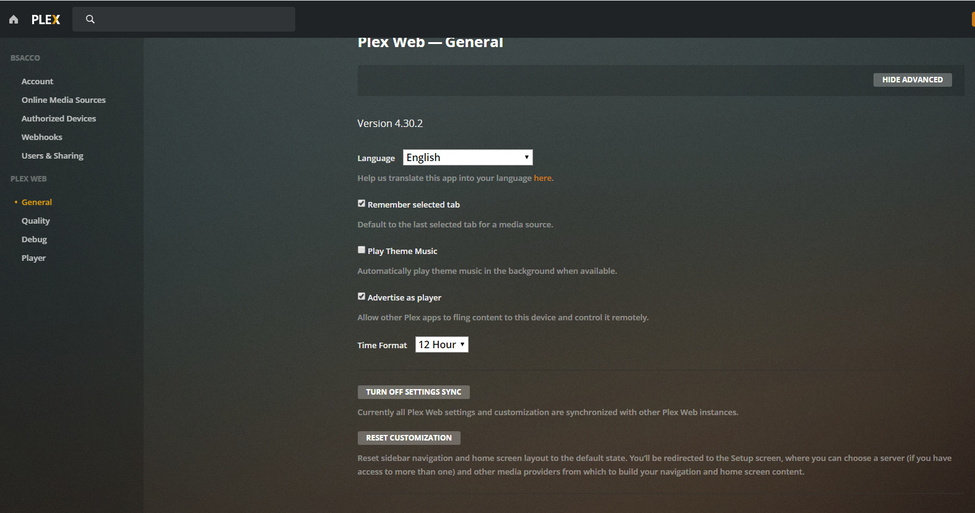
Sorry, to be a pain but I made it to #4 in your list but I’m not seeing the same thing as you. That is, I can click on “Settings” which is actually an icon of a crescent wrench and screwdriver in a cross-pattern on the upper-right hand of the page BUT there is NO Server option. What is get is the following:
Plex Web—General
Version 4.30.2
Language
Help us translate this app into your language here.
Remember selected tab
Default to the last selected tab for a media source.
Play Theme Music
Automatically play theme music in the background when available.
Advertise as player
Allow other Plex apps to fling content to this device and control it remotely.
Time Format
Currently all Plex Web settings and customization are synchronized with other Plex Web instances.
Reset sidebar navigation and home screen layout to the default state. You’ll be redirected to the Setup screen, where you can choose a server (if you have access to more than one) and other media providers from which to build your navigation and home screen content.
btw…note: I have “Show Advanced settings” clicked. Please advise
You are in the settings for Plex Web.
A little further down in the navigation/menu bar on the left you will find the Server entry (named as your server). In that section… go to the General area to find the required setting.
Have you actually installed the Plex Media Server?
If so… do you get the same result by opening the following address in your browser: http://127.0.0.1:32400/web? You usually only get that kind of “half-empty” settings if you (a) don’t have a Plex Media Server or (b) it has not yet been claimed / linked to your Plex account. Even if you had problems accessing the server from http://app.plex.tv/desktop, this should at least show you the server name otherwise (with an info that it’s currently not available)… so my money is on (a) and (b)