That’s totally true! And the Shield is also able to pass through HDR.
But on Windows, you could also install other apps, play games (no mobile android games )and many other things…
With Plex embedded, it is a totally different approach. It’s just for Plex, not intended to use with other apps.
I have a second screen attached to my Windows 10 HTPC , and I run Frontview+ software to show real time metadata about what is being watched, very handy, I would hate to be without it now:
I also have a VFD screen fitted to front of my HTPC case that I use LCD Smartie to control, for time, temperature and resource monitoring.
I also use an IR remote that I can control with my Logitech Harmony, along with all my other devices… Plus, if need be I can jump out of PMP and into another player if I want to, eg MPC-HC with MadVR for 4K / HDR playback.
There is no other device that I can use that would give me all of this functionality, so for me, the time has not yet come for me to move away from a Windows PC as my main player, so the flagship PMP working as it should, would be fabulous.
I just re-visited this again. I am using PMP version 2.10 and I upgraded to 2.21 to get all of the new GUI customisation features. This is on a Windows 10 HTPC with a GTX 1050 graphics card, connected via HDMI through an Arcam AVR550 amplifier into a Samsung 55MU6120 TV.
I started playing back a film at 23.976 fps, the display mode switched, and I had the sync mode on audio. The film played back nice and smoothly but within 10 minutes the audio had drifted out of sync with the video. Stopping and starting the film bought it back into sync again. I switched the Sync mode to display, and the film stuttered along like a slideshow, completely unwatchable.
Uninstalled and re-installed PMP version 2.10, and all is well again with display sync mode, smooth video playback and the audio and video synced for the whole of the film. I amend the .conf file to vdrop rather than adrop, and I barely notice the dropped frames.
Why is no-one else having this issue? How come everyone else is getting along okay with the newer versions of PMP.? Do people not like the audio and video to be synced?
Unless anyone has a better explanation I am going to guess that…
Many users leave the settings at their ‘default’ settings as they are not aware that those settings may not be the best for their set-up, so they could not be getting the best from their system.
That would lead to many users not using refresh rate switching, and instead watching video that is not smooth. Refresh rate switching is vital for smooth playback. Especially when watching 23.976 content, by enabling that setting you would be getting a similar performance to a Blu Ray or UHD player that all switch refresh rate to get the smooth playback.
If people do enable the above settings, then they must just tolerate the lip sync drifting during the course of the film.?
Yeah I use display mode switching using audio sync mode in PMP and I don’t have issues with 23.976fps content getting out of sync.
Please don’t assume everyone is suffering the same issue as you.
I was forced to assume because no-one is giving me any help or explanations, and I have been suffering from this issue and posting about it regularly for 6 long months!!!
Can someone please help me then?
Within 5 minutes I get very noticeable lip sync issues. Why is that? How do I fix it? It drifts by a ‘few’ milliseconds and if I press stop and play it corrects, but then drifts. So if I were to continue I would need to stop and restart the video every 5 or 10 minutes.
Why are the other display modes there, if they don’t work? In what situation would these be used?
I am currently confused as to why there are not more people complaining about it. Is there something different about my system? Or, maybe I am just more sensitive to video that is not smooth and audio and video that is not in sync?
sync mode = display is broken since the version you said, there is a open github issue for it as you know, when its fixed they will close the issue
is it likely to be fixed anytime soon? i suspect not. i suspect they is very few users using it as one, and secondly i suspect the guys who could fix something like this are afk, like longchair
i would try getting sync mode = audio working personally. troubleshoot it, assume your the only one and work backwards, take your amp out of the equation, disable your frontview stuff, disable any post processing settings on the tv, reset PMP back to defaults, just enable display mode switching only and set the audio settings, see if its any different. rule out all the possibility’s.
@dan-the-man I’ve done all of that. In all of my 15 years of using HTPC’s, across a whole range of different equipment I have always needed some clock synchronisation type software to keep 23.976 fps in perfect sync for the duration of a film. I am very sensitive to having the lips of the actors moving in perfect time to the words that they are saying.
Back in the day, it used to be reclock, then various other types of software solutions over the years. If you read the technical explanation that I linked to above, you will see that no end of troubleshooting a HTPC can fix clock drift.
I just don’t understand why so many people are putting up with it. It is driving me crazy, as I use the newer version of PMP in another room where I don’t really watch 23.976 fps content, and I like the new GUI options. But I cannot use it in my main room, where I watch films, due to this issue.
I am seriously contemplating moving to Emby, but I don’t want to as I much prefer the Plex server, and there is just this one issue that is driving me nuts.
I have a feeling that one day version 2.10 of PMP will stop working and then I will be stuffed, as I won’t have a player that I can use to watch films on my main system.
It is so frustrating, as I am paying Plex money for this, but I got better support when I used the free software such as MediaPortal and Kodi.
Come on Plex, can you at least reassure me that PMP version 2.10 will continue to work until you have fixed this issue?
While not a Windows person for some 15 years now, it has been understood for a long now that any copyback operation (as shown above in the dxva2-copyback hardware decoding screenshot) is always prone to cause performance issues and problems on Windows platforms. On Linux platforms, copyback is strongly frowned against due to the performance hit however the Linux architecture does maintain all appropriate sync.
Special considerations operational requirements not withstanding, there always exists the option to use the Kodi HTPC engine with the “Plex for Kodi” GUI thereby yielding what appears to be a win-win scenario in this situation if the time required to address and resolve this issue is the overriding concern.
Thanks @ChuckPa I have tried it with copyback on and off and the issue remains the same…
The reason why I use copyback is because it plays back my recorded TV files better when it is on, these are 1080i25 files that are recorded with Argus TV and shared in Plex via a videos library.
I do have Kodi installed on the same machine and can switch to it, but it is very clunky and dated compared to Plex Media Player. If I need to use Kodi as my main player, then there is little point in using and subscribing to plex at all. I do like the GUI and speed of PMP, I just want it to not drift out of sync.
Are you able to confirm if this issue is being looked into, will the mpv engine get an update?
Also, will version 2.10 of PMP continue to work, or is it likely that a PMP update will cause this to break?
Thanks very much for responding though, I appreciate the dialogue.with a Plex Team Member…
I have just remembered another reason why I can’t use Plex for Kodi. In Kodi, in order to get sync to display mode working, you have to disable audio passthrough. I need audio passthrough, for eg, Atmos. I want best possible audio and best possible video.
In PMP 2.10 I can use sync to display mode, with drop / duplicate audio, and then I change adrop to vdrop in the .conf file. This works.
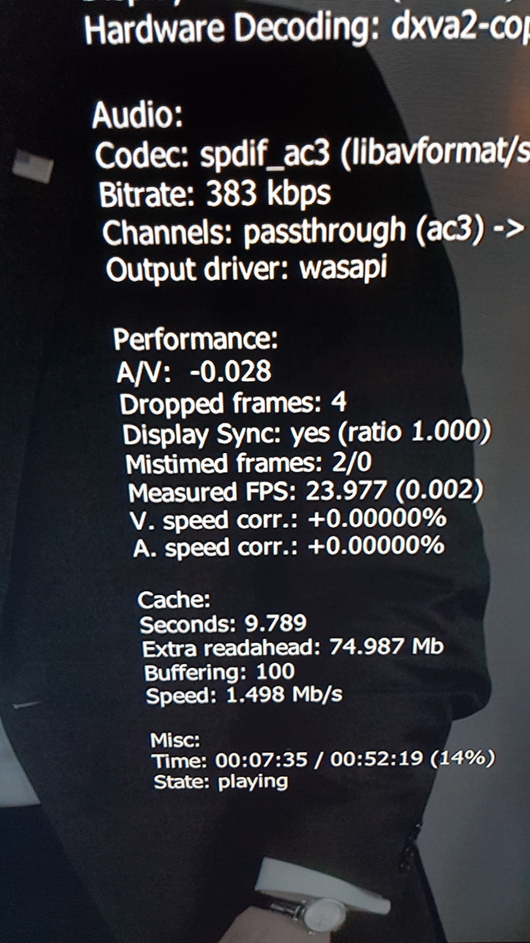
I use MPC-HC with MadVR for 4K / HDR content, and have got a screengrab of the stats for that:
This works really well on my system, I get smooth video (I rarely notice the frame drops / duplications) and I get full audio passthrough of all formats including object orientated. It is however, very clunky to use and user un-friendly, so I use it rarely and for HDR content only.
PMP 2.10 with the settings detailed above, replicates this.
I don’t see that I have any other options than to continue to use this older version, unless anyone has any other suggestions, taking into account the clock deviation info shown in the screengrab?
From what I can discern reading about the Windows 10 issues (apologies for not knowing windows), it looks like the bulk of what you’re seeing is because of the Microsoft update breaking the DXA2 acceleration earlier this year.
In looking at the math you present, inclusive of the screenshots showing the timing offset, if you notice, it clearly states 1 frame (which is 1/25th of a second) is repeated every 4.5 minutes (270 seconds). This is consistent with dynamically restoring sync and correcting timing drift because no two clocks are ever 100% identical. The bottom line here is that 1 video frame is repeated every 6,750 frames to correct for the clock drift. If Windows is still getting this wrong, there’s nothing Plex can do. From what little I’ve been able to read in the time I have, I dont know what can be done if anything.
If you’re playing 25 fps recorded video in the US where the timebase is 60 hz (not 50 hz / 25 fps) you will always have this problem. The problem can’t easily be resolved without completely resampling and resyncing both audio and video streams… The nutshell answer here is : HandBrake and re-based the entire video / audio clock sequence. Doing so also lays down fresh timing markers.
EDIT: If you look at the screenshot, notice the display is running at 23.97 fps (23.976 rounded to 2 digits)
Last screenshot shows display refresh rate at 23.97946Hz which explains why there is audio sync drift. Others such as myself have no issues because the display refresh rate is locked on tight at 23.976Hz. This is how it works on 6 of my NUCs across embedded/Windows PMP. The OP will continue to have issues with builds post 2.10 since the display is not running at an exact 23.976Hz. The OP requires display mode switching using video drop/duplicate which is no longer working.
 )and many other things…