Server Version#: 1.25.7.5604
Player Version#: 1.41.0.2876-e960c9ca
Hey, I recently set up a Mac Mini as a Plex Media Server and got myself the Plex Lifetime Pass.
Everything is going fine (except for maybe slow downloads on my iPad and other mobile devices) but apart from that the experience so far is great!
The only problem I have: On my MacBook Pro (M1 chip as well) there is simply NO download option to find:
I would really appreciate some help cause it’s driving me crazy by now.
Thanks a lot for your help!
-Stan Cubes
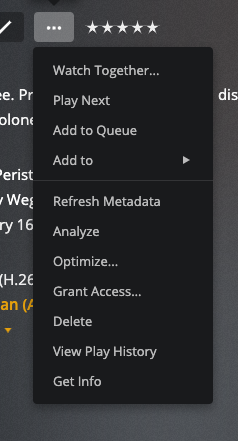
What is the button that is two buttons left of the Three Dots button?

This is from a movie card in the Plex for Mac (Intel) 1.41.0. I would assume there would be no difference running the Plex for Mac client on Intel or Apple Silicon at this point.
Good luck,
Chris
Hey, thanks for the quick reply - this is what the whole screen looks like:

And this is a movie card:

-Stan Cubes
I provide the Plex server myself and bought the lifetime pass, so I’m the admin of the server.
I reinstalled the app 3 times already, but nothing changes.
The iOS app I can install on the M1 MacBook has the download option but I can’t run it in fullscreen mode sadly.
Any other ideas? 
Do you even see the download area of settings?
No, it looks like my Plex web app strangely and not like the iOS app for example.