Hi guys,
I have a couple of movie libraries with accurate German age ratings (as far as I am able to tell) which are presented in the field “content ratings” throughout all of my libraries (strange for me, German translation for content rating and age restriction fields seem to be misplaced - other problem  ).
).
In one of these libraries, I am no longer able to set a filter to view only movies with a single content rating (same menu where you filter by duplicates). I tried optimizing libraries, server upgrade, server restart… nothing helps.
When I choose “Content Rating” in the drop-down menu, I get the inline comment (in German): Optionen konnten nicht geladen werden (which means Options could not be loaded). I have also no auto-form-fill of any content rating if trying to set a custom filter. Both is working well on all other movie libraries.
If I view the movies of that library as a list, I can see each and every single content rating value of all movies in that library (more than 2500) and can sort the list by content ratings. But I cannot set the filter accordingly.
What can I do? How can I check what exactly is “broken”?
I am talking about Plex Web, of course (newest Version 3.2.0). My Amazon Fire TV cannot filter by Content Rating.
Here’s the menu:
Here is the error message (in German):

Here is the list view which has the Content Ratings of all movies visible:
The symptoms show only in one movie library which is a big one and which I hope not create from scratch (LOTS of work).
How do I fix it?
@rossinior said:
This is working for me.
What can I do? How can I check what exactly is “broken”?
I suspect some “exotic” content in the ‘content rating’ field on one or several of your movies.
I’d like to get my hands on the exported library of yours.
ExportTools detail ‘level 666’ and send it to me by PM.
@OttoKerner I will try the export tomorrow… I do not have access to Plex today. Thank you for your Kind offer.
Unfortunately, we can rule out the possibility of “odd characters” in one of the fields.
My Excel table which ExportTools created for this library has as many lines as my library shows movie entries (so all movies are in that Excel). Here are all the different contents of the field “Content Rating”.
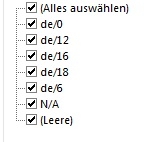
This is exactly the same as in all other movie libraries of mine.
Hmpf, so much for that idea. :neutral:
My only other idea might be a missing index table due to a damaged database.
- Optimize Database
- restart Plex Server, wait a few minutes afterwards
- repair Plex Database
My NAS is on a QNAP… I am not even sure, if SQLite is available on my platform. When extracting the linux precompiled binaries, I get an note:
./sqlite3: /lib/libc.so.6: version `GLIBC_2.7' not found (required by ./sqlite3)
I am hesitant to install software outside the QNAP “universe” to my NAS box as I would not be able to bring it back to life if I break something.
Is it possible to do the repair under Windows and move the database back to Windows then? Has it been done successfully? 
Or is this traceable via logging?
@rossinior said:
My NAS is on a QNAP… I am not even sure, if SQLite is available on my platform. When extracting the linux precompiled binaries, I get an note:
I recommend you this subforum;
https://forums.plex.tv/categories/qnap
Is it possible to do the repair under Windows and move the database back to Windows then? Has it been done successfully? 
Yes, this is possible.
But you must absolutely make sure that Plex server is properly shut down before copying the plex database file over to your Windows computer.
copy all three files:
com.plexapp.plugins.library.db
com.plexapp.plugins.library.db-shm
com.plexapp.plugins.library.db-wal
Keep these original files in a safe place as a security backup.
Just in case the repair attempt is unsuccessful.
The latter two files may or may not exist on your NAS, depending on whether the Plex server was shut down gracefully or not.
After you execute the first of the 4 commands [“PRAGMA integrity_check”] these 2 latter files are expected to vanish.
Then perform the repair procedure.
(of course you can omit the step which creates the backup copy of the database, because you already have a backup [step 2])
Interesting, thank you. I will try this once I am back from Greece in a few days.
Again, thank you for trying to fix this.
Just want to let anybody know that this is fixed now.
I manually updated metadata for each of the 2600++ library entries when the OFDB agent changed its rating scheme for German ratings from “de/xy” to “FSK xy” string.
I had to do it manually (only doing 50 or 60 in a row, because then I start getting OFDB.de requests delivering errors).
Now the rating filter is working again.


